

Portable TidyWindow 4.5.0
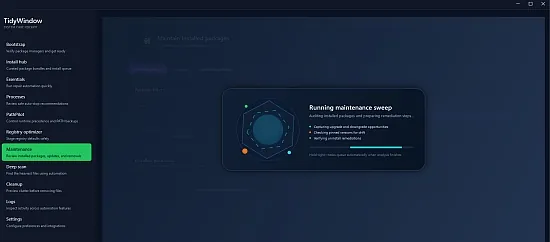
TidyWindow Portable is a comprehensive open-source Windows desktop assistant engineered to automate system maintenance, optimization, and developer workflows through an intuitive graphical interface powered by WPF and underlying PowerShell scripts. This versatile utility serves as a one-stop solution for tackling common PC issues like cluttered drives, registry bloat, software management, and performance diagnostics, making it particularly valuable for developers, IT enthusiasts, and power users who frequently set up new machines or troubleshoot existing ones.
By consolidating repair tools, multi-phase cleanups, package installations via winget/Scoop/Chocolatey, registry tweaks, and observability features into a single, safe, and efficient application, TidyWindow Portable eliminates the need for juggling multiple command-line tools, third-party apps, or manual configurations, delivering a streamlined experience that enhances productivity while prioritizing system safety through previews, restore points, and detailed logging.
Interface and User Experience Design
TidyWindow Portable launches into a modern, dark-themed dashboard built with Windows Presentation Foundation (WPF), featuring a tabbed layout that organizes functionality into logical sections: Essentials Repair Center, Multi-Phase Cleanup, Registry Optimizer, Software Management, and PulseGuard Observability. The central queue system displays pending tasks with progress bars, allowing users to add operations, reorder them, pause, retry, or cancel mid-execution—ensuring controlled, non-disruptive automation even during intensive sessions.
Navigation is effortless: sidebar icons summon tools instantly, while a search bar filters presets and logs. Customizable themes (light/dark/high-contrast) and resizable panels adapt to multi-monitor setups or laptops. Tooltips and inline help explain each action, with one-click “dry-run” previews simulating outcomes without changes. This design philosophy emphasizes transparency and reversibility, building user confidence through visual feedback like before/after comparisons and real-time stats (e.g., space freed, errors fixed).
Essentials Repair Center
The cornerstone of TidyWindow Portable is its Essentials Repair Center, a suite of automated fixes for prevalent Windows ailments. Networking diagnostics reset TCP/IP stacks, flush DNS caches, and repair adapters, resolving “no internet” woes common after updates. Windows Defender repairs scan and quarantine threats, rebuilding definitions if corrupted. Printing troubleshooter clears queues, reinstalls spoolers, and resets permissions for jammed jobs.
Windows Update module fetches missing patches, clears corrupted caches, and resolves servicing stack failures—critical for post-upgrade stability. Each repair includes:
-
Dry-run analysis previewing changes.
-
Automatic System Restore Point creation.
-
Step-by-step logs with success/failure codes and rollback links.
This center shines in developer setups, where VPN conflicts or update loops disrupt workflows, restoring functionality in minutes.
Multi-Phase Cleanup Engine
TidyWindow Portable’s cleanup rivals dedicated optimizers but with phased safety. Phase 1 scans junk: temp files, browser caches (Chrome/Edge/Firefox), Windows logs, thumbnails, and recycle bin. Intelligent checks flag risks—locked files, system-protected items—via color-coded warnings (green=safe, yellow=review, red=skip).
Phase 2 targets duplicates using perceptual hashing for images/docs and byte-matching for binaries, offering merge/rename/delete with preview diffs. Phase 3 prunes empty folders and orphaned shortcuts. Deletions route to recycle bin initially, with shredding options for sensitive data.
Scheduling integrates with Task Scheduler for daily/weekly runs, monitoring watched folders like Downloads/Desktop. Space reclamation reports gigabytes saved, with charts tracking trends over time.
Registry Optimizer and Tweaks
Registry management demands caution; TidyWindow Portable excels here with preset optimizations and JSON backups. Presets include:
-
Performance: Disable telemetry, enable fullscreen optimizations, tweak CPU scheduler.
-
Privacy: Block tracking, clear MRU lists.
-
Developer: Enable WSL2 tweaks, long paths, symbolic links.
Custom editor loads JSON configs, applies with 30-second undo timers. Backup/restore ensures zero-downtime tweaks, with validation scans pre/post-application. This module accelerates fresh Windows installs, applying dozens of tweaks in seconds versus manual regedit hours.
Software Installation and Maintenance
Package management unifies winget, Scoop, Chocolatey, ensuring latest versions without browser hunts. Curated lists install dev stacks: VS Code + extensions, Git, Node.js, Docker, PowerShell 7. Search/install/update/remove happen in-app, with dependency resolution and silent modes.
Maintenance scans detect bloatware, orphans, and update statuses, queuing bulk operations. Chocolatey integration handles GUI apps; Scoop buckets portables. Developers praise one-command “fresh dev env” setups.
PulseGuard Observability and Logging
PulseGuard transforms logs into actionable insights: real-time notifications via tray icon/toast, searchable transcripts, and customizable alerts (e.g., “high CPU on cleanup”). Activity feeds categorize events—repairs green, warnings yellow—with filters by date/type. Export to HTML/CSV aids reporting; dashboard graphs visualize uptime, cleanups performed, space trends.
Queue System and Automation Backbone
PowerShell scripts drive all actions, exposed via modular design—no command-line needed. Queue enforces serial execution, preventing conflicts (e.g., cleanup before registry tweaks). Scripting API allows custom tasks, integrated via drag-drop JSON.
Performance, Safety, and Extensibility
Lightweight (<100MB RAM), GPU-agnostic, Windows 10/11 optimized. Safety-first: UAC prompts, whitelists, virtualization sandboxes for risky ops. Open-source GitHub repo invites contributions; portable ZIP runs sans install.
Use Cases and Workflows
New PC Setup: Repair center + software install + registry tweaks in 15 minutes.
Dev Machine: Weekly cleanups, auto-updates for tools.
Troubleshooting: Network/print fixes with logs.
Maintenance: Scheduled optimizations for servers/laptops.
TidyWindow Portable reimagines Windows upkeep as effortless automation, blending power with prudence for peak performance minus hassle.
Release Notes:
Major Stability & Architecture Improvements
Startup Controller – Backup-Aware Management
- Added backup-only startup entries for items that no longer exist in the live system but are preserved in backups.
- Backup-only entries are clearly marked with an amber “Backup only” badge.
- Enable/Disable actions are disabled for backup-only items to prevent invalid operations.
- New actions for backup-only entries:
- Restore from backup – Recreates the startup item safely.
- Delete backup – Permanently removes the backup with confirmation.
- Backup-only filter toggle with live count indicator.
Robust Backup & Restore Flow
- StartupFolder entries now move shortcut files (
.lnk,.url) to a managed backup directory instead of deleting. - Backup records store both original and backup file paths for safe restoration.
- Restore logic handles conflicts safely:
- If destination already exists, backup is cleaned up without overwriting.
- Automatic cleanup of:
- Stale backups where neither original nor backup file exists.
- Orphaned backups when apps recreate their startup entry after being disabled.
- Full deduplication across ViewModel, store, and UI layers (case-insensitive IDs).
- Backup store is thread-safe and self-healing on refresh.
Startup Reliability & Guarding
False “Re-enabled” Warning Fix
- Fixed incorrect warnings caused by backups being created for enabled entries.
- Backups are now created only for disabled startup items, ensuring warnings are accurate.
In-App Re-enabled Alerts
- Added visible UI alert when non-guarded startup entries re-enable themselves.
- Alert includes:
- Clear warning message with affected entries
- Dismiss action
- Detailed activity log entries retained for auditability.
Run at Startup & Background Mode
App Auto-Start (Multi-Strategy)
- Reliable startup registration using multiple fallbacks:
- Task Scheduler XML task (preferred)
schtasksCLI fallback- Registry Run key fallback (non-admin safe)
- New
IsEnabledverification checks actual registration state. - Automatic cleanup ensures only one startup mechanism remains active.
- Improved error detection and diagnostics.
System Tray Resilience
- Tray icon automatically recovers after Explorer restarts.
- Health check timer validates tray icon presence in background mode.
- Retry logic with controlled backoff.
- Thread-safe tray operations and full disposal cleanup.
Threat Watch Accuracy Improvements
Safer Detection Logic
- Threat Watch now only flags unsigned startup entries.
- Explicitly skips system directories:
- Windows
- System32
- SysWOW64
- Removed overly aggressive “unsigned startup” catch-all rule.
- New severity rules:
- RED – Unsigned startup from temp locations
- YELLOW – Unsigned startup from user workspaces (Downloads, Desktop, Documents)
- OK – Unsigned entries in system or Program Files locations
UI & UX Refinements
Startup Controller
- Removed drop shadow hover effects to prevent card movement.
- Hover state now only changes border color for a stable layout.
- Cleaner backup actions with clear destructive styling for delete.
Performance Lab – Complete Redesign
- Modern, lightweight full-width layout.
- Clean step cards with:
- Number badge
- Title
- Status dot
- 1–2 aligned action buttons
- Controls moved to hero header for clarity.
- Minimal status indicators instead of verbose chips.
- Compact info dialogs and refined button sizing.
- Improved visual hierarchy and consistency across steps.
Logs & Settings Pages
- Logs page redesigned with:
- Two-column layout (entries + details)
- Color-coded severity badges and emoji indicators
- Virtualized list for performance
- Settings page modernized:
- Card-based layout
- Modern toggles with accent styling
- Simplified chips and overlays
- Reduced complexity (~60% fewer lines)
Feature Scope Adjustments
Latency Guard (Removed)
- Latency Guard feature was fully removed due to instability.
- All related pages, services, samplers, tests, DI registrations, and navigation references were deleted to keep the codebase clean.
Expanded Coverage & Capabilities
Known Processes Catalog
- Expanded from ~95 to ~190 entries.
- Added 7 new categories including AI, Accessibility, Media, Network, Security Extras, and OEM bloatware.
Startup Sources
- Startup Controller now supports 22 startup source kinds, including:
- LSA Providers
- Shell Extensions
- Winsock Providers
- Browser Helper Objects
- Font Drivers
- Known DLLs
- Print Monitors
Cleanup System
- Cleanup coverage expanded to 100+ targets:
- Windows upgrade residue
- AI/Copilot/Recall data
- Browsers, messaging apps, developer tools
- GPU caches, game launchers, cloud storage
- Virtualization platforms, UWP apps, peripherals
- Automation scripts updated to match full UI coverage.