

Portable Fixyfier 5.4.9
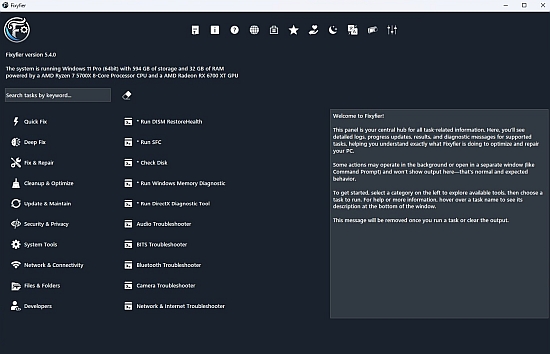
Fixyfier Portable is a minimalist, all-in-one Windows repair, optimization, and maintenance utility that consolidates dozens of native Windows troubleshooting tools, advanced diagnostics, and performance tweaks into a single, user-friendly interface, designed for IT professionals, power users, and everyday consumers frustrated with scattered commands and complex menus.
Exclusively for Windows 10 and 11, this free Microsoft Store app—digitally signed for seamless installation—transforms PC troubleshooting from a scavenger hunt across Control Panel, Command Prompt, PowerShell, and Settings into streamlined, one-click operations, covering everything from system file repairs and disk cleanup to network resets, driver updates, security hardening, and AI-assisted diagnostics. With real-time monitoring dashboards, batch scripting for automation, and transparent logging that explains every action, Fixyfier Portable ensures users regain control over sluggish, error-prone machines without risking stability or requiring technical expertise.
Born from a personal batch script evolved into a polished app, Fixyfier Portable emphasizes efficiency: no bloatware, no subscriptions, low resource footprint (under 50MB RAM), and lightning-fast execution even on older hardware. Its dual-panel layout—left sidebar categories, right details/logs—prioritizes clarity, grouping tools logically while providing progress bars, success/failure indicators, and reversible changes via checkpoints.
Interface and Navigation
Fixyfier Portable launches to a dark-themed, resizable window with collapsible sidebar categories:
-
Fix Everything: One-click comprehensive scan/repair.
-
Fix & Repair: Core integrity checks.
-
Optimize & Boost: Performance enhancers.
-
Update & Maintain: Software/driver hygiene.
-
Security & Privacy: Defenses and telemetry blocks.
-
System Tools: Hardware/info access.
-
Network & Connectivity: IP/DNS troubleshooting.
-
Files & Folders: Locking/deletion utilities.
-
Developers: Advanced scripting/registry.
-
All & Assistance: AI chat/search.
Selecting expands right panel with buttons, toggles, logs. Search bar queries across tools (e.g., “DNS flush”); favorites pin frequent tasks.
Fix & Repair Module
Central to Fixyfier Portable, this runs Windows natives elevated:
-
SFC /scannow: Scans/replaces corrupted system files.
-
DISM /Online /Cleanup-Image /RestoreHealth: Repairs component store from WU.
-
CHKDSK: Schedules disk error checks.
-
Windows Troubleshooters: Network, hardware, Bluetooth, keyboard, printer, etc.—launched contextually.
-
Reset Windows Features: Reinstalls Calculator, Photos, Mail via PowerShell.
Pre/post scans log changes; “Fix Everything” chains all sequentially, rebooting as needed.
Optimize & Boost Tools
Performance suite clears bloat:
-
Junk Cleanup: Temp files, %temp%, Prefetch, Recycle Bin, browser caches (Chrome/Edge/Firefox), Windows Update/Store/Teams/Outlook caches, thumbnail databases, recent items/Run history.
-
Startup Manager: Disables non-essential services/autoruns via msconfig/Task Manager APIs.
-
Disk Optimizer: Defrags HDDs, TRIMs SSDs, wipes free space (sdelete Gutmann).
-
RAM Booster: Empties standby lists, tweaks pagefile.
-
Ultimate Performance: Enables hidden power plan.
Visual graphs show before/after speeds (CrystalDiskMark integration).
Update & Maintain
-
App Updates: Winget/Store upgrade all.
-
Driver Scanner: PnPUtil scans/matches.
-
WU Reset: Clears download cache, re-registers services.
-
Installed Programs: List/uninstall/pin, export CSV.
Security & Privacy Controls
-
Firewall/Smart App Control: Toggle/enable rules.
-
BitLocker: Unlock/encrypt drives.
-
Disable Telemetry: Blocks Connected User Experiences, Diagnostic Data (levels 0-3), ads (lock screen/taskbar/File Explorer).
-
SysMain/Hyper-V/Hibernate: On/off.
-
Restore Points: Create before changes.
-
Group Policy: Launches gpedit.msc with presets (disable Cortana/Search highlights).
System Tools and Monitoring
Dashboard displays CPU/RAM/disk/GPU usage, temps (HWMonitor API), uptime, specs (CPUID), services/devices. Quick launches: BIOS, Activation, Netplwiz, DiskMgmt, Services.msc, Event Viewer.
Network & Connectivity
-
DNS Flush/Release-Renew: ipconfig /flushdns, /release, /renew.
-
TCP/IP Reset: netsh int ip reset.
-
Remote Desktop: Enable/port forward.
-
Connection Test: Ping/tracert to gateways.
Files & Folders Management
-
Force Delete: Handle unlock + rd /s /q.
-
Hide/Lock: attrib +h/+s, icacls deny.
-
Batch Scripts: Generate .cmd for tasks.
Developers Toolkit
-
Registry Editor shortcuts.
-
PowerShell ISE.
-
Task Scheduler.
AI Assistance
Chatbot (local LLM?) answers: “Safe Mode steps,” “Driver update guide,” generating commands/logs.
Performance and Safety
Actions log comprehensively (export TXT/HTML), reversible via restore points. No auto-runs; manual confirmations prevent mishaps. UAC-respecting elevations.
Microsoft Store verified, open-source GitHub.
Fixyfier Portable redefines Windows maintenance—centralized, transparent, powerful. From one-click fixes to pro tweaks, it restores PCs effortlessly, minimalist yet mighty.
