
Portable Darktable v5.4.0 (x64)
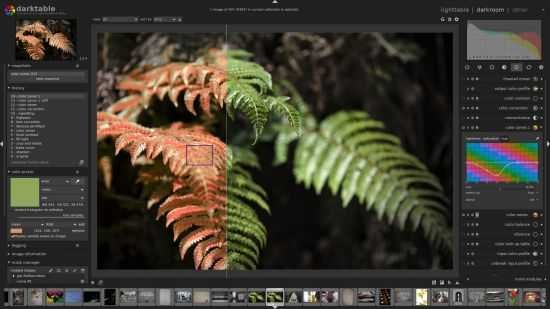
Darktable Portable is an open-source photography workflow application and raw developer that provides photographers with a complete non-destructive editing environment for managing, developing, and exporting high-quality images from raw files and beyond. This powerful, free tool rivals commercial software like Lightroom and Photoshop in capability, offering a modular pipeline for precise control over every aspect of image processing, from lens corrections and noise reduction to creative color grading and artistic effects.
Designed by photographers for photographers, Darktable runs on Linux, macOS, Windows, and other platforms, emphasizing GPU acceleration, professional color management, and a flexible interface that adapts to individual workflows, making it ideal for enthusiasts, professionals, and anyone seeking a cost-free alternative to proprietary suites.
Core Architecture and Non-Destructive Workflow
Darktable’s foundation is its non-destructive editing pipeline, where original images remain untouched while adjustments are stored as instructions in XMP sidecar files or an internal database. This parametric approach operates in 32-bit floating-point CIE LAB color space for superior dynamic range and precision, ensuring edits scale perfectly during export without generational loss. The software processes pixels through a chain of over 60 modules, each handling specific tasks like exposure, white balance, or sharpening, with real-time previews that update instantly thanks to multi-level caching and OpenCL GPU acceleration.
Users organize modules into three groups—basic, tone, and color—for logical progression, though drag-and-drop reordering allows custom pipelines. History stacks track every change with snapshots for A/B comparisons, and masks enable localized edits without affecting the global image. This architecture supports tethered shooting, batch processing of thousands of images, and Lua scripting for automation, turning repetitive tasks into one-click operations.
Lighttable: Image Management and Organization
The Lighttable module serves as Darktable’s library manager, akin to Lightroom’s catalog, where users import, cull, rate, tag, and search vast collections using metadata, EXIF data, GPS coordinates, and custom filters. Thumbnail views range from contact sheets to full-screen zooms, with culling tools highlighting rejects via color labels (red/yellow/green) or star ratings (1-5). Filmroll organization mirrors folder structures, while collections group images by dynamic queries—e.g., “all underexposed portraits from last month shot with 50mm lens.”
Geotagging integrates with maps for location-based sorting, and duplicate detection flags similar shots by perceptual hash. Export presets streamline workflows to JPEG, TIFF, PNG, or HDR formats (PFM/EXR), with watermarks, FTP uploads, or Piwigo gallery generation. Tethered capture supports live view from compatible cameras, auto-importing shots into styled collections for event photography or studio work.
Darkroom: Advanced Image Development
Switching to Darkroom reveals the editing powerhouse, where raw files are demosaiced, lens-corrected, and enhanced through stacked modules. Basic controls handle exposure bracketing, highlight reconstruction (via wavelets for clipped skies), and shadows/highlights recovery with natural falloff. White balance eyedroppers sample neutrals, with finetuning via temperature/tint sliders and presets for common light sources.
Tone mapping shines for HDR workflows: base curve presets simulate film stocks, tone equalizer visualizes luminance distribution for surgical lifts/drops, and filmic RGB compresses dynamic range while preserving midtones. Local contrast enhances micro-details without halos, and bilateral filter sharpens edges selectively.
Color Management and Grading Tools
Darktable’s color engine is fully ICC-managed, supporting input/output profiles (sRGB, Adobe RGB, ProPhoto) and soft-proofing for print. Color calibration module emulates camera sensors with primaries tweaks, while color lookup tables (3D LUTs) apply cinematic looks. Split-toning balances highlights/shadows with hue/saturation, and color zones act like a parametric curves tool for isolating skin tones or skies.
Channel mixer extracts luminance/chrominance for monochrome conversions, with masking for dodging/burning specific hues. Vividness sliders boost saturation intelligently, avoiding oversaturated skintones.
Masking and Local Adjustments
Darktable’s masking system is exceptionally versatile, supporting parametric (luma/chroma/hue-based), drawn (paths/gradients/radials), and brush masks blended via union/intersect/exclude operations. Mask manager organizes complex stacks, with feather/strength falloffs for seamless transitions. Pixel-peep at 1:1 reveals clone/heal spots, liquify warps, or retouch fills from surrounding areas.
Drawn masks snap to edges via edge detection, ideal for portrait dodging or product isolation. Multiple instances per module allow stacked adjustments—e.g., brighten eyes, saturate lips, smooth skin—without layers bloating history.
Specialized Modules for Quality and Creativity
Lens correction auto-applies profiles for distortion/vignetting/chromatic aberration, with manual tweaks. Demosaic profiles optimize Bayer/CMOS patterns per camera. Noise reduction profiles match ISO levels with wavelet denoising that preserves edges, effective up to 6400 ISO.
Sharpening uses unsharp mask or microcontrast for natural acuity. Artistic modules include bloom (glow), soften (diffuse), grain (film emulation), and overlays (texture blending). Lilac module inpaints distractions, while haze removal clarifies atmospheres.
Performance Optimization and GPU Acceleration
OpenCL harnesses GPUs for 10x speedups on filters, masking, and exports, with fallback to CPU for unsupported cards. Zero-latency zooming/cropping uses tiled caches, handling 50MP+ raws fluidly. Batch exports parallelize across cores, optimizing LUTs or watermarks.
Cross-platform builds ensure consistency, with Wayland/X11 support on Linux and Metal/OpenCL on macOS.
Tethering, Printing, and Export
Tethered mode previews live JPEGs/raws, with auto-stacking exposures for HDR. Print module supports CMYK profiles, bleed/registration marks, and ICC gamut warnings. Export variants generate web galleries or slideshows.
Community-Driven Extensibility
Lua plugins automate tagging, style presets, or external integrations (Flickr, SmugMug). User-contributed presets/styles/films share via database.
Workflow Examples
Landscape Photographer: Import bracketed raws → Lighttable cull by GPS → Darkroom: highlight reconstruction, haze removal, local contrast on foreground, split-toning for golden hour.
Portrait Retoucher: Frequency separation via masks, liquify reshaping, color harmony matching.
Astrophotographer: Stacking module merges lights/darks/flats, gradient subtraction.
Strengths and Learning Curve
Darktable’s modularity empowers experimentation but demands pipeline understanding—start simple, master masks/EQ. Tutorials, presets, and styles accelerate onboarding.
Free, ad-free, and privacy-focused, it evolves via global contributors, supporting 1000+ cameras.
Darktable empowers photographers to extract maximum fidelity from raws through precise, creative control in a performant, extensible package—proof open-source rivals (and often surpasses) commercial tools for serious imaging workflows.
Darktable is – together with RawTherapee – the perfect alternative to Adobe Lightroom.
General Features
- Non-destructive editing throughout the complete workflow, your original images are never modified.
- Take advantage of the real power of raw: All darktable core functions operate on 4×32-bit floating point pixel buffers, enabling SSE instructions for speedups.
- GPU accelerated image processing: many image opertions are lightning fast thanks to OpenCL support (runtime detection and enabling).
- Professional color management: darktable is fully color managed, supporting automatic display profile detection on most systems, including built-in ICC profile support for sRGB, Adobe RGB, XYZ and linear RGB color spaces.
- Cross platform: darktable runs on Linux, Mac OS X / macports, BSD, Windows and Solaris 11 / GNOME.
- Filtering and sorting: search your image collections by tags, image rating (stars), color labels and many more, use flexible database queries on all metadata of your images.
- Image formats: darktable can import a variety of standard, raw and high dynamic range image formats (e.g. JPEG, CR2, NEF, HDR, PFM, RAF … ).
- Zero-latency, zoomable user interface: through multi-level software caches darktable provides a fluid experience.
- Tethered shooting: support for instrumentation of your camera with live view for some camera brands.
- Speaks your language: darktable is also translated into more than a dozen different languages. As the list of supported translations changes with each release, you are advised to check the news page for more details.
- Powerful export system supports Piwigo webalbums, disk storage, 1:1 copy, email attachments and can generate a simple html-based web gallery. darktable allows you to export to low dynamic range (JPEG, PNG, TIFF), 16-bit (PPM, TIFF), or linear high dynamic range (PFM, EXR) images.
- Never lose your image development settings darktable uses both XMP sidecar files as well as its fast database for saving metadata and processing settings. All Exif data is read and written using libexiv2.
- Automate repetitive tasks: Many aspects of darktable can be scripted in Lua.