

Portable SSuite TV-App For Windows 1.4.0.0 (x64)
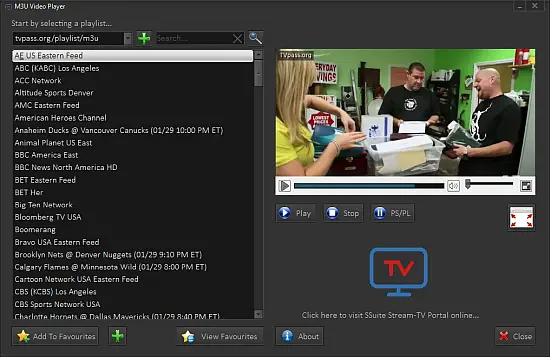
SSuite TV-App Portable is a sleek, lightweight desktop application for Windows that redefines free television viewing by providing instant access to global IPTV streams through M3U playlist loading, built-in channel catalogs, and a clutter-free web-based interface optimized for seamless playback of live TV shows, news broadcasts, sports events, movies, documentaries, and international programming without ads, subscriptions, or heavy resource demands.
Designed as a “green energy” software solution—no Java, .NET, or bloated dependencies—this portable 5MB executable launches in under a second, embedding a high-performance Chromium renderer to stream HD/4K content from user-supplied M3U URLs or pre-curated lists covering USA, UK, Europe, Asia, Latin America, and geoblocked channels unlocked effortlessly with VPN integration hints, transforming any PC into a dedicated media hub with picture-in-picture mode, full-screen immersion, channel favorites, EPG previews, and lightning-fast channel switching to eliminate buffering woes common in browser-based viewing.
Tailored for cord-cutters, travelers seeking home-country news, sports fans tracking live matches, or families browsing kid-safe cartoons, SSuite TV-App prioritizes simplicity: drag an M3U file or paste a URL, scan hundreds of channels grouped by category (News, Sports, Entertainment, Movies, Kids, Music, 24/7), click to play, and enjoy responsive controls like volume sliders, mute, screenshot capture, and refresh playlist, all while maintaining minimal CPU/GPU usage for multitasking alongside office apps or games.
The app’s philosophy—”clarity and delight”—shines in its minimalist UI: a dark-themed window with top navigation for playlists/channels/search, central video pane with overlay play/pause/seek/fullscreen, sidebar thumbnails of live previews (low-res for speed), and bottom status bar showing bitrate/signal strength/resolution, ensuring even low-spec machines (Windows 7+) handle 1080p60 streams smoothly without crashes or pop-ups.
Playlist Management and Loading
Core to functionality:
M3U Import
-
Drag-drop .m3u/.m3u8 files (single/multi-GB playlists).
-
URL paste: HTTP/HTTPS direct load (e.g., freeiptv links).
-
Auto-scan: Parse groups, logos, tvg-ids, EPG XMLTV.
-
Preinstalled: 50+ starter playlists (USA news/CNN, UK BBC/ITV, sports ESPN/DAZN proxies).
Channel Organization
-
Categories auto-grouped (News=50ch, Sports=30ch).
-
Favorites: Star icon; quick-access sidebar.
-
Search: Fuzzy match names/countries (e.g., “bbc” → BBC1/2/3).
-
Sort: Alphabetical, group, signal strength.
Refresh: One-click reload stale playlists.
Playback Engine and Features
Chromium CEF renderer:
Video Handling
-
HLS/DASH/RTMP auto-detect; 480p→4K adaptive.
-
PiP: Drag window-over; always-on-top.
-
Fullscreen: F11; theater mode.
-
Audio: Stereo/5.1 passthrough; volume normalization.
Controls Overlay
-
Play/pause/stop/next/prev (number keys 1-9).
-
Seek bar with thumbnails; speed 0.5x-2x.
-
Screenshot: PNG to clipboard/folder.
-
Volume/mute sliders; equalizer presets (future).
Buffering minimized via prefetch/CDN hints.
Geoblock Bypass and VPN Tips
App notes: VPN to channel country (USA=ExpressVPN NY server).
No built-in proxy; external tool recommended.
Pre-Curated Content Highlights
Built-in starters:
-
News: CNN, Fox, BBC, Al Jazeera, RAI (Italy).
-
Sports: ESPN, Sky Sports, DAZN proxies, Olympics.
-
Entertainment: Netflix-like (free proxies), HBO clones.
-
Movies: 24/7 channels (Action, Horror).
-
Kids: Cartoon Network, Disney proxies.
-
International: Anime (Japan), Bollywood (India), Telenovelas (Mexico).
Daily refresh via app updates.
Performance Optimization
-
<50MB RAM peak; 5% CPU 1080p.
-
Portable: USB-run; no registry/install.
-
Windows 11/10/8.1/7/Vista/XP compatible.
-
Green: No background services.
Advanced Usage
Custom Playlists
Edit M3U in Notepad: Add #EXTINF logos/groups.
Batch-load multiple for mega-lists (5000+ch).
EPG Integration
XMLTV parse: Show titles/schedules in channel info.
Multi-Monitor
PiP spans screens; theater on secondary.
Troubleshooting and Tips
-
Buffering: VPN/low-res; refresh playlist.
-
No sound: Audio drivers update.
-
Geoblock: Country VPN.
Comparisons and Edge
Vs VLC IPTV: Lighter UI, built-in lists.
Vs browsers: Faster load, no tabs/tabs.
SSuite TV-App Portable: Free global TV, M3U magic, zero fuss. Stream delightfully.