

Portable Hekasoft Backup & Restore 1.0
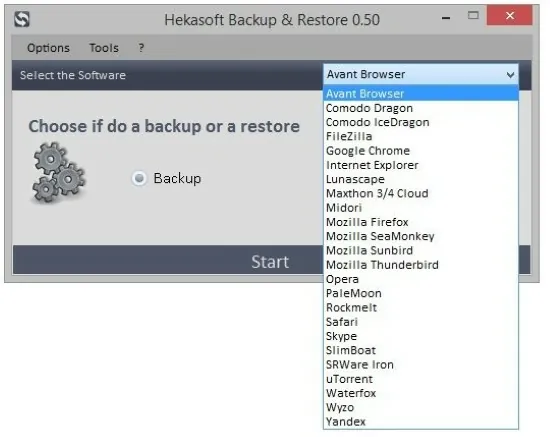
Hekasoft Backup & Restore Portable is a versatile and free all-in-one software utility designed primarily for Windows users who frequently switch browsers, migrate to new computers, or need to safeguard their application data against loss or corruption. This lightweight application specializes in creating comprehensive backups of browser profiles—including bookmarks, passwords, extensions, history, cookies, and settings—while extending support to email clients, download managers, and other popular programs like FileZilla, Skype, and qBitTorrent.
With its intuitive one-click backup and restore processes, profile migration capabilities between different browsers, and built-in optimization tools that safely remove temporary files, caches, and logs, Hekasoft Backup & Restore Portable streamlines data portability across installations, operating systems, or even browser engines like Chromium and Gecko. Ideal for power users, IT enthusiasts, web developers, and casual surfers alike, it ensures seamless transitions without the hassle of manual exports or reconfiguration, supporting dozens of browsers from Chrome and Firefox to niche ones like Mullvad Browser and Supermium, all while maintaining data integrity through compressed, portable archive files.
Core Backup and Restore Functionality
At the heart of Hekasoft Backup & Restore Portable lies its straightforward backup engine, which scans selected applications and packages their entire profile folders—along with critical registry entries where applicable—into a single, self-contained .hbk file. Launching the app reveals a clean tabbed interface listing supported software by category: Browsers (main focus), Mail Clients, Downloaders, and Others. Users select items via checkboxes, customize exclusions (e.g., skip session cookies), choose compression levels (none to ultra, balancing speed and size), and optionally encrypt with AES-256 passwords. The one-click “Backup” button generates archives in seconds for small profiles or minutes for heavily extended browsers, displaying real-time progress, estimated size, and verification hashes (MD5/SHA-1).
Restoration mirrors this simplicity: drop an .hbk file, select target paths (auto-detects installations), and confirm overwrites or merges. Smart conflict resolution prompts for duplicates—like existing bookmarks—offering append, replace, or skip options. Partial restores allow cherry-picking components (e.g., only passwords and extensions), making it perfect for targeted recoveries. The software handles running instances gracefully by closing browsers temporarily or queuing post-reboot restores, ensuring no data loss during active sessions.
This bidirectional workflow shines for fresh Windows installs: backup on old PC, transfer via USB/cloud, restore on new—bookmarks, logins, and themes intact in under five minutes.
Browser Migration and Cross-Engine Portability
One of Hekasoft’s standout features is seamless profile migration, converting data between incompatible browsers without manual intervention. For instance, export Chrome’s profile and import into Vivaldi or Edge Chromium—the app remaps bookmarks.html to JSON, adapts extension IDs (via plugin scanner), and translates settings like startup pages or sync flags. Gecko-to-Chromium transfers handle Firefox’s places.sqlite to Chrome’s History database, preserving folder structures and visit counts.
Supported browsers encompass mainstream heavyweights (Google Chrome, Microsoft Edge, Mozilla Firefox, Opera, Brave, Vivaldi) and alternatives (SRWare Iron, Waterfox, LibreWolf, Mullvad, Thorium, Supermium, Mercury, Avast/AVG/Avira Secure Browsers, Norton Private Browser). Niche entries like Lunascape, Maxthon, Sleipnir, and Catsxp round out coverage. Migration previews show compatibility matrices (e.g., 95% for Chrome→Firefox), flagging unsupported elements like proprietary extensions.
This eliminates “starting from scratch” pain, letting users test browsers without losing muscle memory—e.g., migrate Firefox ecosystem to Chromium-based for speed, retaining 1000+ bookmarks intact.
Optimization and Cleanup Tools
Beyond backup, Hekasoft includes a profile optimizer that scans for bloat: temporary files, crash dumps, old session restores, thumbnail caches, and orphaned extension data. The scan identifies safe deletions—non-essential items not affecting functionality—reclaiming gigabytes from bloated profiles (Chrome with 50 extensions can exceed 5GB). Previews categorize finds (cache: 2.1GB, logs: 450MB), with one-click purges and verification runs confirming no breakage.
Plugin and add-on scanners detect broken or outdated extensions across browsers, listing versions, publishers, and disable/remove options. Dead link checkers validate bookmarks/history for 404s, bulk-removing invalids to streamline navigation. These tools run pre-backup automatically, ensuring lean archives.
Extended Application Support
While browser-centric, Hekasoft extends to:
-
Mail Clients: Betterbird, eM Client, Thunderbird, OE Classic, Postbox—backing up emails, accounts, signatures, and address books.
-
Downloaders: FileZilla (sites, queues), qBitTorrent/uTorrent (torrents, settings), with partial resume support.
-
Others: CapCut (projects), Skype (chats, contacts)—each with tailored modules preserving configs.
Custom module creation empowers users: define folders/registry keys via a wizard (shortcuts to %APPDATA%, HKCU paths), test, and share .hbm files community-wide. This extensibility covers unlisted apps like Discord or Steam, democratizing backups.
User Interface and Workflow Enhancements
The modern, dark-themed UI tabs logically: Backup, Restore, Migrate, Optimize, Modules. Search filters apps; drag-drop handles files/folders. Portable mode (no install) suits USB deployment; scheduler automates weekly backups to NAS/cloud.
Logs detail operations with timestamps, errors, and diffs; exports to HTML/CSV for audits. Multilingual (20+ languages, auto-detect) and high-DPI aware, it scales on 4K setups. Version 0.99 (2025) adds real-time notifications, improved Skype handling, and code optimizations.
Performance and Safety Features
Ultra-light (<50MB RAM), it processes multi-GB profiles swiftly via 7-Zip integration (v24.09). Safety includes dry-runs, auto-close warnings, registry snapshots, and post-restore verifications (launch browser, check bookmarks). No telemetry; fully offline.
Windows 10/11 exclusive (.NET 4.8), with Vista deprecation.
Practical Scenarios and Use Cases
PC Upgrades: Backup→transfer→restore across hardware.
Browser Hopping: Chrome→Brave migration sans reconfiguration.
Malware Recovery: Restore clean profiles post-infection.
Team Sharing: Modules for shared FileZilla sites.
Dev Testing: Clean Firefox profiles for extension dev.
IT Pros: Bulk client migrations via scripts.
Hekasoft Backup & Restore Portable masterfully condenses browser/app continuity into elegant simplicity, proving essential digital hygiene. Its migration magic, optimization smarts, and custom extensibility make data loss obsolete—empowering fluid transitions in our multi-browser world. Free, evolving (regular 2025 updates), it rivals paid suites, safeguarding digital lives one profile at a time.