
Portable Windows Backup & Restore Tool 4.0.0
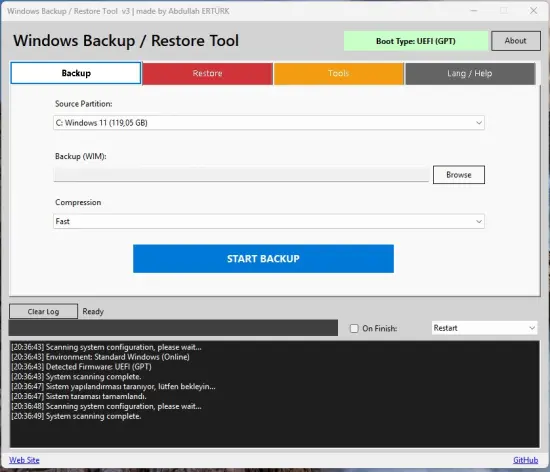
Windows Backup & Restore Tool Portable is a sophisticated yet user-friendly software solution designed for efficient data backup and restoration.
How Does it Work?
This tool operates seamlessly within both the familiar Windows operating environment and the specialized WinPE (Windows Preinstallation Environment), making it suitable for a variety of scenarios. While its core functionality centers on backup and recovery tasks, it also enables a clean Windows installation when the situation demands. With its intuitive interface and robust features, users can confidently protect their data and ensure a smooth recovery process.
Windows Backup & Restore Tool is a versatile utility that allows you to create comprehensive backups of your entire system or specific partitions and drives. One of its key features is the integration with Volume Shadow Copy Service (VSS), enabling live system backups without downtime.
The Tool Offers Three Levels of Intelligent Compression
None: fastest option
Fast: balanced approach
Maximum: minimizes file size
Restoration Features
Dual Mode Operation
● Whole Disk Restore: Formats entire disk and deploys system
● Partition Only Restore: Restores to the selected partition
Automatic Boot Configuration
● GPT/UEFI support
● MBR/BIOS support
● Automated boot record creation
Multi-Index WIM Support: Select different Windows editions from WIM file
Intelligent Disk Management: Automatic resolution of drive letter conflicts
Additional Features
● Post-Operation Actions: Automatic shutdown or restart after backup/restore
● Real-Time Progress: Detailed logging and progress indicators
● Firmware Detection: Automatic UEFI/BIOS detection
● Safety Checks: Prevents accidental system disk overwrites
● Hidden Partition Support: Temporary drive letter assignment for GUID paths
Additionally, it smartly excludes certain folders, such as cloud storage services like OneDrive, Google Drive, and Dropbox, as well as unnecessary files from the backup process. Furthermore, it supports standard Windows imaging formats, including WIM and ESD, ensuring compatibility and ease of use.
Release Notes:
Architecture & Compatibility (.NET 4.5 Rollback)
- Maximum WinPE Compatibility: To ensure seamless operation in older or custom WinPE environments like Sergei Strelec, the application was rolled back from .NET 8 to .NET Framework 4.5 and optimized.
🌐 Smart Language Engine
- Auto OS Language Detection : On startup, the tool checks Lang\config.txt. If no language was previously selected, it dynamically checks the host Operating System Language. If the OS language is available in the Lang folder (e.g. tr.ini), it loads it. If unsupported, it gracefully defaults to the universal en.ini.
- Multi-Language Support: In addition to Turkish and English, full support and automatic integration for all other world languages present in the Lang folder (Arabic, Chinese, Dutch, French, German, Hungarian, Italian, Japanese, Korean, Polish, Portuguese, Russian, Spanish) was implemented.
🖥️ Responsive & Dynamic UI
- Fully Resizable: The main application window is now completely resizable and supports maximization.
- Proportional Scaling: When maximized or widened, all internal inputs, combo boxes, the progress bar, and log boxes gracefully stretch to fill the available space, while buttons remain perfectly pinned to their respective edges.
- Anti-Overlap Protection: A strict Minimum Size constraint was added. Users cannot shrink the window below its default dimensions, guaranteeing that no UI elements ever overlap, clip, or become hidden.
- UI Truncation Fixes : To prevent text overflow in various languages, horizontal side-by-side radio buttons (e.g., Whole Disk / Partition Only, UEFI / BIOS) were re-aligned vertically, and all fixed label widths were removed to support dynamic expansion.
- Missing Translations Added : Previously hardcoded strings such as “System scanning complete”, “File Dialog Filters (Browse)”, and “Compression Levels (Fast, Maximum, etc.)” were fully integrated into the language engine and made translatable.
- UI Bug Fixes: Resolved legacy layout bugs where resizing caused the Progress Bar to swallow bottom labels and buttons due to incorrect vertical anchoring.