Portable Vivaldi v7.9.3970.59 + Mail v3.0 + VPN (x64) Multilingual
Vivaldi Portable stands as the unparalleled champion of customizable web browsing, meticulously crafted by a team of former Opera visionaries for power users, developers, researchers, multitaskers, privacy advocates, and professionals who refuse to adapt to rigid browser interfaces—instead demanding a chameleon-like tool that morphs precisely to their workflows through infinite theming, tab orchestration, keyboard-driven commands, built-in productivity panels, and uncompromising privacy protections.
Launched in 2015 and evolved through 2026 stable releases (version 7.6+), this Chromium-based powerhouse—available for Windows, macOS, Linux (DEB/RPM/AppImage/Flatpak), Android, and iOS—delivers ad/tracker blocking by default, encrypted end-to-end sync across devices without data harvesting, tab stacking/tiling/workspaces for 500+ open pages without RAM meltdown, mouse gestures for one-flick navigation (e.g., “Rocker” left-click+right-drag reloads), command chains that chain 10+ actions into single hotkeys (“Close tab, next tab, mute audio”), and side panels housing full web apps (WhatsApp, Reddit, Gmail) alongside native tools like Notes, Bookmarks, Downloads, History, and Calendar—all while maintaining sub-1GB memory footprint on 100-tab sessions that would choke Chrome, making it the ultimate browser for coders juggling GitHub PRs, marketers monitoring 20 dashboards, or academics cross-referencing 50 PDFs without interface fatigue or privacy compromises.
Tab Management Revolution
Vivaldi’s Tab Bar transcends traditional horizontal strips, offering vertical tabs (left/right docking with tree hierarchy), tab stacks (group related tabs like “ProjectX” collapsing 15 devtools/debugger tabs into one clickable stack), tab tiling (split-screen 50/50 or golden ratio across 4-8 viewports for side-by-side docs/videos), and workspaces (isolated tab galaxies: “Work” with 30 CRM tabs, “Personal” with 10 news feeds—switch via hotkey or Ctrl+` cycle). **Tab Hibernation** auto-suspends inactive tabs (freeing 90% RAM), **Lazy Load** previews thumbnails on hover, and **Sessions** save/restore exact layouts (“Morning Routine: 12 tabs across 3 workspaces”).
Advanced Cycling: Ctrl+Tab MRU (most recently used) order, not left-right; “Pick Tab” (F2) fuzzy-searches 1,000 tabs by domain/title (“github pr”). Tab Muting per-stack (silence YouTube tabs globally), Duplicate Tab (Alt+Enter), and Reload Bypassing Cache (Alt+R) streamline debugging. Multi-monitor setups span tab bars across displays, with per-workspace pinning.
Interface Customization Mastery
Every pixel bends to user will: Address Bar trims to search icon + 3 words (hide bookmarks bar entirely), Status Bar shows only download progress + zoom (drag to reposition), Side Panels dock left/right/bottom with auto-hide, Web Panels embed live sites (Twitter timeline, Google Keep) as collapsible drawers. Themes Engine generates 1,000+ variants from uploaded images (corner arc gradients, accent bleeds), auto-switches light/dark by time/OS/site (“Dark after 8PM”), and schedules per-workspace (“Code: Monokai, Reading: Sepia”).
Command Chains script routines: “Close other tabs, capture page, save to Notes, mute site” bound to Ctrl+Shift+Z—macros rival AutoHotkey without external tools. Mouse Gestures (hold right-click, draw “H” for home, “R” reload, “D” download) support custom doodles with 0.2s recognition. Keyboard Shortcuts remap 500+ actions (Vivaldi Menu → Settings → Keyboard), including Vim-style hjkl navigation.
Privacy and Security Fortress
No Tracking, Ever: Vivaldi collects zero usage data (transparent privacy policy), blocks trackers/ads/popups natively (no extensions needed), and supports custom blocklists (uBlock filters import). Private Windows persist sessions with amnesia, Forced Dark Mode overrides sites, and Fingerprint Randomization rotates canvas/fonts per session. Sync encrypts everything end-to-end (passphrase-locked, no server access)—tabs/passwords/notes roam securely.
Content Blocking: Granular per-site rules (“Allow ads on CNN, block trackers everywhere”), Link/Page Capture (screenshot full pages as PNG/MHTML), and Reader View strips clutter. Malware Protection via safe browsing + download scanning.
Built-in Productivity Ecosystem
Notes Panel: Rich text (bold/underline/lists/images), auto-links URLs, search/sync across devices—pin “Meeting Agenda” forever. Calendar integrates .ics feeds (Google/Outlook), color-codes events, week/month views. Mail Client (IMAP/POP3): threaded conversations, saved searches (“unread from: boss@”), labels, offline caching—full MUA without leaving browser.
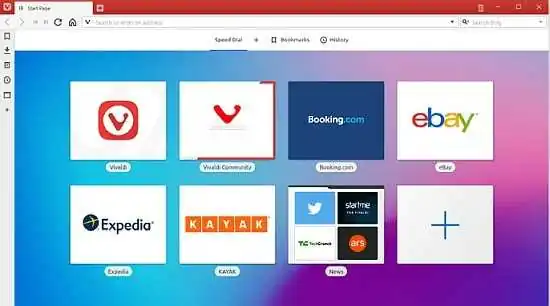
Speed Dial: Custom tiles (resize/reorder), folder expansion, dynamic backgrounds. Quick Commands (F2) omniboxes tabs/history/bookmarks/settings (“Close duplicates”). Web Capture scrolls/annotates/exports full pages.
Developer and Power User Tools
Developer Tools enhance Chromium DevTools: Live Inspector docks to side panel, Workspaces map local files to remote DOM, Blackbox Scripts ignore React bundles. Sessions API for automation, Custom CSS/JS per-site (Settings → Webpages → Custom”). Translation (100+ languages), Caret Browsing (F7: Vim everywhere), and Spatial Navigation (arrow keys through pages).
Floating Window: Detach tabs as mini-browsers (picture-in-picture YouTube + notes). Tab Capture records/streams tab audio/video.
This Vivaldi interface showcases tab stacks for banking, email, and shopping sites, highlighting productivity overlays and promotional productivity tools.
Performance Optimization
Proprietary Renderer: Compiles to native ARM/x86, hibernates tabs aggressively (100 tabs = 800MB vs Chrome’s 3GB), Hardware Acceleration selective (off for battery). Force GC hotkey frees memory mid-session. Low Power Mode throttles JS on mobiles.
Cross-Platform Perfection
Desktop: Windows 7-11, macOS 10.15+, Linux (native Wayland/X11). Android: Tab stacks vertical, bottom bar gestures. iOS: Fullscreen tabs, panel hints. Sync Seamless: One account, zero config.
Customization Matrix
Pro Workflow Examples
Developer: Workspace “Backend” (API docs, Postman, logs), gesture “R” refreshes, chain “Capture + Notes” documents bugs.
Marketer: Tile Analytics + Ads dashboard, Speed Dial campaigns, Notes tracks KPIs.
Researcher: 50-tab matrix stacked by topic, reader view PDFs, mail clippings.
Power User: Vertical tabs + web panels (Discord + calendar), command “Archive read tabs.”
Extension Support: Full Chrome Web Store + Vivaldi-specific (Tab Menu customizer).
Free Forever, No Limits
Zero ads, no paywalls, community-driven snapshots (beta edge). Translate: 50 languages. Accessibility: High-contrast, screen reader optimized.