
Portable VidControl 2.9.19
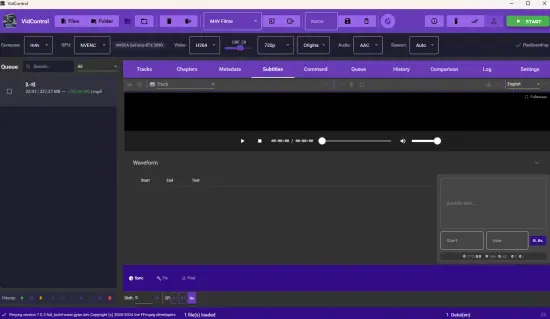
VidControl Portable is a free all-in-one video converter. CPU Encoding, Hardware-accelerated encoding with NVIDIA NVENC, AMD AMF, and Intel QSV for maximum speed. Subtitle Editor, Built-in editor with OCR recognition (Tesseract), spell checking, and batch processing. Batch Queue, Queue multiple files and let them process automatically one after another. Encoding Presets, Predefined and custom presets for quick setup – from CRF values to audio settings. Crop Editor, Visual crop editor with preview and automatic black bar detection. Watch Folders, Folder monitoring: New files are automatically detected and added to the queue.
All Features at a Glance
Video Encoding
- H.264, H.265 (HEVC), and AV1 support
- GPU encoding: NVIDIA NVENC, AMD AMF, Intel QSV
- CRF mode for constant quality
- Audio: AAC, AC3, Opus – or passthrough
- Multiple audio and subtitle tracks
- Automatic GPU/hardware detection
Subtitles
- VobSub & PGS image subtitle OCR (Tesseract)
- Built-in SRT editor with waveform display
- Hunspell spell checking (DE/EN)
- Batch OCR for complete series
- Custom name list for OCR correction
- Native MKV parsing without external tools
Workflow
- Drag & drop import
- Batch queue with auto processing
- Watch folders – automatic monitoring
- Custom encoding presets
- Smart output naming
- Encoding history with statistics
Release Notes:
- NEW — Target-VMAF auto-CRF: VidControl sample-encodes a few representative segments and binary-searches the highest CRF (smallest file) that still reaches your quality target (e.g. VMAF 95). One button in Advanced Video settings opens a live probe dialog and applies the chosen CRF to your preset
- VMAF analysis fixed: an unescaped Windows drive-letter colon in the libvmaf filtergraph meant VMAF never actually ran; also made resolution-robust via scale2ref
- Fixed a startup crash in 2.9.18: duplicate localization keys (left over from the i18n waves) threw before logging initialized, so the app exited with no error dialog and no log
- Diagnostics export now redacts webhook URLs (not just keys/tokens)
- Subtitle editor: pacing now operates on the correct file if you switch tracks during the audio analysis; removed double event-subscriptions on track load; QC auto-fixes pick the correct neighbour cue when two cues share a start time
- Settings are saved thread-safely — structural list mutations during parallel encodes can no longer make a debounced save silently fail