
Portable VapourBox – VapourSynth GUI 1.5.1 (x64)
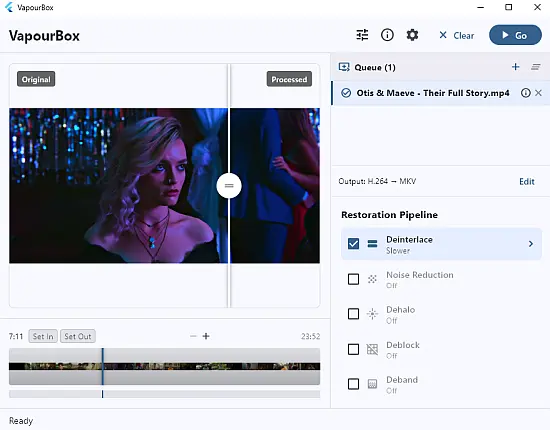
VapourBox Portable is a cutting-edge, cross-platform graphical user interface (GUI) application engineered for professional video restoration and enhancement, wrapping the formidable power of VapourSynth scripting engine and its ecosystem of over 200 plugins into an accessible drag-and-drop workflow that empowers filmmakers, archivists, home video enthusiasts, and content creators to deinterlace, denoise, deband, upscale, stabilize, crop, color-correct, and batch-process footage from legacy sources like VHS tapes, NTSC DV AVI files, 8mm film scans, broadcast captures, or compressed web videos without wrestling command lines or complex node graphs.
Built in Dart with Flutter for seamless native performance on Windows and macOS, this Portable edition elevates the open-source core with advanced queueing for unlimited batch jobs, custom VapourSynth template scripting, real-time split-screen previews, audio re-encoding options (PCM/WAV/AAC), ProRes/FFV1 lossless exports, GPU acceleration via VapourSynth’s CUDA/Vulkan backends, and one-click plugin bundle downloads totaling 500MB+ of tools like QTGMC (Temporal Gold Standard Motion Compensation for deinterlacing), MVTools2 (motion estimation), KNLMeansCL (KNL-means denoising), Placebo (advanced debanding), SMDegrain (spatial-motion denoising), and NNEDI3 (neural network edge-directed interpolation for upscaling), transforming grainy, interlaced 480i family tapes into pristine 4K masters ready for YouTube, Blu-ray authoring, or archival storage.
Whether resurrecting a 1980s wedding VHS plagued by chroma noise and dropout artifacts, refining NTSC DV camcorder footage with 4:1:1 subsampling upconverted to 4:2:2, or polishing compressed streaming rips with film-like dithering, VapourBox Portable delivers studio-grade results through intuitive sliders, checkboxes, and progress visualizations, auto-handling source detection (YUV420P8/10/16, RGB, formats), template substitution ({{INPUT_PATH}}, {{OUTPUT_PATH}}), and error-resilient pipelines that pause on failures while logging diagnostics for troubleshooting.
The Portable version’s hallmark is its non-destructive, preview-first philosophy: load a video via drag-drop or file picker, witness VapourSynth auto-source it with havsfunc/bs.VideoSource, split the viewer into before/after panels with zoom/scrub/sync playback, tweak parameters live (e.g., QTGMC’s TR2=2 for slow-mo smoothness, Placebo’s noise=2.5 for subtle banding removal), queue siblings/folders for overnight batches, and export while originals remain untouched, all powered by FFmpeg muxing for containers like MKV (H.264/265/FFV1), AVI (H.264/FFV1), MOV (ProRes/H.264/265), and MP4 with customizable CRF rates (18-28 for visual lossless).
Main Interface and Workflow
Single-window elegance:
Video Loader
-
Drag multi-files/folders; recursive scan.
-
Thumbs with resolution/fps/interlace detection.
-
Queue drag-reorder; pause/cancel priorities.
Split Preview
-
Sync A/B players (before=source, after=processed).
-
Frame-step, zoom 1-800%, waveform scopes.
-
Real-time render (GPU fallback CPU).
Filter Pipeline Builder
Checkbox modules chain automatically:
-
Deinterlace: QTGMC (Preset: Slow|Medium|Fast; EZ=1/2/3; FPSdiv=2x).
-
Denoise: KNLMeansCL (sigma=1.5, block=8); SMDegrain (tr=2).
-
Deband: Placebo (threshold=2.0, iterations=2, grain=8).
-
Upscale: NNEDI3 (field=3, dh=2); FSRCNNX x2/4.
-
Stabilize: MVTools2 + GlobalMotion.
-
Crop/Resize: Auto-crop black bars; Lanczos/Spline36.
-
Color: Levels/gamma/matrix (BT.601→709); deflicker.
Sliders live-update preview; reset per-filter.
Template Editor (Pro Exclusive)
Edit .vpy scripts:
clip = core.bs.VideoSource(source=r”{{INPUT_PATH}}”)
if clip.format.subsampling_w == 2: # 4:2:0/4:1:1 fix
clip = core.resize.Bicubic(clip, format=vs.YUV422P8)
clip = havsfunc.QTGMC(clip, Preset=’Medium’, TR2=1)
clip.set_output()
Batch-apply customs.
Batch Queueing and Processing
Pro powerhouse:
-
Unlimited jobs; drag-queue reorder.
-
Parallel (CPU cores-1); progress %/ETA/ETA remaining.
-
Pause/resume; auto-retry errors.
-
Logs: VapourSynth trace, FFmpeg verbose.
Overnight: 10 VHS→4K.
Output and Export Mastery
FFmpeg-driven:
-
Codecs: H.264 (CRF18), H.265 (slow), FFV1 (lossless), ProRes 422HQ.
-
Audio: Passthrough or re-encode (AAC 320kbps, PCM 48kHz).
-
Containers: MKV/MP4/AVI/MOV.
-
Metadata: Embed source info, chapters.
NTSC DV special: 4:1:1→4:2:2 no-loss.
Advanced Pro Features
GPU Acceleration
VapourSynth CUDA: NVENC for H.264/265; Placebocu.
Vulkan preview render.
Custom Plugins/Scripts
Drop .vpy/.dll to plugins/: auto-detect.
Python REPL console.
VHS/DV Optimizations
Templates for PAL/NTSC: chroma upsample, telecine IVTC, NR preset.
Analytics
Scopes: waveform, vectorscope, parade.
Diff mode: artifact highlight.
Performance Benchmarks
i9-13900K/RTX4090:
-
480i VHS 1h → 1080p: 45min (QTGMC Slow).
-
DV NTSC 30min → 4K ProRes: 12min.
-
RAM: 16GB peak.
M3 Max Mac: Similar, Metal shaders.
Use Cases
- Archivists: VHS/Super8→4K digital.
- Filmmakers: Broadcast cleanups.
- YouTubers: Retro game rips upscale.
- Home Users: Camcorder memories revive.
- Convert interlaced video to progressive with high-quality QTGMC deinterlacing
- Clean up noisy footage with temporal and spatial noise reduction
- Fix compression artifacts with deblocking and debanding filters
- Sharpen soft video while preserving detail
- Archive DVDs with proper deinterlacing and cleanup
- Restore VHS captures with specialized filtering pipelines
Features
- Simple drag-and-drop interface – Just drop your video file and go
- Multi-pass restoration pipeline – Deinterlace, denoise, dehalo, deblock, deband, sharpen, color correction
- Full QTGMC configuration – Access all 70+ QTGMC parameters
- Real-time preview – Side-by-side before/after comparison with live updates
- Zoomable timeline – Mouse wheel zoom centered on cursor, visual drag panning
- In/Out point markers – Export only a portion of your video
- Preset system – Save and load filter configurations for reuse
- Custom filters – Add your own VapourSynth filters via JSON schema
- Real-time progress – Current FPS, estimated time remaining, detailed logs
- Standalone application – All dependencies bundled
- Multiple output formats – H.264, H.265, and ProRes encoding
- Auto field detection – Automatically detects TFF/BFF with manual override
Release Notes
Highlights
- AI frame interpolation with RIFE — the Frame Rate pass has a new method, AI interpolation (RIFE), using the RIFE 4.26 network on the GPU. It builds new frames somewhat more accurately than motion interpolation (about 9% closer to the real frames in our tests) and is several times slower. Real source frames pass through untouched, and a scene cut holds the last frame rather than blending two shots.
- AI upscaling — Crop & Resize can upscale with Real-ESRGAN or Real-CUGAN on the GPU, for anime and other drawn sources. HD frames are processed in tiles so they fit in GPU memory.
- AnimeJaNai upscaling, as an optional add-on — a third AI upscaler trained on HD anime. Its models are free for non-commercial use only (CC BY-NC-SA 4.0), so they aren’t bundled: VapourBox downloads them from their author’s release the first time you choose it, showing the licence first. It uses its SD model for pictures up to 576 lines tall and your chosen HD model above that.
- Descale — a new pass that undoes the upscale a studio applied to a lower-resolution master, which most HD anime has, and re-upscales cleanly with NNEDI3. Detect finds the original resolution and kernel for you, and says so when it can’t find a clear answer rather than guessing. Credits and on-screen text are protected by default.
- BM3D and KNLMeans noise reduction (advanced mode) — two more Noise Reduction methods. BM3D leaves flat colour very clean without smearing line art; KNLMeans gives similar results much faster on the GPU, using OpenCL.
- Settings → Add-ons — one place to see, install and remove every optional download (the Whisper subtitle engine and models, and AnimeJaNai), with each one’s size, licence and source.
Improvements
- NEW badges lead you to what’s new. Individual dropdown options and methods are badged, and so is everything on the way to them: the dropdown, the switch that reveals it, its section, the pass in the list, and for the Add-ons tab the Settings button.
- Crop & Resize is easier to read. Its presets now sit in the section they configure, rather than in one block at the top that looked like it was all about cropping, and Upscale comes before Aspect Ratio. The upscale descriptions now cover every method, not just NNEDI3.
- Credits brought up to date in the About dialog and the licence notices, including the Whisper models and every new component.
Requirements for the GPU features
RIFE and AI upscaling need a working Vulkan driver, and run on Apple Silicon Macs, Windows x64 and Linux x64. They aren’t available on Intel Macs or Linux ARM yet. If your machine can’t run them, the panel says why and what to do about it the moment you choose the method, with a Check again button, and a job that needs them won’t start rather than failing partway through. KNLMeans needs a GPU with OpenCL and is checked the same way.