
Portable VanishBit 6.0.2
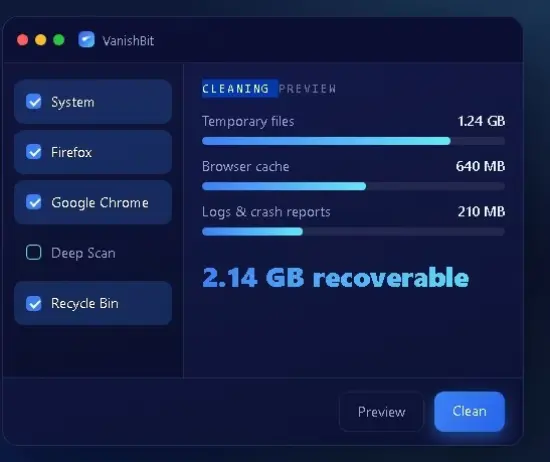
VanishBit Portable erases junk files, private traces and the ghosts of deleted files — cleanly, and beyond recovery. Reclaim gigabytes. Leave nothing behind.
Remove unnecessary and unneeded files from web browsers
Focusing more on functionality and less on looks, VanishBit features a simple GUI that, essentially, allows selecting the data to cleanup, previewing the results and moving on to applying the changes. Usage is extremely intuitive, since the left-side panel displays a checklist with all the applications and system data that might require cleaning, allowing you to tick the checkboxes as you please.
As I expected, VanishBit can remove unnecessary data from installed web browsers, including cache, cookies, the download and form filling history, the browsing history and other logs that might occupy disk space.
Cleanup data generated by Defender, Windows Explorer and the operating system
Aside from browsers, VanishBit also extracts and removes data created by Windows Defender and Windows Explorer. As such, it can delete backup files, logs and history, temporary files created by Defender, all while allowing you to erase the lists of recently used files, the search history, shellbags, thumbnails and so on from Windows Explorer.
There is also system-generated data that can be erased thanks to VanishBit, although you can also do this manually in Windows. VanishBit can clean the Windows clipboard, logs, temporary files and Recycle Bin contents, update uninstallers abd the MUICache. You can also use it to clean the DNS cache and carry out a memory dump.
More tech-savvy users will be happy to know that VanishBit can also perform a deep scan to cleanup files that are widely scattered across the disk. However, the expert mode needs to be activated to be able to run a deep scan, since it requires extra caution when handling sensitive system data, increasing the risk of data loss and, what is worse, causing boot problems or rendering the system unusable.
Get your system cleaned up with this fork of BleachBit
A fork of BleachBit, VanishBit displays a similar look with extra features such as the deep scanner. Having it preserve the preview function is a plus, since it allows the user to first check out the outcome and only then apply the changes, so as to avoid the accidental deletion of data.