Portable UniGetUI 2026.1.11
UniGetUI Portable is a modern, open‑source graphical interface that unifies multiple Windows package managers under a single, user‑friendly dashboard. While tools like Winget, Chocolatey, and Scoop have long been essential for developers and power users who prefer command‑line workflows, they require familiarity with terminal commands and package syntax. UniGetUI Portable removes that barrier by providing a visual, point‑and‑click environment where users can discover, install, update, and remove software from several package sources without ever opening a command prompt. This makes package management accessible to a far broader audience while still preserving the power and flexibility that advanced users expect.
At its core, UniGetUI Portable is a “package manager manager” that acts as a unified front end for the underlying engines. It does not replace Winget, Chocolatey, Scoop, or other package managers; instead, it orchestrates them, allowing users to take advantage of their combined repositories and capabilities from one consistent interface. This consolidation is particularly valuable in environments where different applications are only available through different package sources, or where organizations want to standardize how software is installed and maintained across multiple machines.
Historical Context and Stewardship Update
UniGetUI originally emerged as a community‑driven project focused on simplifying Windows package management through a graphical interface. Over time, it matured into a stable, widely used tool that bridged the gap between command‑line package managers and users who prefer visual workflows. With the 2026 release series, the project underwent a significant transition in governance and ownership, moving under the stewardship of the Devolutions organization. This shift marked a change from purely community maintenance to a more structured, corporate‑backed development model while preserving the software’s open‑source nature and MIT license.
The move to Devolutions brought stronger security signing, streamlined release automation, and more reliable update infrastructure. All update links and download endpoints were migrated to Devolutions domains, improving trust and consistency for end users. The project also adopted a new versioning scheme, with the 2026.x series reflecting this new era of development. Despite the change in ownership, UniGetUI Portable remains free and open‑source, continuing to be accessible to both individual users and organizations without licensing barriers.
Unified Support for Multiple Package Managers
One of UniGetUI Portable’s defining features is its ability to work with multiple package managers simultaneously. The application supports Winget, Microsoft’s native package manager that is integrated into modern Windows systems, as well as Chocolatey and Scoop, which are popular in developer communities for their vast repositories and specialized tooling. Each of these backends is treated as a separate source within the application, allowing users to browse and manage packages from all of them in a single view.
This multi‑manager support is not superficial; UniGetUI Portable fully integrates the update and lifecycle logic of each backend. The software can query each package manager for available updates, display them in a consolidated list, and install or update packages using the appropriate backend without requiring the user to know which manager supplies a particular application. This abstraction layer simplifies the experience for users who might otherwise need to remember different commands or syntax for different tools.
Extensibility and Future Package Sources
Beyond its core support for Winget, Chocolatey, and Scoop, UniGetUI Portable is designed with extensibility in mind. The architecture allows for the integration of additional package managers and sources as the Windows ecosystem evolves. Community contributors and developers can build adapters or plugins to support new repositories, ensuring that the application remains relevant as new tools emerge. This forward‑looking design helps protect investments in inventory management, automation scripts, and organizational workflows that rely on a unified package management interface.
Intuitive Graphical Interface and Navigation
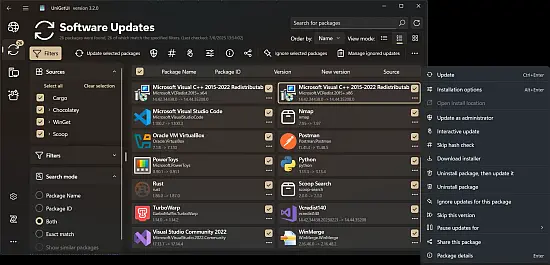
UniGetUI Portable presents a clean, modern interface that is organized around the most common package management tasks: discovering new software, updating installed applications, and managing the list of installed packages. The main dashboard typically features tabs or sections for different views, such as an “Updates” tab that aggregates all available updates across all supported package managers, an “Installed” tab that lists currently installed applications, and a “Discover” or “Browse” tab for searching and installing new software.
The interface is visual and list‑oriented, showing package names, versions, publishers, and brief descriptions. Users can filter and sort results by name, category, or installation status, making it easy to find specific applications or to get an overview of what is installed on the system. Search functionality is fast and responsive, querying the underlying package repositories and presenting results in real time. This design reduces the cognitive load compared to command‑line tools, where users must remember exact package names or construct complex search queries.
Visual Feedback and Status Indicators
To improve usability, UniGetUI Portable incorporates visual feedback and status indicators throughout the interface. Packages that have available updates are clearly marked, and pending operations are shown with progress bars or spinner indicators. Successful installations and updates are confirmed with clear messages, while errors or failures are presented with explanatory text that helps users understand what went wrong and how to resolve the issue. This transparency is particularly helpful for users who are less familiar with the inner workings of package managers and might otherwise be intimidated by cryptic error messages.
Package Discovery, Search, and Installation
Discovering and installing software is a core workflow in UniGetUI Portable. The application provides a dedicated discovery interface where users can browse available packages, search by name or keyword, and filter results by category or source. Each package entry includes metadata such as version number, publisher information, installation size (when available), and a short description. Links to official project pages or documentation are also provided where possible, allowing users to verify the legitimacy of a package before installation.
Installation is performed with a single click. Once a user selects a package and confirms the action, UniGetUI Portable automatically invokes the appropriate backend package manager, handles any required dependencies, and monitors the installation process. The application abstracts away the complexity of different package formats and installation parameters, presenting a consistent experience regardless of whether the underlying engine is Winget, Chocolatey, or Scoop.
Batch Operations and Bulk Updates
For users who need to manage large numbers of applications, UniGetUI Portable supports batch operations that streamline the update and installation process. The “Updates” view aggregates all available updates from all supported package managers, allowing users to select multiple packages and update them simultaneously. This bulk update capability is particularly valuable on systems with many installed applications or in environments where multiple machines need to be kept up to date.
Batch operations reduce the time and effort required to maintain software hygiene across a fleet of systems. Instead of updating each package individually, users can initiate a single update sequence that processes all selected packages in order, monitoring progress through a unified status display. This approach helps ensure that systems remain current with security patches and feature updates without requiring repetitive manual intervention.
Update Management and Security Patching
Keeping software up to date is a critical aspect of system security and stability, and UniGetUI Portable places strong emphasis on update management. The application regularly checks for updates across all supported package managers, presenting a consolidated list of available updates that includes both system tools and third‑party applications. This centralized view makes it easier for users to identify outdated software and apply patches promptly.
Security is further enhanced by the project’s move under Devolutions stewardship. The 2026 release series introduced stronger code signing and more reliable update infrastructure, ensuring that downloads and updates come from trusted sources and that the integrity of the software feed is maintained. All update links now point to Devolutions domains, which provides a more secure and consistent source for update artifacts and reduces the risk of supply‑chain attacks.
Automatic Update Checks and Notifications
UniGetUI Portable can be configured to automatically check for updates at regular intervals and notify users when new packages are available. This background monitoring ensures that users are aware of important updates without needing to manually launch the application and search for new versions. Notifications can be subtle and non‑intrusive, appearing as system tray messages or status bar indicators that do not disrupt normal workflow.
For organizations that require stricter update policies, UniGetUI Portable can be integrated into broader management workflows where updates are scheduled or controlled through external tools. The application’s command‑line interface and scriptable nature allow it to be used in automated maintenance routines, ensuring that package updates are applied as part of regular system
Changelog
Improvements
- Added a warning when a winget host changed between two versions
- Enhanced the update functionality and logging
- Reduced Windows release package size
- Reduced navigation bar item size to fit long translations
- Improved the operation output views in the Avalonia UI
- Avalonia: Added support to the system tray on non-Windows machines
Bug Fixes
- Fixed elevator in avalonia not working
- Fixed portable package being deleted when updating
- Fixed packages remaining in update list after a successful update
- Fixed pinger not finding some update