
Portable Unicodia – Encyclopedia of Characters 3.2.0 (x64)
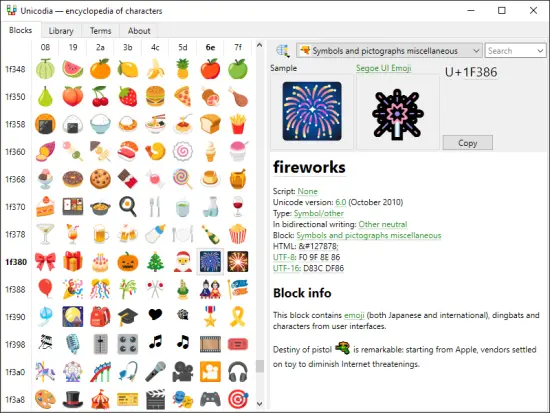
Unicodia Portable is best understood as a specialized reference tool for people who work with symbols, character sets, and the enormous variety of written signs used across digital systems. It is designed to function like an encyclopedia of characters, giving users a structured way to explore, identify, compare, and copy symbols from many writing systems and character blocks. The portable format adds an especially useful layer of convenience, because it allows the application to be carried, launched, and used across different Windows environments without requiring the usual permanent installation workflow.
At first glance, an encyclopedia of characters may sound like a niche idea, but in practice it is extremely practical. Modern computing relies on a vast universe of letters, punctuation marks, symbols, mathematical signs, currency signs, technical notations, and decorative glyphs. Most people only encounter a tiny fraction of this range in everyday typing, yet designers, writers, programmers, linguists, editors, and curious users often need access to much more. Unicodia Portable brings that world into a single organized space, making characters easier to browse and understand.
What the software represents
Unicodia Portable represents a reference-oriented approach to digital writing. Rather than focusing on text creation in the traditional sense, it focuses on the building blocks of writing itself. Every character on a computer has a place, a meaning, a code position, and often a cultural or technical role. A tool like this helps users move beyond seeing a symbol as just a visual mark and instead understand it as part of a larger system.
That perspective is what makes the software useful. When people work with fonts, layouts, translations, code, data, or multilingual content, they often run into unfamiliar symbols. Some characters look similar but behave differently. Some are used in ordinary language, while others have specialized use in mathematics, phonetics, logic, or signage. Unicodia Portable helps make those distinctions visible and easier to manage.
Portable convenience
The Portable version makes the encyclopedia more flexible and easier to keep close at hand. A portable character reference can be stored on removable media, used on a shared workstation, or launched from a project directory without the burden of a standard installation. That is helpful for users who need character lookup while moving between systems or who prefer to keep tools self-contained.
Portability also suits situations where the software is used as a companion utility rather than a main work environment. A designer, editor, translator, or developer may only need it occasionally, but when that moment comes, having a portable encyclopedia of characters available can save a considerable amount of time. It becomes a reference you can carry rather than a resource you must search for later.
Character exploration
One of the strongest ideas behind Unicodia Portable is exploration. A typical character tool may simply allow a user to type or insert symbols, but an encyclopedia encourages discovery. It invites users to browse through Unicode ranges, compare similar glyphs, and learn how different symbols are organized. That makes the software not just practical, but educational.
This exploratory aspect is important because the character space is surprisingly vast. There are letters from many alphabets, symbols from different technical fields, and visual forms used in all kinds of communication. Users often discover symbols they did not know existed, or they realize that a familiar mark has variants that serve different purposes. A well-organized encyclopedia helps transform that complexity into something understandable.
Reference value
As a reference tool, Unicodia Portable is valuable because it gives users a structured way to inspect characters in detail. A symbol is more than a shape on the screen. It may have a code point, a name, a script family, a general category, and associations with historical or technical usage. The software’s encyclopedia style makes those details easier to absorb and compare.
That reference value matters most when users are trying to avoid mistakes. Two characters may look nearly identical but behave differently in text systems. A user may need the precise form that matches a language requirement or a formatting standard. By presenting characters in a clear and browsable reference environment, the software helps reduce confusion and supports more careful work.
Useful for language work
Language-oriented users benefit greatly from a character encyclopedia. Writers, translators, linguists, and editors often need to inspect accents, diacritics, special letters, punctuation variants, and script-specific forms. Unicodia Portable provides a practical environment for that kind of work because it makes the underlying symbol landscape easier to navigate.
This is especially useful when dealing with multilingual text. Many writing systems contain characters that are unfamiliar to users who normally work in only one language. A reference tool that exposes those characters in a searchable and organized way can make the work more approachable. It supports accuracy, learning, and confidence when handling text outside the familiar range.
Useful for technical work
Technical users also benefit from a character encyclopedia. Programmers, data workers, markup authors, and system-minded users often encounter symbols in code, configuration files, documentation, and formulae. Some characters are reserved, some are special, and some must be inserted carefully to avoid errors. Unicodia Portable helps make those characters visible and easy to distinguish.
Technical work often depends on precision. A single wrong symbol can alter meaning, break a command, or produce an incorrect result. A reference tool that helps identify characters accurately is therefore more than a convenience; it is a safeguard. That makes the software valuable in tasks where correct notation is essential.
Copying and insertion workflow
Even though the software is encyclopedic in nature, it is also practical in everyday use because users often want to copy a symbol directly after finding it. An effective character reference tool should make the path from discovery to insertion as short as possible. Unicodia Portable is suited to that kind of workflow because users can browse a character, inspect it, and move it into their text or project with minimal friction.
This matters in real work because people rarely look up symbols for curiosity alone. They usually need to place the symbol somewhere, whether in a document, code, caption, design, or translation. When the lookup tool supports fast transfer into active work, it becomes much more than a static encyclopedia. It becomes part of the writing and editing process itself.
Educational value
Unicodia Portable has strong educational value because it helps users understand how written symbols are organized across systems. Many people know how to type ordinary letters, but they do not always know how rich character encoding really is. A character encyclopedia can reveal that richness in a way that is practical and easy to browse.
That educational function is useful for students, curious users, and professionals who want to deepen their understanding of writing systems. It can help explain why some characters are distinct even when they look similar, or why a particular glyph belongs to a specialized block. This kind of insight builds confidence and makes the user more fluent in digital typography and notation.
Organization and structure
The value of an encyclopedia depends heavily on organization. A character collection is only helpful if it is grouped and labeled in a way that makes sense. Unicodia Portable is designed around that principle, giving users a structured overview rather than a flat list of symbols. That structure helps users move between related characters and understand their context.
Good organization also makes browsing more enjoyable. Instead of feeling lost in a giant sea of symbols, the user can work through families, categories, and blocks in a logical way. That makes the software more usable for both quick lookups and longer sessions of exploration. A well-structured character encyclopedia is easier to trust and easier to return to over time.
Search and lookup behavior
A tool like this is most effective when the user can find characters quickly. Search and lookup behavior are therefore central to the experience. Whether a user knows the character name, a partial description, or the block it belongs to, the software should help narrow the field and reveal the right symbol as efficiently as possible. That keeps the reference process from becoming frustrating.
Fast lookup is important because many character tasks happen in the middle of other work. A user may be drafting text, editing a document, building a design, or reviewing an encoded file, and they need the symbol now rather than later. A responsive encyclopedia helps preserve that momentum by turning character lookup into a quick interruption rather than a full detour.
Visual comparison
One of the most interesting aspects of a character encyclopedia is the ability to compare similar symbols visually. This is especially useful when characters differ only slightly in shape or function. Unicodia Portable is ideal for this kind of comparison because it lets users inspect subtle differences that would be easy to miss in ordinary text.
Visual comparison matters in typography, language work, and technical notation. A symbol may appear interchangeable at a glance, but its use may be specific and important. Being able to inspect the characters side by side, or in close conceptual relation, gives the user a stronger grasp of the differences and reduces accidental misuse.
Designed for curiosity
Beyond practical tasks, Unicodia Portable is also a software for curiosity. Many users simply enjoy exploring the breadth of written symbols and discovering forms they have never encountered before. A character encyclopedia supports that curiosity by presenting the world of glyphs as something organized and approachable rather than obscure or intimidating.
That exploratory quality helps make the software memorable. A user may open it for a specific symbol and end up learning about entire scripts or symbol families. This kind of discovery gives the tool a lasting appeal because it keeps revealing new details over time, rather than exhausting its value after one or two lookups.
Practical use in design
Graphic designers and layout specialists may also find Unicodia Portable useful. Design work often involves decorative symbols, special punctuation, arrows, line elements, and other glyphs that are not always easy to locate from ordinary typing methods. A character encyclopedia helps designers identify and collect the exact symbol they need without guesswork.
That is particularly helpful in projects where visual consistency matters. The designer may need one specific form of a character rather than a close substitute. By offering a reference-rich environment, the software helps maintain accuracy in typography and composition. It can be a reliable companion when working on visually detailed projects.
Practical use in documentation
Documentation writers also benefit from access to an encyclopedia of characters. Manuals, guides, and technical articles often need exact symbols to illustrate commands, notation, examples, or formatting conventions. Unicodia Portable supports this work by making it easier to look up and verify the right character before placing it into a draft.
That reduces ambiguity and improves the quality of written material. When symbols are correct and consistent, documentation becomes easier to read and less likely to confuse the audience. A reference tool that helps ensure that precision is therefore very valuable in publishing and instructional work.
Why an encyclopedia format matters
The encyclopedia format matters because it implies depth and context. Instead of treating characters as isolated symbols, it encourages the user to understand them within a larger system. That is one of the strengths of Unicodia Portable: it is not only a symbol picker, but a way of thinking about characters as a structured domain of knowledge.
This format helps users move from simple lookup to genuine understanding. Over time, the user begins to notice categories, relationships, and distinctions that were not obvious before. That makes the software useful not only as a utility, but as a learning environment for anyone interested in writing systems and symbol design.
Overall character of the software
Unicodia Portable is best described as a thoughtful, reference-oriented utility for exploring the universe of written characters. It brings together browsing, lookup, comparison, and practical symbol access in a portable package that can be carried from one system to another. Its encyclopedia style gives it a special identity because it aims to inform as well as assist.
The software is valuable because it helps users work more accurately with symbols while also encouraging curiosity and learning. Whether the task involves language, design, programming, documentation, or simple exploration, the tool offers a structured way to engage with the character space. That makes it useful in both specialist and everyday contexts.
For anyone who regularly works with unusual symbols or simply wants a better understanding of the characters available in digital text, Unicodia Portable offers a clear and practical environment. It turns a complicated and often overlooked part of computing into something easier to browse, understand, and use with confidence.