
Portable Subtitle Edit 5.0.0 Multilingual
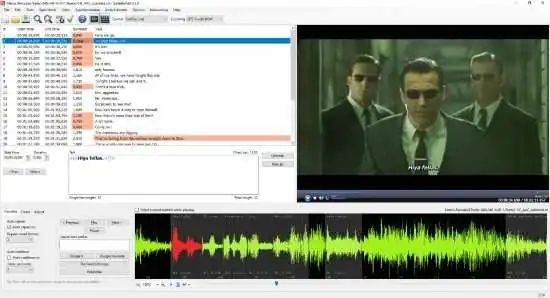
Subtitle Edit Portable is a feature-rich software program designed to help users create, edit and synchronize subtitles for movies, TV shows, and other video content. Developed by Nikolaj Lynge Olsson, the software has been widely praised for its user-friendly interface, extensive set of features, and powerful subtitle editing capabilities.
One of the key features of Subtitle Edit Portable is its ability to work with a wide range of subtitle file formats. The software supports all of the most popular subtitle file types, including SRT, SUB, SSA, ASS, STL, XML, and many others. This enables users to easily import existing subtitle files or create new ones from scratch, depending on their needs.
Once a subtitle file has been imported into Subtitle Edit Portable, users can take advantage of a variety of powerful editing tools to customize the text and timing of their subtitles. For example, the software includes a built-in spell checker that helps users identify and correct spelling errors in their subtitles. It also allows users to adjust the timing of individual lines of text, add or remove subtitle markers, and split or merge subtitle files as needed.
In addition to these basic editing tools, Subtitle Edit also includes a number of advanced features that make it a versatile and powerful tool for professional subtitle editors. For example, the software includes a translation mode that enables users to translate subtitles from one language to another with ease. It also includes a synchronization tool that automatically adjusts the timing of subtitles to match the audio track of a video file.
Another useful feature of Subtitle Edit is its ability to work with multiple subtitle files at once. Users can open and edit multiple files simultaneously, which makes it easy to compare and synchronize subtitles across different versions of a video or between different videos altogether.
To further simplify the subtitle editing process, Subtitle Edit includes a number of automation features that help users save time and improve accuracy. For example, the software can automatically detect and fix common errors in subtitle files, such as overlapping text or timing issues. It can also batch process large numbers of subtitle files at once, which makes it a great tool for professional editors who need to work with large volumes of content.
Overall, Subtitle Edit Portable is an essential tool for anyone who needs to create, edit, or synchronize subtitles for video content. Its user-friendly interface, extensive set of features, and powerful editing capabilities make it one of the best subtitle editing tools on the market today. Whether you’re a professional editor or just starting out, Subtitle Edit has everything you need to get the job done quickly and efficiently.
Features
- Create/adjust/sync/translate subtitle lines
- Convert between SubRib, MicroDVD, Advanced Sub Station Alpha, Sub Station Alpha, D-Cinema, SAMI, youtube sbv, and many more (300+ different formats!)
- Cool audio visualizer control – can display wave form and/or spectrogram
- Video player uses mpv, DirectShow, or VLC media player
- Visually sync/adjust a subtitle (start/end position and speed)
- Audio to text (speech recognition) via Whisper or Vosk/Kaldi
- Auto Translation via Google translate
- Rip subtitles from a (decrypted) dvd
- Import and OCR VobSub sub/idx binary subtitles
- Import and OCR Blu-ray .sup files – bd sup reading is based on Java code from BDSup2Sub by 0xdeadbeef)
- Can open subtitles embedded inside Matroska files
- Can open subtitles (text, closed captions, VobSub) embedded inside mp4/mv4 files
- Can open/OCR XSub subtitles embedded inside divx/avi files
- Can open/OCR DVB and teletext subtitles embedded inside .ts/.m2ts (Transport Stream) files
- Can open/OCR Blu-ray subtitles embedded inside .m2ts (Transport Stream) files
- Can read and write both UTF-8 and other unicode files and ANSI (support for all languages/encodings on the pc!)
- Sync: Show texts earlier/later + point synchronization + synchronization via other subtitle
- Merge/split subtitles
- Adjust display time
- Fix common errors wizard
- Spell checking via Libre Office dictionaries (many dictionaries available)
- Remove text for hear impaired (HI)
- Renumbering
- Effects: Typewriter and karaoke
- History/undo manager (Undo=Ctrl+z, Redo=Ctrl+y)
- Compare subtitles
- Multiple search and replace
- Change casing using names dictionary
- Merge short lines/split long lines
- Export to PNG images (+bdn xml), Adobe Encore FAB image script, VobSub, Blu-ray sup, EBU stl, PAC, and plain text
Subtitle Edit can read, write, and convert between more than 300 subtitle formats, like:
- SubRip (.srt)
- ABC iView
- Adobe Encore
- Advanced Sub Station Alpha
- AQTitle
- Avid
- CapMaker Plus (.cap, binary)
- Captionate
- Cavena890 (.890, binary)
- Cheetah Caption (.cap, binary)
- D-Cinema (Cinecanvas, both interop and smpte)
- Dvd Studio Pro
- Dvd Subtitle
- EBU Subtitling data exchange format (.stl, binary)
- F4 (several variations)
- Flash xml
- Json (two variations, for use with JavaScript)
- MicroDvd
- MPlayer2
- OpenDvt
- PAC (.pac, binary)
- Pinnacle Impression
- QuickTime Text
- RealTime Text
- Scenarist
- Sony DVD Architect
- Sub Station Alpha
- SubViewer 1.0
- SubViewer 2.0
- Sami (.smi)
- Son (.son, import only)
- Subtitle Editor Project
- Timed Text 1.0 (.xml), also know as TTML or DFXP
- Timed Text Draft (.xml)
- TMPlayer
- TTXT
- TurboTitle
- Ulead Subtitle Format
- Ultech (.cap, binary, only read)
- UTX
- WebVTT
- YouTube Annotations
- YouTube Sbv
- Zero G
- Xml
- Csv
- VobSub (.sub/.idx, binary – can also be read from Matroska/mp4 files)
- DVD Vob (.vob, binary, read only)
- Blu-ray sup (.sup, binary, can also be read from Matroska files)
- Bdn xml (.xml + png images, read+write)
- Transport Stream subtitles (.ts)
- + several formats of unknown name
Release Notes:
Subtitle Edit 5.0.0 is a major milestone for the popular open-source subtitle editor, built entirely from the ground up to modernize the software and introduce full cross-platform capabilities.
The Headline: A Complete Rewrite
Maintaining the previous architecture (SE 4) across multiple operating systems—especially Linux—was becoming incredibly difficult. For Subtitle Edit 5.0.0, the user interface has been completely rewritten using Avalonia UI.
This shift allows for a single, cross-platform codebase that runs natively across systems without requiring external emulation frameworks like Mono.
-
Windows 10 (22H2) or newer (Native, self-contained)
-
macOS 12 (Monterey) or newer (Native support for both Intel and Apple Silicon M1/M2/M3/M4/M5)
-
Modern Linux Distributions (Self-contained tarball or Flatpak)
⚠️ Important Upgrade Note: Because SE 5 is an entirely new application rather than a minor update, layouts, shortcuts, and some workflows have shifted. A few hyper-specialized features from SE 4 are not yet ported over. You can run the portable versions of SE 4 and SE 5 side-by-side if you rely on specific niche tools.
Key Features & Improvements
1. Self-Contained Deployments
You no longer need to hunt down separate .NET installations. The packages are fully self-contained. On macOS and Linux, the critical backend media components like mpv and ffmpeg are bundled directly into the application wrapper.
2. Enhanced AI Capabilities
The AI toolkit has seen major expansions for automated workflows:
-
Advanced OCR: Includes standalone PaddleOCR (drastically faster and functions locally without needing a heavy Python environment), alongside OCR support powered by Ollama vision models.
-
Expanded Speech-to-Text: Updated engine frameworks supporting new speech models like Parakeet, Cohere, and Kyutai, alongside deep integrations for Faster-Whisper-XXL.
-
AI Translation: Direct API translation functionality utilizing modern LLM structures including Mistral, KoboldCpp, and AvalAI.
3. Audio & Workflow Modernization
-
Unified Waveform UI: The spectrogram and audio waveform engine interfaces have been structurally unified and now feature new dark and light visual themes.
-
Text-to-Speech (TTS): The integrated TTS engine now fully supports native voice-over workflows.
-
Format Utilities: Added a brand new native conversion tool specifically designed for mapping and converting actors/styles between Advanced SubStation Alpha (
.ass/.assa) and standard text formats.