Portable SoundCraft 0.8.0 (x64)
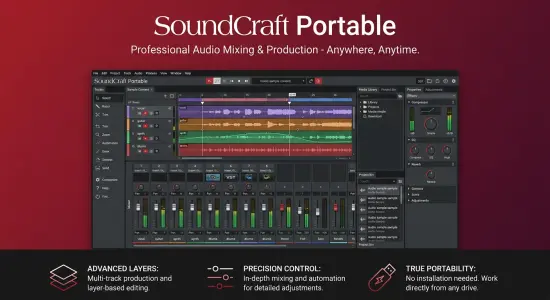
SoundCraft Portable is a desktop digital audio workstation for recording, arranging, editing, and mixing music and other audio projects. It brings a timeline-based editing workspace and a channel-oriented mixing console together in one application, so a project can move from initial recording and arrangement through detailed processing and final mixdown without switching between separate programs.
The software is open source and is being developed for macOS, Windows, Linux, and FreeBSD, with a browser-based build also documented. Its design is aimed at musicians, producers, audio engineers, soundtrack creators, and developers who want a flexible environment for multitrack work. SoundCraft is still identified as pre-alpha, so it is best understood as an actively developing workstation rather than a fully mature replacement for established studio software. Its functionality is substantial, but users should test it with their own equipment, plugins, and project files before relying on it for time-critical production work. GitHub
A Flexible Workspace for Audio Projects
SoundCraft Portable centers its workflow around two main views: an Edit window for organizing and shaping a project over time, and a Mix window for balancing tracks and configuring signal flow. This separation reflects two different ways of thinking about audio production. In the Edit window, the focus is on the structure of the piece: where clips begin and end, how parts relate to one another, and how the arrangement develops. In the Mix window, the focus shifts to levels, processing, routing, and the relationship between tracks.
That division can make large sessions easier to navigate. A producer can concentrate on editing a vocal or refining the timing of a performance, then move to the mixer to adjust its tone and position. The application’s interface is designed around familiar recording-studio concepts, including tracks, channels, busses, sends, automation, and plugin inserts. Users who have worked in a conventional digital audio workstation may recognize many of these ideas, though each application handles details differently.
The software supports multitrack audio and MIDI projects. That means an arrangement can combine recorded performances, imported audio, and MIDI parts in a shared session. A song might include drum recordings, bass, layered keyboards, vocal takes, and MIDI-based instrumental parts, while a film or game project might organize dialogue, ambience, effects, and musical cues into separate tracks. The same overall workflow can be adapted to podcasts, sound design, rehearsal recordings, or other projects that benefit from multiple synchronized layers.
SoundCraft Portable Edit Window and Arrangement Tools
The Edit window provides the timeline where users arrange and refine their material. Audio and MIDI clips can be placed on tracks, moved into position, and organized into a larger musical or production structure. A timeline-based layout is particularly helpful when a project has repeated sections, overlapping layers, or precise timing requirements. It gives the user a visual overview of what happens throughout a session rather than limiting the work to one sound or channel at a time.
SoundCraft Portable includes editing modes such as Shuffle, Slip, Spot, and Grid. These offer different approaches to moving or positioning material. Grid-oriented editing is useful when clips need to align with a musical or time-based division, while less constrained modes can help when edits need to preserve a particular timing relationship or land at an exact location. The availability of several modes allows users to choose an editing approach suited to the task instead of forcing every operation into one behavior.
The application also provides tools for working with playlists and comping. Playlists are useful for keeping alternate performances or versions associated with a track. Comping lets a user build a preferred performance from selected portions of multiple takes, a common approach for vocals, guitar, and other recorded parts. Rather than treating every take as a separate finished track, the editor can help organize alternatives and assemble the strongest sections into a cohesive performance.
Fades and tempo maps are part of the project-editing toolkit. Fades help smooth the start or end of audio regions and can reduce abrupt transitions. Tempo maps allow a project’s tempo to vary over time, which can be important for expressive music, live recordings, or arrangements that change pace. Memory locations and markers can also help users identify important points in a session, such as a verse, chorus, edit location, or section that needs review.
Mixing, Routing, and Channel Control
SoundCraft Portable’s Mix window brings together track-level controls and routing tools. Each track can use inserts and sends, while busses and auxiliary inputs provide ways to combine or distribute signals. In a straightforward production, a user might send several drum tracks to a shared bus, route multiple backing vocals through a group channel, or send selected tracks to an effects return. These approaches make a session easier to manage and can support consistent processing across related sounds.
The mixer supports up to ten inserts and ten sends per track, along with busses, aux inputs, VCAs, and routing folders. Inserts place processors directly in a channel’s signal path, while sends let a portion of a signal feed another destination, such as a reverb or delay. VCAs offer a way to control the levels of assigned channels together without replacing their individual routing. Solo-in-place and metering with peak hold support common monitoring and troubleshooting tasks. The software also documents automatic plugin delay compensation, which is intended to help keep tracks aligned when processing introduces latency. GitHub
A full mix benefits from being able to move between broad adjustments and precise ones. Faders and meters provide an overview of levels, while panning and routing help define where sound travels through the session. A user can make a quick balance with channel faders, then focus on a single instrument’s inserts or send levels. For larger sessions, grouping and bus routing can reduce repetitive adjustments and help maintain a coherent mix structure.
Automation extends these controls across the timeline. SoundCraft Portable documents Write, Touch, Latch, and Trim modes for recording automation passes. Automation can be used for volume, pan, mutes, sends, and plugin parameters, letting the mix change as a project plays. This is useful for tasks such as lowering an instrumental part beneath a vocal, raising a sound effect at a specific moment, or shaping a gradual transition between sections. Automation turns a static mix into a time-dependent one, giving users finer control over how the production unfolds.
MIDI Editing and Musical Composition
SoundCraft Portable combines MIDI editing with audio production. Its piano-roll editor provides a visual space for placing and adjusting notes, while velocity information can be edited in a dedicated lane. Step input, quantization, and transposition support common composition and editing tasks. Users can enter notes in sequence, adjust their timing against a grid, or move a phrase to another pitch range without having to recreate it from scratch.
The software also documents a score-notation editor and Standard MIDI File import and export. A notation view can be useful for users who prefer working with written musical parts or need to inspect a passage in conventional staff form. MIDI import and export can help move musical material between compatible tools, though compatibility details should be checked for the specific workflows and files involved.
MIDI features can serve many roles in a production. A composer might sketch a melody, develop a chord sequence, or build a rhythmic pattern. A producer might use MIDI to program an arrangement and later replace or supplement parts with recorded performances. Because audio and MIDI tracks can exist in the same session, the application supports a mixed workflow in which programmed and recorded material are edited alongside one another.
Built-In Processing and Plugin Support
SoundCraft Portable includes built-in audio tools and supports external plugins. Its documented plugin formats include CLAP, VST3, and Audio Unit support, alongside built-in effects and instruments such as equalization, dynamics processing, reverbs, delays, modulation effects, and synthesizers. This gives users a starting set of tools for shaping sounds while providing a route to compatible third-party processors and instruments. GitHub
Equalization can help control frequency balance, while dynamics processors can shape changes in loudness. Reverbs and delays can create a sense of space, depth, or rhythmic repetition. Modulation effects and synthesizers add further options for creative sound design and musical production. These tools may be used directly on tracks or through sends and returns, depending on the desired signal flow.
Plugin compatibility is an important part of any workstation workflow, but support does not guarantee that every plugin will behave identically across operating systems or versions. Users should check plugin format, platform availability, and current project requirements before building a session around a particular third-party tool. Since SoundCraft is under active development, testing a plugin in a small project before using it in a larger or high-stakes session is a sensible way to identify potential issues early.
Surround Audio and Video Synchronization
SoundCraft Portable includes surround panning and support for immersive speaker layouts up to 9.1.6, as documented for the project. Spatial tools can be valuable for film, television, games, installations, and other productions in which sound needs to move beyond a conventional stereo field. A dedicated renderer and speaker-oriented view help users work with multichannel placement as part of the session rather than treating spatial audio as an unrelated export step.
The application also documents a picture track with video playback synchronized to the playhead. This can help composers and sound editors align audio to scenes, cuts, and on-screen events. A synchronized picture reference is useful for tasks such as timing a musical cue, matching a sound effect to an action, or refining dialogue and ambience against moving images. As with other developing features, users should confirm that the video formats and playback behavior they need are supported in their particular setup.
Scripting and Workflow Automation
SoundCraft Portable is designed to expose commands to more than the graphical interface. The project describes a command-line interface, a JSON control channel, and an MCP server for scripts and agent-based workflows. These options may be useful to technically inclined users who want to automate repetitive actions, build custom tools, or integrate session operations into a broader production process. GitHub
For example, scripting can be helpful when a project requires repeated setup steps, predictable processing, or a consistent export routine. A command-line workflow may also suit developers who want to test operations or connect audio production tasks to other software. These features are not essential for every user, but they make the workstation potentially useful beyond the traditional mouse-and-keyboard studio workflow.
Supported Platforms and Portable Use
SoundCraft Portable is documented for desktop use on macOS, Windows, Linux, and FreeBSD, with a browser-based WebAssembly build also available. The project provides different distribution formats according to operating system, including portable archive options for Windows. A portable build can be convenient when a user wants to unpack and run the application without a conventional installer, or keep the application files in a chosen folder. The exact behavior of settings, plugins, and project files may still depend on the operating system and user configuration, so “portable” should not be taken to mean every related component automatically travels with the application.
The project’s release materials also include platform-specific options such as installers and Linux package formats. When choosing a build, users should match it to their system architecture and operating system. A checksum file is provided with releases, which can be used to verify that a downloaded file matches the published checksum. Following the release instructions and checking the selected build before opening important sessions can help reduce installation and compatibility problems. GitHub
Who May Benefit from SoundCraft Portable?
SoundCraft Portable may appeal to people who want an open-source workstation with both editing and mixing tools in one place. Musicians can use it to arrange and record songs; producers can combine MIDI programming with recorded audio; engineers can work with routing, inserts, sends, and automation; and soundtrack creators can use timeline and video-oriented tools to coordinate sound with picture.
Its open-source development model may also interest developers who want to examine the project, contribute improvements, or build workflows around its exposed controls. That said, an open-source license and a wide feature set do not automatically make a developing application suitable for every studio. The project is marked pre-alpha, and its own status notes describe areas still in development. Users should keep backups, test critical workflows, and avoid assuming that all sessions or plugin setups will transfer seamlessly from other workstations. GitHub
For someone evaluating the program, a practical first test is to open a sample session, import a few files, create audio and MIDI tracks, try the mixer, and perform a short export or bounce. Then test the audio interface, plugins, and any specific formats needed for regular work. This gives a clearer sense of how the software behaves on the user’s own system than a feature checklist alone.
Getting Started with SoundCraft Portable
A sensible introduction begins with a small project rather than a complex production. Create a session, add a few tracks, and import or record a limited amount of material. Explore the Edit window’s clip movement and grid settings, then open the Mix window to check faders, meters, panning, and routing. Save the project and reopen it to make sure the session behaves as expected.
Next, try one or two built-in processors and a send effect. Add a simple automation pass, such as a volume change over a short section, and listen back to confirm that the result matches the intended movement. MIDI users can test note entry, quantization, and export with a short phrase. Video users can make a small timing test with a short clip before moving on to a full soundtrack session.
This gradual approach helps reveal which features are stable and useful for an individual workflow, while keeping experimentation easy to undo. It also makes it simpler to report a reproducible bug if something goes wrong. For active development software, clear project backups and incremental saves are good habits regardless of experience level.
Overall Impression
SoundCraft Portable brings together a broad set of digital-audio-workstation concepts: multitrack editing, MIDI composition, mixing, automation, plugin processing, surround tools, video synchronization, and command-driven operations. Its two-window workflow gives users distinct spaces for arranging and mixing, while its open-source nature and multi-platform targets make it relevant to a varied audience.
The strongest reason to explore it is the breadth of its intended workflow, particularly for users interested in an open, extensible project. The key consideration is its development stage. Pre-alpha software can change quickly, and the presence of a feature in documentation does not guarantee it will meet every professional requirement in every environment. Treat SoundCraft Portable as a promising work in progress: experiment with it, test the tools that matter to you, and keep reliable backups of important projects.
Features at a Glance
- Digital audio workstation for recording, editing, arranging, and mixing
- Separate Edit and Mix windows
- Multitrack audio and MIDI sessions
- Playlist and comping workflows
- Shuffle, Slip, Spot, and Grid editing modes
- MIDI piano roll, velocity editing, step input, quantization, and transposition
- Score notation and Standard MIDI File import and export
- Channel inserts, sends, busses, aux inputs, VCAs, and routing folders
- Volume, pan, mute, send, and plugin-parameter automation
- Built-in effects and instruments, plus documented CLAP, VST3, and Audio Unit support
- Surround panning up to 9.1.6 and synchronized video playback
- Command-line and programmatic control options
- Builds documented for macOS, Windows, Linux, FreeBSD, and the web
Latest Changelog
SoundCraft v0.8.0 is listed as the latest release in the project’s release information. Its published changes include Windows engine-test compilation fixes, a Nix check workflow, and changes to how stored paths are followed on the current computer or within a session share.