
Portable Smart Media Cutter 2.2.7 (x64)
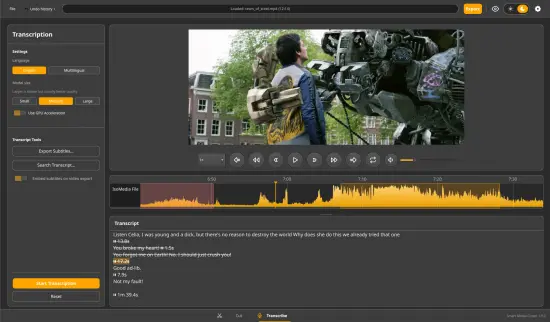
Smart Media Cutter Portable is a modern, AI‑assisted, linear video editor designed to let content creators quickly and precisely cut, trim, and restructure long video and audio files without degrading the original quality or spending hours re‑rendering. The software is built around a “smart‑cut” philosophy: instead of re‑encoding every frame of a multi‑hour recording, it surgically removes unwanted segments, only re‑encoding the brief sections around the cutpoints to stitch the timeline back together. This makes it especially attractive to YouTubers, podcasters, streamers, and video editors who need to prune long recordings into tight, publishable clips while preserving the look and feel of the original footage.
Core idea and main purpose
Smart Media Cutter positions itself as a lossless, transcription‑driven video‑and‑audio editor that turns tedious cutting tasks into something closer to text‑editing than traditional timeline work. The central idea is that:
-
Editing should focus on what is said, not how the timeline is cut.
-
Long recordings can be trimmed down in seconds, not in minutes or hours, because the software only touches the small GOP‑sized regions surrounding your cuts rather than the whole file.
-
The final output keeps the original codec, resolution, and bitstream integrity, so there is no extra generational loss from massive re‑rendering.
For practical use, Smart Media Cutter is aimed at:
-
Video creators who record long talking‑head or gameplay sessions and want to slice them into tight YouTube videos, Shorts, or TikTok clips.
-
Podcasters and audio‑first creators who need to remove pauses, filler words, or long silences from interview‑style audio.
-
Streamers managing multi‑hour live‑stream VODs and wanting to generate highlight reels quickly.
-
Team‑based editors who want to “mark” edits using transcripts first, then export a clean timeline to a professional NLE such as DaVinci Resolve or Premiere Pro.
In all of these roles, the software is less of a full‑on color‑grading or compositing suite and more of a precision scalpel for cleaning up and structuring existing media.
Lossless cutting and “smart‑cut” engine
The technical backbone of Smart Media Cutter is its lossless, smart‑cut engine, inspired by the “VideoReDo‑style” export approach. Instead of doing a full, frame‑by‑frame re‑encode every time you delete a segment, it:
-
Identifies keyframe boundaries (GOPs) in the video and only re‑encodes the small segments around where the cuts occur.
-
Preserves the untouched portions of the file, leaving their bitstream exactly as it was, so quality and file size do not degrade across large stretches of the video.
-
Works with a wide range of formats and codecs, letting you cut files that were recorded by cameras, phones, streaming software, or even imported from professional workflows.
For the user, this means:
-
A 3‑hour streaming recap can be trimmed into a 10‑minute highlight reel in a few seconds, rather than waiting for a long render.
-
You can experiment with multiple edit versions quickly, without the fear of “baking in” bad compression each time you export.
-
The final exported video feels like the original, with the same noise, color, and motion‑handling, because only the cut transition zones are re‑encoded.
This smart‑cut principle is particularly valuable for creators who work with high‑bitrate or high‑resolution files, where a full re‑render could be both slow and storage‑expensive.
Transcription‑based editing and AI‑powered workflows
One of the defining features of Smart Media Cutter Portable is its AI‑driven, transcription‑based editing model. The software can generate spoken‑word transcriptions from your video or audio, then let you edit the timeline as if it were a text document:
-
AI transcription engine (often using local Whisper‑style models) generates a time‑coded text transcript of the speech, with punctuation and word‑timing placed next to the visual timeline.
-
Editing‑from‑text lets you select sentences or phrases in the transcript and remove them, effectively deleting the corresponding audio‑and‑video segments in the timeline.
-
Multi‑track transcriptions support multiple speakers or tracks, so you can distinguish between different voices and choose which ones to keep or remove.
This approach is extremely efficient for:
-
Removing “ums,” “ahs,” coughs, or technical mistakes by simply deleting the words in the transcript rather than scrubbing through hours of footage.
-
Cleaning up long podcast conversations or interviews by deleting off‑topic tangents, without manually listening to every minute.
-
Preparing educational or tutorial content where you want to tighten the narrative by removing pauses or repeated explanations.
You can also automatically remove sections with no speech or silence, so the software can scan for long quiet gaps, stutters, or dead air and cut them out with minimal input from you.
Workflow and user interface
Smart Media Cutter is built around a linear, timeline‑plus‑transcript interface that feels lighter and faster than traditional NLEs but still structured enough for precise editing.
-
A central video preview shows the media, with a synced playback head that moves in lockstep with the transcript.
-
A transcript panel runs along the bottom or side of the screen, displaying the words spoken at each moment, often with speaker‑labeling or color‑coding.
-
A cut‑marker and timeline panel lets you place in/out points, splice regions, or define ranges visually, while still being able to jump to specific words or phrases by clicking the transcript.
The typical workflow looks like this:
-
You import a video or audio file (often very long: 1‑, 2‑, or even 3‑hour recordings).
-
The software runs an AI‑based transcription pass, generating a time‑coded text version of the speech.
-
You scan the transcript, either manually or by using automatic silence‑removal, and mark or delete sections you do not want.
-
Smart Media Cutter regenerates the timeline, taking out the unwanted segments while preserving the original quality of the remaining parts.
-
You can optionally export the edited timeline directly to a professional editor (such as DaVinci Resolve or Premiere Pro), so your cutting can be done quickly in Smart Media Cutter and then polished with color, effects, or music elsewhere.
This workflow is designed to shift the heavy lifting from manual scrubbing to text‑level editing, which is much faster for many content creators.
Vertical‑clip and social‑media export
Recognizing that a huge portion of modern video content ends up on platforms like YouTube Shorts, TikTok, or Instagram Reels, Smart Media Cutter includes built‑in tools for vertical‑format clipping:
-
You can convert a horizontal 16:9 video into a 9:16 vertical format, choosing where the camera “look‑at” point is and how the frame is cropped.
-
The software can generate multiple short‑clip variants from the same long source, each sized for different platforms, without needing to export the full source every time.
-
A cropping‑template tool lets you save preferred crop settings (for example, center‑focus, left‑third, or right‑third framing), so you can reuse the same framing rules across multiple videos.
This is especially useful for:
-
Turning long vlogs or tutorials into a series of short, vertical‑oriented clips for social‑media promotion.
-
Preparing quote‑cards or caption‑style edits that highlight specific phrases from the transcript, laid out in a vertical layout.
-
Creating “talking‑head‑over‑b‑roll” style edits where the person is framed in a vertical slice of the original video and the background or b‑roll fills the rest of the frame.
By baking in vertical‑oriented workflows, Smart Media Cutter reduces the extra steps otherwise required to reframe and export clips for each platform.
Audio‑focused tools and speech denoising
Because many of the target users work with long‑form spoken‑word content, Smart Media Cutter includes audio‑centric tools, even though it is fundamentally a video editor.
-
Multi‑track audio support lets you work with stereo or multi‑channel audio, separate microphone tracks, or commentator‑style mixer inputs, so you can edit one speaker without affecting the others.
-
An advanced speech‑denoiser uses neural‑network models to reduce background noise, hums, fan noise, or echo while preserving the clarity of the voice. This is extremely useful for:
-
Podcasts recorded in suboptimal environments.
-
Livestreams captured with low‑cost microphones or noisy rooms.
-
Phone‑recorded interviews that came through poor‑quality channels.
-
-
Silence and pause detection can automatically identify and flag or remove regions with no speech, helping you tighten the audio‑and‑video edit with a single click.
These audio tools make Smart Media Cutter viable not only as a visual editor but also as a light‑weight audio‑cleanup and podcast‑editing environment.
Export, NLE integration, and batch handling
Smart Media Cutter is designed to fit into modern editing pipelines, not exist in isolation. Its export and integration features include:
-
Fast export with minimal re‑encoding: the final file is generated in a matter of seconds, even for very long source files, because the software only re‑encodes the small regions around the cutpoints.
-
Direct export to other editors such as DaVinci Resolve or Adobe Premiere Pro, which lets you:
-
Do the bulk of the cutting in Smart Media Cutter, where the lossless, smart‑cut engine is fastest.
-
Export a timeline that preserves the edit points, so you can open the sequence in a more powerful NLE and continue adding effects, color grading, music, and graphics.
-
-
Batch‑style operations for multiple files or regions within a single file, so you can apply similar cuts or silence‑removal rules to several segments at once without re‑doing the work for each one.
These export options make the software a bridge between raw recording and professional post‑production, especially for creators who want speed on the cutting side and polish on the grading and effects side.
Privacy, local‑only processing, and freemium model
Another important aspect of Smart Media Cutter is its emphasis on privacy and local‑only processing. The software is generally designed to:
-
Generate transcriptions and process audio/video entirely on your local machine, without uploading your files to external servers.
-
Work with a generous free tier or freemium model, so that individual creators and small‑scale teams can use it without immediate licensing pressure.
-
Offer a portable version or lightweight install option, reducing the footprint on the system and making it easy to run from an external drive or shared workstation.
This local‑only, privacy‑oriented model is especially attractive for:
-
Creators who handle sensitive or personal content and do not want their footage leaving the local machine.
-
Teams that need to comply with internal data‑governance policies when editing interviews, corporate training videos, or internal communications.
-
Freelancers who work across multiple client projects and want to keep client materials entirely under their own control.
Use cases and target workflows
Smart Media Cutter excels in several high‑volume, repetitive workflows:
-
YouTube content creation: trimming long interview‑style videos, vlogs, or live‑stream recordings into tight, viewer‑friendly edits without re‑rendering everything.
-
Podcasting and audio‑first content: removing long pauses, repeated phrases, or technical glitches from multi‑hour recordings and exporting a clean, ready‑to‑upload episode.
-
Streamers and gamers: generating highlight reels from multi‑hour gameplay sessions by marking the best moments via text or simple markers.
-
Training and education: editing long lecture or tutorial recordings into shorter modules, lecture snippets, or promotional teasers.
-
Team‑based editing: using transcripts and AI‑assisted silence‑removal to pre‑edit footage before handing it off to a professional editor for final polish.
In all of these scenarios, the software shifts the bottleneck from “how long does it take to render the cut” to “how fast can I decide what to keep,” and that is usually where AI‑driven, text‑based editing is most effective.
Strengths and limitations
Like any specialized tool, Smart Media Cutter has clear strengths and some natural limitations.
Strengths include:
-
Lightning‑fast, lossless cutting that preserves the original quality and avoids long re‑rendering times.
-
AI‑powered transcription and speech‑aware editing, which lets you edit video like a text document and automatically remove silences or bad takes.
-
Multi‑track transcription and audio support, which is very useful for dialogues, interviews, and multi‑mic setups.
-
Vertical‑clipping tools and social‑media export, helping creators quickly generate ready‑made Shorts, Reels, or TikTok clips.
-
Local‑only, privacy‑centric design that keeps content on the user’s machine.
-
Export‑to‑NLE integration, so you can keep the heavy‑lifting cutting in Smart Media Cutter and export the refined timeline to more powerful editors.
Limitations typically include:
-
A focus on cutting and trimming rather than advanced effects, color grading, or compositing, so it is not a replacement for a full‑featured NLE.
-
Dependence on the accuracy of the AI transcription; if the speech is highly accented, noisy, or too soft, the transcript may be incomplete, forcing you to supplement with manual editing.
-
Potential platform‑specific quirks with certain codecs or containers, though the software is generally built to handle a wide range of formats.
These trade‑offs are acceptable for many users, because the software is not trying to do everything; it is trying to do a few things—cutting, trimming, silence removal, and transcript‑based editing—extremely well and very quickly.
Overall user experience and positioning
Smart Media Cutter positions itself as a high‑speed, AI‑assisted, linear video cutter that sits between the raw recording and the full‑blown editing environment. It is built for creators who value their time, who routinely deal with long, uncut video and audio, and who want to turn those into tight, professional‑quality edits without the overhead of traditional re‑rendering. The combination of lossless smart‑cutting, AI‑driven transcription, silence‑removal, and vertical‑video export creates a workflow that feels both powerful and intuitive once you adapt to the idea of editing video through text.
For YouTubers, podcasters, streamers, trainers, and small‑team editors, Smart Media Cutter offers a way to dramatically reduce the time spent on the most tedious part of the process—cutting and trimming—while still preserving the original quality and passing the final polish to more advanced tools. In an ecosystem crowded with general‑purpose editors, it stands out as a focused, efficient, and privacy‑aware utility that turns hours of raw footage into moments of sharp, ready‑to‑use content.
Release Notes:
Added "preferred" audio track mode to audio playback settings
Fixed issue where h264 smartcut outputs were sometimes not playing correctly in QuickTime
Fixed audio timeline being quite slow and buggy with trackpad
Fixed bitstream tab colors not showing correctly on all systems
Improved preview player speed and some quirks when hardware decoder is enabled