
Portable Sioni Windows Toolkit Pro 1.8.0 Multilingual
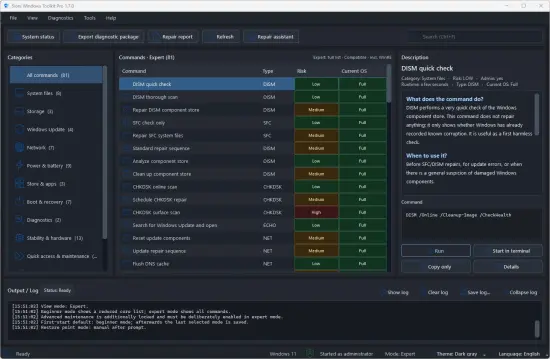
Sioni Windows Toolkit Pro Portable – Analyze, maintain and repair Windows with its own tools. The individual commands are divided into categories. Once you click on a command, you can read what it does on the right-hand side. The command itself is also displayed in the bottom right corner. Essentially, everything you need to solve a problem that Windows offers is there. And you save a lot of time compared to manually entering individual commands in PowerShell, for example, or sifting through tutorials for Windows 10 or Windows 11.
Another function is, for example, “System Status”. This displays a lot of information about the system, which is quite necessary for a first impression.
To avoid overwhelming users, the author has divided the individual functions into “Beginner Mode” with currently 49 functions and “Expert Mode” with currently 71 functions. Otherwise, the operation of the tool, now called ” Sioni Windows Toolkit Pro, ” remains the same. You have the option to select, and the respective descriptions of the functions and the sequence of the selected actions are displayed.
Sioni Windows Toolkit Pro is a local Windows toolkit for diagnostics, repair, maintenance, and system analysis. The app bundles many Windows-related checks, repair commands, and system tools into a clear and user-friendly interface.
Features at a glance:
– Local Windows toolkit for diagnostics, repair and maintenance
– Clear command catalog with 79 Windows-related diagnostic and repair points
– Beginner mode with a reduced, safe core list
– Expert mode for full functionality
– Additional safeguards for extended maintenance functions
– Clear risk indication per command
– Indication of whether administrator rights are required
– Compatibility indicator for the detected Windows version
– Detailed section with brief description, practical use, safety and precautionary information
– Execute, start in terminal, or just copy, depending on the command type.
– Repair assistant with guided diagnostic and repair steps
– System status including Windows, storage, update, BitLocker, protection, network and restart information
– Windows Update special page with update services, cache status and repair options
– Diagnostic package export for support and troubleshooting
– Repair report and meeting minutes
– Sioni performance check with Windows-like performance index
– History and comparison of saved performance checks
– Hardware stability check with cautious evaluation and clear limits
– History and comparison of saved stability checks
– Live system monitor for CPU, RAM, GPU/VRAM and storage
– Snapshot and CSV export in the live system monitor
– Diagnostic history with detailed view, comparison, JSON and CSV export
– Quick access to important Windows tools such as Task Manager, winver, Disk Cleanup, Device Manager and other system tools
– App self-test for catalog, release files, localization and important package components
– Local storage of settings, logs, history and reports
– Diagnostic packages without collecting personal documents
– Multilingual interface: German, English, French, Spanish, Italian and Portuguese
– Help/manual with function overview, diagnostic areas and complete command catalog
– Bright, classic Windows layout with clear navigation
Release Notes:
- Version 1.8.0 introduces, above all, new “Quick Fix” tools:
- reinitializing graphics; restarting audio, printing, and Windows Update services; Wi-Fi and network diagnostics; time synchronization; hardware redetection; and other handy Windows utilities.