

Portable S-IT BRC Backup Restore CleanUp 4.0
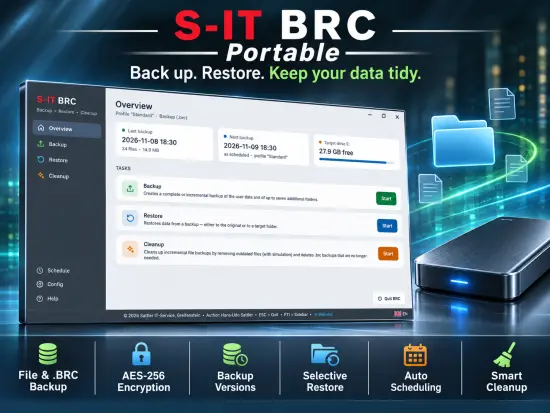
Protecting personal and professional data has become one of the most important aspects of modern computing. Documents, photos, videos, configuration files, and application settings often represent years of work and valuable memories. Losing such data because of hardware failure, accidental deletion, malware attacks, operating system corruption, or user error can be frustrating and costly. S-IT BRC Portable was created to address these challenges by providing an easy-to-use yet capable backup environment designed specifically for Windows users.
S-IT BRC Portable combines three essential functions in a single application: backup, restore, and cleanup. Instead of requiring separate tools for each task, it offers a centralized platform where users can protect important files, recover lost data, and manage older backups efficiently. This integrated approach simplifies data protection and makes regular backup routines more accessible to both home users and small business environments.
The software focuses on practicality and clarity. Rather than overwhelming users with complex enterprise-grade terminology, it presents backup operations through an intuitive workflow that helps users quickly create and manage backup profiles. This accessibility makes the application appealing to beginners while still providing advanced functionality that experienced users can appreciate.
Why Data Backup Matters More Than Ever
As digital lives continue to expand, the amount of important information stored on computers grows every year. Family photographs, financial records, educational materials, work projects, databases, software configurations, and cloud-synchronized files all require reliable protection.
While cloud services provide an additional layer of security, they do not completely eliminate the need for local backups. Accidental file synchronization, ransomware infections, account problems, or human mistakes can still lead to data loss. Having independent backup copies stored on external drives or other storage media remains one of the most effective strategies for long-term data safety.
S-IT BRC Portable addresses this need by offering an organized and automated backup solution that helps users maintain consistent protection without requiring extensive technical knowledge.
Modern Backup Architecture
One of the strongest aspects of S-IT BRC Portable is its flexible backup architecture. Users can configure backup profiles according to their specific needs and determine exactly what information should be protected.
The software supports common Windows user folders such as:
- Desktop
- Documents
- Pictures
- Music
- Videos
- Downloads
- Application data folders
In addition, users can include multiple custom directories. This flexibility ensures that virtually any important type of data can be included in a backup strategy.
Backup profiles make it easy to separate different categories of data. For example, users can create one profile for personal documents, another for multimedia files, and a third for work-related projects. This organization improves manageability and makes restoration processes much more efficient.
Two Backup Methods for Different Requirements
A notable feature of S-IT BRC Portable is the availability of multiple backup approaches.
The first method stores files individually within destination folders. This traditional backup style offers excellent transparency because every backed-up file remains directly accessible through Windows Explorer. Users can browse backup locations and open files without launching the software.
The second method creates a single backup container file. This approach helps maintain a cleaner backup structure and simplifies storage management. It can be especially beneficial when preserving large collections of files that would otherwise be distributed across thousands of folders and directories.
Having both methods available allows users to choose the strategy that best suits their workflow and storage preferences.
Secure Backup Protection with Encryption
Security is a critical part of any backup strategy, especially when storing sensitive information.
S-IT BRC Portable includes support for strong backup encryption, allowing users to secure backup archives using modern encryption technology. This feature helps ensure that unauthorized individuals cannot access protected data, even if they gain physical possession of the backup storage device.
Encrypted backups are particularly useful for:
- Personal documents
- Financial information
- Confidential business records
- Client data
- Academic research
- Sensitive project files
The availability of encryption makes the software suitable for users who require an additional security layer beyond standard backup functionality.
Backup Version Management
Managing multiple generations of backups is an essential component of reliable data protection.
S-IT BRC Portable allows users to maintain several backup versions for individual profiles. This capability helps protect against situations where data corruption or accidental modifications go unnoticed for an extended period.
Instead of relying solely on the latest backup copy, users can preserve historical backup versions and restore files from an earlier point in time when necessary.
Version management offers several important advantages:
- Recovery from accidental edits
- Protection against file corruption
- Defense against ransomware damage
- Access to historical project revisions
- Improved long-term data retention
By maintaining multiple backup generations, users gain additional flexibility when recovering information.
Efficient Restore Operations
Creating backups is only half of the data protection process. Equally important is the ability to restore data quickly and accurately when needed.
S-IT BRC Portable offers a dedicated restore environment that simplifies recovery operations. Users can locate backed-up files and restore them without unnecessary complexity.
The restoration system supports selective recovery, meaning users do not need to recover entire backup sets when only a few files are required. This saves time and reduces storage overhead during recovery operations.
Whether recovering a single document, an individual folder, or a larger data collection, the software provides a practical and streamlined process that helps minimize downtime.
Recovery of Individual Files and Folders
Many backup applications require users to extract complete backup archives before accessing individual files. S-IT BRC Portable improves efficiency by supporting targeted restoration operations.
This capability is especially valuable when:
- A specific file was accidentally deleted
- Only one folder needs recovery
- Earlier versions of a document are required
- Data must be restored to a different location
- A user wants to inspect backup contents before full restoration
Targeted restoration helps reduce unnecessary operations and accelerates access to important data.
Backup Verification for Improved Reliability
A backup is only useful if it can be restored successfully. For this reason, backup verification plays a major role in modern data protection strategies.
S-IT BRC Portable includes validation mechanisms designed to verify backup integrity. By checking stored data against verification information, users gain added confidence that backups remain usable and intact.
Regular verification provides several benefits:
- Detection of corrupted backups
- Improved trust in recovery operations
- Greater confidence during long-term storage
- Early identification of storage device problems
These verification capabilities help strengthen overall backup reliability.
Integrated Cleanup Functionality
As backup collections grow over time, storage consumption can increase significantly. Managing old backups manually often becomes tedious and inefficient.
S-IT BRC Portable addresses this challenge with an integrated cleanup module. The cleanup environment helps users identify outdated backups, unnecessary files, and obsolete data that may no longer be required.
This functionality contributes to:
- Better disk space utilization
- Simplified backup management
- Reduced storage waste
- Improved organization
By integrating cleanup functions directly into the application, the software eliminates the need for additional maintenance utilities.
Scheduling and Automation
Consistency is one of the most important characteristics of an effective backup strategy. Even the best backup software cannot protect data if backups are forgotten or performed irregularly.
S-IT BRC Portable includes scheduling capabilities that automate backup operations according to user-defined rules.
Automatic scheduling reduces administrative effort and helps ensure that backups are performed regularly without manual intervention.
Automation options support scenarios such as:
- Daily backups
- Weekly backups
- Monthly backups
- Interval-based execution
- Background operation
This flexibility allows users to design backup routines that match their individual requirements.
User-Friendly Interface Design
An intuitive interface can significantly influence the success of a backup application. Complex menus and confusing workflows often discourage users from maintaining consistent backup practices.
S-IT BRC Portable emphasizes accessibility through a clear design philosophy. Navigation is organized logically, allowing users to move between backup, restore, and cleanup functions without confusion.
The software’s modern layout supports efficient operation regardless of whether the user is creating a new profile, launching a backup, reviewing logs, or restoring files.
This emphasis on usability makes the application suitable for a wide range of skill levels.
Support for OneDrive-Based File Locations
Modern Windows installations increasingly rely on cloud synchronization technologies. In many cases, user folders are redirected to cloud-managed directories.
S-IT BRC Portable recognizes this reality and accommodates such environments by working with OneDrive-related folder structures. This ensures that important synchronized files remain included in backup operations, helping users maintain comprehensive protection across both local and cloud-integrated environments.
For users who depend heavily on Microsoft’s cloud ecosystem, this capability can be particularly valuable.
Advanced Progress Monitoring
Monitoring long-running backup operations is often important, especially when working with large data sets.
S-IT BRC Portable provides detailed feedback during backup execution. Progress indicators help users understand how much data has already been processed, how much remains, and how efficiently the operation is progressing.
Such visibility improves the user experience while providing reassurance that backup activities are proceeding as expected.
Multi-Language Accessibility
Software becomes more useful when it can serve users in their preferred language.
S-IT BRC Portable includes support for multiple languages, making the application accessible to a broader international audience. This multilingual approach improves usability and helps reduce the learning curve for users around the world.
The availability of localized interfaces demonstrates the developer’s commitment to making backup technology approachable and practical for diverse user groups.
Suitable for Home and Professional Use
The flexibility of S-IT BRC Portable allows it to adapt to many different environments.
Home users can take advantage of:
- Personal file protection
- Family photo backups
- Recovery from accidental deletion
- Protection against hardware failures
Professional users can benefit from:
- Structured backup profiles
- Automated scheduling
- Secure encrypted backup archives
- Recovery of business-critical files
- Efficient backup management
This versatility helps the software bridge the gap between basic consumer tools and more complex enterprise solutions.
Performance and Efficiency
Backup software should provide strong protection without consuming excessive system resources.
S-IT BRC Portable focuses on efficient processing while maintaining reliability and accuracy. Its design allows users to perform backup operations without significantly disrupting normal computer usage.
The software’s workflow is structured to maximize productivity while minimizing unnecessary complexity, making it practical for routine daily operation.
Long-Term Data Protection Strategy
A strong backup strategy involves more than simply copying files. It requires planning, organization, verification, retention management, and recovery preparedness.
S-IT BRC Portable supports these principles by combining multiple data protection functions into a unified environment. Users can create structured backup plans, automate execution, maintain historical versions, verify backup integrity, and perform targeted recoveries when necessary.
This comprehensive approach promotes long-term data resilience and reduces the likelihood of permanent information loss.
Conclusion
S-IT BRC Portable delivers a balanced combination of backup, restore, and cleanup functionality within a user-friendly Windows application. Its support for multiple backup methods, encrypted archives, backup verification, version retention, automation, selective restoration, and integrated maintenance tools creates a comprehensive environment for safeguarding important data.
Whether protecting personal documents, preserving family memories, managing work files, or maintaining organized backup archives, S-IT BRC Portable provides a practical and efficient solution. The software’s emphasis on simplicity, flexibility, and reliability makes it an appealing option for users seeking a capable backup utility that remains approachable while offering advanced functionality when needed.
Features at a Glance
- Backup, Restore, and Cleanup modules in one application
- Backup of common Windows user folders
- Support for custom folder selection
- Traditional file-based backup mode
- Single-file backup container support
- AES-256 backup encryption
- Multiple backup version retention
- Selective file and folder restoration
- Backup integrity verification
- Automated backup scheduling
- Background execution support
- Detailed progress tracking
- OneDrive-aware backup handling
- Searchable backup records
- Multi-language user interface
- Modern navigation layout
- Cleanup tools for outdated backups
- Support for local and external storage devices
- Flexible profile-based configuration
- Suitable for home and professional users
Release Notes:
- Added single-file backup format (.brc)
- Introduced AES-256 encryption support for backup archives
- Added backup version management and retention controls
- Implemented backup verification functionality
- Added selective restoration from backup archives
- Introduced backup registry and search capabilities
- Improved OneDrive folder detection and handling
- Added enhanced scheduling and automation options
- Introduced a completely redesigned user interface
- Added multiple language localizations
- Added integrated help system with illustrations
- Improved progress monitoring during large file operations
- Added support for portable deployment and easier migration
- General performance, usability, and stability improvements