
Portable RawTherapee 5.13 (x64) Multilingual
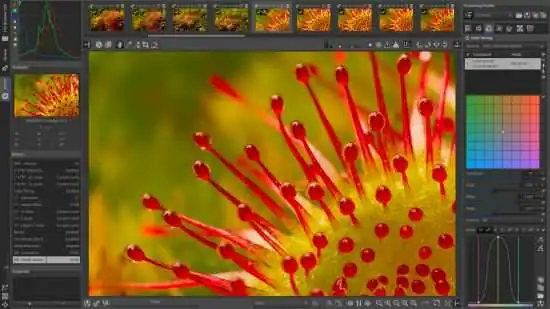
RawTherapee Portable is a powerful graphics editor with many features and options for photo processing, which supports, among other things, the RAW-format digital cameras. The program has a fairly rich image editing tool that makes it one of the best for professional photo processing, adequately competing with Lightroom application. Is there color correction, noise reduction, rotation, exposure control, the change of light and shadow, tone setting, vignetting, processing EXIF-data capture, crop, white balance, and much more. If you want to edit a large number of photos of a batch mode is provided.
Features:
– High Image Quality
* 96 bits (floating point) processing engine
* Non destructive editing
* Get the most details and least artifacts from your raw photos thanks to modern and traditional demosaicing algorithms: AMaZE, DCB, fast, AHD, EAHD, HPHD, IGV, LMMSE & VNG4.
* Advanced color handling from white balance to HSV (Hue-Saturation-Value) curves and color management.
* Powerful CIE Color Appearance Model 2002 (CIECAM02) module
* Enhanced exposure and tonality tools: tone and Lab curves, highlights and shadows tools, tone mapping (HDR-like effect), etc.
* Multiple denoising methods: luminance, chrominance (both rewritten in 2012), impulse (for salt and pepper noise) noise reduction.
* Several tools to enhance details: unsharp mask, RL deconvolution, contrast by detail levels.
– Efficiency
* Multi-threaded algorithms for high performance (RawTherapee can utilize modern processor features, like SSE).
* Quick thumbnails load lightning fast and are replaced later with live thumbnails.
* Batch processing: convert all the developed images at once without loading the processor while you work.
* Copy/paste editing parameters from one file to many other. Partially copying and/or pasting is also possible.
* Basic tools immediately at your hands.
* Parallel editing of multiple images in separate editor tabs, and/or all at once from the file browser.
* An optional secondary display can be used.
– Versatility
* Wide variety of supported cameras: almost all DSLRs and even some medium format bodies are supported.
* Can load DSLR’s raw file, as well as standard Jpeg, Png (8/16 bits), and Tiff files, (8/16 bits + 32 bits ‘logluv’ format) ; can write Jpeg, Png (8/16 bits) or Tiff files (8/16 bits)
* Advanced control over the algorithms with many fine-tuning parameters and curves.
* Can send to Gimp or the editing tool of your choice in one click (16 bits Tiff file).
* Command line usage besides the normal graphical interface.
* Various layouts: multiple tabs, single tab with filmstrip, vertical tab with filmstrip, dual monitor.
– Freedom for Free
* RawTherapee is free and open source software, meaning you can use it free of charge, wherever you like on whatever hardware you like, as long as you abide by the copyleft GPLv3 license. Download the source code, modify it, feel free to do what comes to mind. We believe in open software.
* It is cross-platform: Linux, Mac, or Windows, be it 32-bit or 64-bit – you pick, we provide.
* International: it is available in 25 languages!
Release Notes:
- The Gamut Compression tool received several enhancements:
- The maximum values for the distance limits has been increased.
- The distance limits can be set automatically.
- The tool now shows the maximum red, green, blue, and achromatic values, as well as the estimated distance ratio between the working and target color spaces.
- The Abstract Profile tool in Color Management received several enhancements:
- Highlight attenuation can be adjusted rather than simply being on or off.
- There is a new custom destination primaries option that allows changing the primaries by hue and saturation.
- The xy chromaticity diagram in the primaries adjustment shows the Rec2020 primaries for reference.
- The Color Appearance & Lighting tool received several enhancements.
- The Selective Editing’s Equalization & Pre-Tone Mapping (formerly Shadows/Highlights, Equalizer & GHS) tool has a new simple tone mapper called Michaelis-Menten.
- The Generalized Hyperbolic Stretch (GHS) method in Selective Editing’s Equalization & Pre-Tone Mapping (formerly Shadows/Highlights, Equalizer & GHS) tool received several enhancements:
- The Black point and White point can be set automatically.
- The Black point/White point section now shows the maximum red, green, and blue values and the dynamic range.
- There is now a choice of matrix conversions that affect the color handling.
- Several parameters can now be adjusted regardless of what the Stretch Factor (D) is set to.
- The Symmetry point shows a recommended value and can be set automatically.
- Middle gray, RGB maximum, and 3 sigma standard deviation are displayed.
- In Selective Editing’s Color Appearance tool, the Source Data Adjustments section has a new TRC based tone mapper with per-channel TRC adjustment and a color inversion option. The RGB channel slope tone mapper also received the color inversion option.
- The Blur/Grain & Denoise tool in Selective Editing received several enhancements:
- A new Recovery Based on Luminance Mask in Blur & Noise allows refining the blurred area.
- Denoise has new options to reduce denoising of details.
- Selective Editing’s Sharpening tool has a new Capture Deconvolution method which brings the benefits of Capture Sharpening to Selective Editing and works on both raw and non-raw images.
- The Crop tool guides has been revamped to allow multiple guides to be shown simultaneously, the guides’ color to be changed, alternative aspect ratios to be shown, and a bleed area to be set.
- The Lens / Geometry tool can scale images horizontally or vertically.
- The Capture Sharpening tool has a new Presharpening denoise option which can improve the sharpening result on noisy images by creating a better contrast mask.
- The File Browser can show color labels from XMPs embedded in image files.
- In the Queue’s Output Location template, a new “%e” format specifier is available which expands to the file extension of the output file (for example, “jpg” or “png”).
- HiDPI support is improved, most notably making the editor preview and thumbnails sharp.
- All profiles are now shown in the monitor profile selection in Preferences.
- Performance on ARM has been improved.
- All preferences can now be easily reset in Preferences.
- Adapted Olympus lens name detection is improved.
- Added new translations for Hebrew and Korean.
- Updated translations for Simplified Chinese, Dutch, and German.
- Added or improved support for cameras, raw formats, and color profiles (not an exhaustive list because unconfirmed support is excluded):
- Canon EOS M50 (white level)
- Canon EOS R5m2
- Canon EOS R6 Mark III (black level)
- Canon EOS R50 V (black level)
- Canon EOS R100 (white level)
- Canon PowerShot V1 (black level, white level)
- Fujifilm GFX 50S II (color matrix)
- Fujifilm GFX 50S II (color matrix)
- Fujifilm GFX 100 II (color matrix)
- Fujifilm X-M5 (color matrix, raw crop)
- Fujifilm X-T30 III (raw crop)
- Hasselblad CFV-100c (color matrix)
- Nikon Z5_2 (color matrix)
- Nikon Z50_2 (color matrix)
- Nikon Z f (white level)
- Olympus OM-3 (color matrix)
- Olympus OM-5MarkII (color matrix)
- Panasonic DC-G97 (color matrix)
- Panasonic DC-S1M2ES (raw crop)
- Panasonic DC-S1M2 (raw crop)
- Panasonic DC-S1RM2 (raw crop)
- Panasonic DC-S9 (raw crop)
- Samsung DNGs (black level, white level)
- Sony DSC-RX1RM3 (raw crop)
- Sony ILCE-1M2 (color matrix, raw crop)
- Sony ILCE-7M5 (black level, raw crop)
- Sony ILCE-6400A (color matrix