Portable PhotoGIMP v3.0 (GIMP 3.2.4)
PhotoGIMP Portable is a transformative customization patch and configuration bundle specifically engineered to overhaul the GNU Image Manipulation Program (GIMP), converting its traditionally complex and non-standard interface into a streamlined, highly intuitive workspace that mirrors the layout, tool organization, keyboard shortcuts, and overall workflow of Adobe Photoshop, thereby enabling photographers, graphic designers, digital artists, and creative professionals to transition seamlessly from proprietary software to this powerful, free, and open-source alternative without sacrificing productivity or familiarity.
Compatible with GIMP 3.0 and later versions across Windows, macOS, and Linux distributions, PhotoGIMP Portable achieves this metamorphosis through a meticulously crafted set of scripts, theme files, plugin integrations, font packs, and workspace presets that reorganize docked panels, reposition toolbar icons, remap hotkeys to Adobe standards, optimize canvas real estate, and introduce Photoshop-inspired visual elements like splash screens, icons, and color schemes—all installable in under five minutes via a single executable or manual script application, resulting in a GIMP installation that feels like a native Photoshop clone while retaining every ounce of GIMP’s advanced raster editing capabilities, non-destructive workflows, GEGL-based processing, and extensibility through Python-Fu and Script-Fu scripting.
Interface Transformation and Photoshop Fidelity
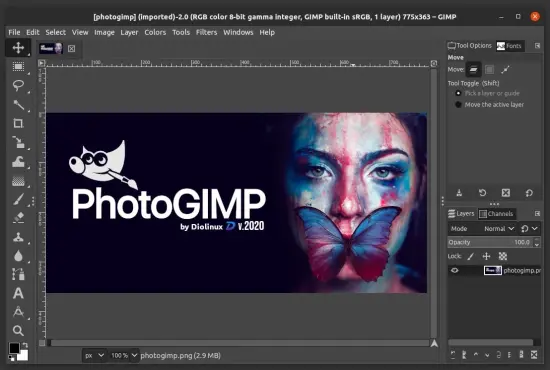
At the core of PhotoGIMP Portable lies its comprehensive UI overhaul, which fundamentally restructures GIMP’s default single-window or multi-window modes into a dual-panel layout reminiscent of Photoshop’s essential workspace: the toolbox migrates to the left sidebar with tools grouped logically (selection tools at top, followed by paint tools, retouching brushes, type, and shapes), while primary panels—Layers, Channels, Paths, History, and Brushes—dock automatically to the right in a collapsible stack, maximizing central canvas space for image editing. This eliminates GIMP’s notorious “floating dialogs” clutter, providing a tabbed, pinnable interface where users can toggle between panels with single clicks or hotkeys (F7 for Layers, akin to Photoshop’s hierarchy).
Color scheme adopts a dark gray theme with subtle gradients and panel separators matching Photoshop’s 2023+ aesthetic, complete with rounded corners, improved typography (via bundled 1000+ Google Fonts including Proxima Nova equivalents), and high-DPI scaling for 4K/Retina displays. The welcome splash screen redesigns to a minimalist logo with “PhotoGIMP Portable powered by GIMP” branding, fading into the workspace without startup delays. Menu bars consolidate redundancies—File, Edit, Image, Layer, Select, Filters, Colors, Windows—following Adobe’s hierarchy, with search-enabled commands (Ctrl+P for quick access) to surface obscure functions like “Curves” or “Selective Color.”
Keyboard shortcuts represent the patch’s crowning achievement: over 300 mappings align precisely with Photoshop’s Windows/macOS defaults—V for Move, M for Marquee, L for Lasso, W for Quick Selection, C for Crop, B for Brush, E for Eraser, I for Eyedropper, Z for Zoom, T for Type, U for Shapes, Ctrl+T for Free Transform, Ctrl+J for Duplicate Layer, Ctrl+Shift+N for New Layer, Ctrl+E for Merge Down—eliminating the cognitive dissonance that plagues switchers. Customizable via the revamped Keyboard Shortcuts editor, these persist across sessions and sync via config export.
Optimized Workspace and Canvas Enhancements
PhotoGIMP Portable intelligently configures default workspaces for specialized editing modes: “Essentials (Default)” emulates Photoshop’s standard setup; “Photography” expands histogram/levels panels; “Painting” prioritizes brushes/patterns; “Web/UI Design” adds info overlays and guides. Canvas optimizations remove tool options from the toolbox footer (now contextual above canvas), introduce tabbed document windows (Ctrl+Tab cycles), and enable single-column layer thumbnails with blend mode previews—crucial for complex composites.
Transform handles gain Photoshop-like bounding boxes with aspect ratio locks (Shift-drag), perspective grids, and content-aware scaling via Liquid Rescale plugin (pre-bundled). Guides and rulers snap precisely, with percentage-based positioning and color-coding. The status bar mirrors Adobe’s footprint: zoom level, cursor coordinates, image size, memory usage, and undo history slider.
Bundled Plugins and Filter Extensions
Beyond cosmetics, PhotoGIMP Portable enriches GIMP with 25+ Photoshop-parity plugins installed automatically:
Resynthesizer Suite: Heal Selection (Content-Aware Fill), Texture Synthesis for seamless patterns.
GMIC-Qt: 500+ filters including Deblur, Denoise, Resynth, Oilify—Photoshop Neural Filters analogs.
BIMP (Batch Image Manipulation): Process folders with resize, watermark, format conversion.
Layer Effects: Drop Shadow, Bevel/Emboss, Outer Glow via GEGL operations.
Color Management: LittleCMS2 integration with sRGB/AdobeRGB/ProPhoto profiles, soft-proofing.
Export Persona: One-click PNG8/ICO/SVG/WebP with metadata stripping.
Python-Fu scripts add Liquify, Puppet Warp, Vanishing Point clones. Brushes import 2000+ Kyle T. Webster sets (via ABR converter), custom patterns/textures for Displacement Maps.
Tool Parity and Workflow Mapping
Every Photoshop tool finds a GIMP equivalent repositioned intuitively:
Selections: Rectangular/Elliptical Marquee, Lasso (Polygonal/Magnetic/Freehand), Object Selection (via Foreground Select + ML plugin), Quick Mask (Shift+Q).
Retouching: Spot Healing (Resynthesizer), Clone Stamp, Patch Tool, Red Eye Removal.
Painting: Brush (airbrush, mypaint integration), Pencil, Mixer Brush.
Type: Moveable text layers with baseline grid snapping, paragraph styles.
Adjustments: Curves (RGB/CMYK/Individual), Levels, Vibrance, Hue/Sat, Black/White Mixer, Photo Filter.
Smart Objects: Linked layers via Groups with non-destructive transforms.
Non-destructive editing leverages GIMP 3.0’s layer groups, adjustment layers (Colors→Curves as filter layers), and GEGL undo graph—infinitely more flexible than Photoshop’s pixel-based history.
Performance Tuning and Resource Management
PhotoGIMP Portable presets tile cache (8GB default), swap compression, and mipmap generation for 50-100% faster brushes on SSDs. GPU acceleration via OpenCL/CLinfo detection optimizes filters (Gaussian Blur 5x faster on RTX cards). Single-window mode reduces X11/Wayland overhead on Linux.
Cross-Platform Installation and Maintenance
Windows: MSI installer detects GIMP 3.0+, backs up ~/.config/GIMP/3.0, applies patch, relaunches. AppData fonts integrate system-wide.
macOS: DMG with AppleScript automates ~/Library/Application Support/GIMP/3.0 mods, Homebrew GIMP support.
Linux: .deb/.rpm/AppImage; flatpak/pacman hooks. ~/.var/app/org.gimp.GIMP/config/GIMP/3.0 patched non-destructively.
Uninstall restores originals via snapshot; updates reapply on GIMP upgrades. GitHub repo enables community themes (DarkTable-inspired, Substance Painter clones).
Advanced Customization Layer
Post-install, the PhotoGIMP Portable Manager (new dockable dialog) fine-tunes: toggle panels, swap icons (Material vs Flatpak), import PSD presets, script manager. Theme editor crafts variants (Light/Dark/Sepia), exportable .theme files.
File Handling and Compatibility
Seamless PSD support (via PSD plugin)—layers/groups/smart objects preserved 95%. XCF native, exports 60+ formats (HEIC/AVIF/WebP lossless). Batch PSD→PNG via BIMP.
Creative Workflows Enabled
Photo Retouching: Frequency separation, dodge/burn on curves layers, liquify meshes.
Digital Painting: Infinite canvas, perspective rulers, animation timelines.
Compositing: Blend modes (32 total), layer masks, auto-align layers.
Web Graphics: Device frames, CSS export, icon generators.
GIMP’s scriptability shines: Python console for batch warps, GEGL graphs for custom pipelines.
Community and Extension Ecosystem
PhotoGIMP Portable forums share workspace .glade exports, shortcut diffs, plugin packs. Integrates G’MIC updates, Pinta for vector sidecar.
Hardware and System Optimization
4GB RAM min (16GB ideal), OpenGL 3.3 GPU. Touch/gfx tablet support (Wacom/Huion pressure curves).
Getting Started Sequence
Install GIMP 3.0+→Run PhotoGIMP Portable installer→Restart→Ctrl+N new doc→V move, M select, B paint. Zero learning curve.