Portable Patchy Photo Editor 1.23
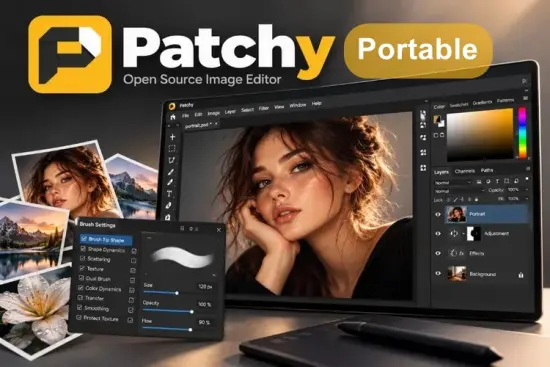
Patchy Portable is a powerful open-source image editing application designed to provide creators, designers, photographers, digital artists, and content producers with a highly capable environment for working with layered image files. Developed with a strong emphasis on PSD compatibility and Photoshop-style workflows, the software aims to make advanced image editing more accessible without compromising professional functionality.
In a market filled with image editors that often struggle to accurately interpret complex layered files, Patchy Portable stands out by focusing on preserving editable content. Rather than simply importing flattened artwork, the software is designed to maintain the structure of sophisticated projects, including layers, masks, text elements, vector information, layer styles, and Smart Objects whenever supported.
The result is an editing experience that feels familiar to users transitioning from commercial design applications while remaining lightweight, open, and community-driven. Whether users need to adjust marketing materials, create digital illustrations, edit website graphics, design user interfaces, or prepare visual assets for publication, Patchy Portable offers a flexible workspace capable of handling demanding creative projects.
Its growing popularity among graphic designers and open-source enthusiasts reflects the increasing demand for professional-grade alternatives that respect user freedom while delivering modern capabilities. The software continues to evolve rapidly with frequent updates, introducing workflow refinements, compatibility improvements, and new editing tools that enhance both productivity and creative expression.
Why Patchy Portable Is Different from Traditional Image Editors
Many image editing applications concentrate primarily on raster manipulation. While these programs may offer extensive effects and filters, they often struggle when tasked with opening complicated PSD documents created in professional environments.
Patchy Portable was built with a different philosophy.
Instead of treating PSD support as a secondary feature, the application places compatibility at the center of its design. This means users can work with files that contain multiple layers, text elements, vector shapes, masks, effects, and other advanced structures without immediately losing editability.
This approach makes the software particularly attractive for:
- Graphic designers collaborating across different platforms
- Marketing agencies working with PSD assets
- Freelancers receiving client files
- Content creators editing layered projects
- Students learning professional design workflows
- Open-source advocates seeking creative freedom
Because of this strong focus on compatibility, users spend less time rebuilding imported projects and more time refining the actual content.
Professional PSD Workflow Support
One of the strongest aspects of Patchy Portable is its dedication to preserving complex document structures.
Professional designers frequently work with layered compositions that contain dozens or even hundreds of individual elements. Maintaining those layers is essential for non-destructive editing. According to the project’s description, Patchy Portable focuses on keeping text, vectors, masks, layer styles, and Smart Objects editable when handling layered Photoshop files.
This capability creates several advantages:
Easier Collaboration
Designers working with colleagues or clients can open PSD-based projects without immediately flattening important content.
Better Revision Management
Editable layers allow modifications at any stage of the creative process, reducing the need for complete redesigns.
Improved Asset Reusability
Individual elements can be extracted, adjusted, or repurposed for future projects.
Reduced Workflow Disruptions
Users can remain focused on creative work rather than spending hours correcting import issues.
For professionals handling design assets daily, these benefits can significantly improve productivity.
Clean and Familiar User Interface
A major challenge faced by many advanced image editors is balancing powerful functionality with usability. Patchy Portable addresses this by implementing workflows that feel familiar to users experienced with mainstream graphics software.
The interface is organized around common design concepts such as:
- Layer management
- Tool palettes
- Document workspaces
- Property panels
- Visual previews
- Customizable controls
This familiar structure reduces the learning curve and enables creators to become productive quickly.
Beginners appreciate the logical arrangement of tools, while advanced users benefit from efficient access to frequently used functions. The layout encourages experimentation and creative exploration without overwhelming the workspace with unnecessary complexity.
Advanced Layer-Based Editing Environment
Layers remain one of the most important components of modern image editing.
Patchy Portable provides a sophisticated layer-based workflow that allows users to organize content efficiently while maintaining complete editing flexibility.
Using layers enables creators to:
- Separate design components
- Manage backgrounds independently
- Isolate text elements
- Apply effects selectively
- Create composite artwork
- Build non-destructive editing pipelines
Recent development updates have enhanced the layer management system with customization options and improved thumbnail presentation, helping users navigate complex projects more effectively.
This attention to layer organization makes the software suitable for both simple graphics and highly detailed compositions.
Powerful Text Editing Capabilities
Text handling is often a critical requirement in design projects.
Marketing materials, banners, social media graphics, website assets, posters, and advertisements all rely heavily on typography. Patchy Portable includes support for editable text structures and continues to improve text rendering compatibility within imported documents.
Users can benefit from:
- Editable text layers
- Typography adjustments
- Multi-layer text projects
- Layout flexibility
- Improved document fidelity
- Better compatibility with imported files
Rather than forcing designers to recreate textual content after import, the application focuses on preserving editability whenever possible.
This capability is particularly valuable in environments where frequent text updates are required.
Creative Tools for Digital Artists
Patchy Portable is not limited to traditional graphic design. It also offers valuable features for illustration and digital painting.
Recent versions have introduced major improvements to brush functionality, including enhanced brush dynamics, preview systems, overlay options, filtering tools, and configurable brush settings.
Artists can use these capabilities to create:
- Digital paintings
- Concept art
- Character designs
- Sketches
- Matte paintings
- Texture artwork
- Social media illustrations
The brush system offers flexibility for both subtle detail work and expressive artistic creation.
By allowing users to customize brush behavior, the software supports a wide range of creative styles.
Non-Destructive Editing Advantages
Modern design workflows increasingly depend on non-destructive editing methods.
Patchy Portable helps support this philosophy through editable layers, masks, styles, and structured content.
Non-destructive workflows provide several important benefits:
- Original content remains intact
- Changes can be reversed easily
- Experimentation becomes safer
- Revision requests are easier to manage
- Multiple variations can be created quickly
These advantages reduce production risks and encourage greater creative freedom.
Designers can explore multiple ideas without worrying about permanently damaging source materials.
Cross-Platform Flexibility
One of the most appealing aspects of Patchy Portable is its availability across multiple environments.
The project is described as a free and open-source image editor available for Windows, macOS, Linux, and even browser-based usage.
This cross-platform approach offers important benefits:
- Consistent workflows across devices
- Easier collaboration
- Greater accessibility
- Reduced software restrictions
- Flexible deployment options
Creative professionals frequently work in mixed operating system environments. Having access to the same editing platform across different systems helps maintain workflow continuity.
Open-Source Development Model
The open-source nature of Patchy Portable contributes significantly to its appeal.
Unlike closed ecosystems that depend entirely on corporate development decisions, open-source projects encourage transparency and community involvement.
Benefits include:
- Public development visibility
- Community feedback
- Faster innovation cycles
- Greater customization potential
- Long-term accessibility
- User-focused improvements
As the project continues to expand, contributors and users help shape its future direction, encouraging rapid progression and feature enhancement.
Image Editing and Design Applications
Patchy Portable can be used in numerous professional and creative scenarios.
Graphic Design
Create logos, advertisements, banners, and brand assets.
Content Creation
Develop graphics for videos, blogs, podcasts, and social networks.
Web Design
Produce interface elements, mockups, and website graphics.
Photography
Enhance compositions, manage layers, and prepare visual assets.
Illustration
Design artwork using advanced brush tools and layered workflows.
Educational Purposes
Learn image editing concepts through a professional-quality platform.
Its wide applicability makes it useful for individuals, educational institutions, creative agencies, and businesses alike.
Performance and Workflow Efficiency
Productivity is a crucial factor in professional image editing.
Patchy Portable focuses on delivering a streamlined editing experience that minimizes friction between ideas and execution.
Several workflow-oriented enhancements introduced in recent versions target:
- Improved tool accessibility
- Better panel management
- Enhanced brush controls
- Refined interface organization
- More efficient navigation
- Improved preview systems
These ongoing refinements contribute to a smoother user experience and allow creators to spend more time producing content rather than managing software limitations.
Modern Features for Contemporary Creators
Digital design continues to evolve, and creative tools must evolve with it.
Patchy Portable demonstrates a commitment to modern workflows by continuously expanding its capabilities.
Recent improvements include areas such as:
- Advanced brush dynamics
- Improved clone and healing tools
- Customizable layer panels
- Animation preview enhancements
- Better GIMP file compatibility
- Expanded color handling
- Improved text processing
- User interface refinements
These developments show active investment in both functionality and usability.
Rather than remaining static, the software continues to mature through frequent development cycles.
Compatibility with Complex Creative Projects
Creative professionals often encounter files generated by different tools and platforms.
Patchy Portable is designed to help bridge those environments by emphasizing compatibility and editability.
The software supports workflows involving:
- Layered design files
- Multi-element compositions
- Advanced typography
- Masks and effects
- Vector-based components
- Large creative projects
This versatility allows users to consolidate work inside a single application rather than relying on multiple tools to complete a project.
Ideal Users for Patchy Portable
Patchy Portable serves a broad spectrum of creative users.
Freelance Designers
Handle client PSD files without expensive subscription requirements.
Agencies
Maintain collaborative workflows across multiple projects.
Illustrators
Take advantage of customizable brush systems and layer-based editing.
Students
Learn industry-standard design concepts within a modern environment.
Content Creators
Produce graphics for websites, video platforms, and social media.
Open-Source Enthusiasts
Support transparent, community-driven software development.
Because the software balances professional functionality with accessibility, it appeals to both newcomers and experienced designers.
Future Potential and Ongoing Development
One of the most exciting aspects of Patchy Portable is its active development pace.
Recent release activity demonstrates continual enhancements to functionality, usability, PSD accuracy, interface design, brush systems, animation handling, and compatibility improvements.
This rapid evolution suggests strong future potential.
As additional features are introduced and existing tools continue to mature, Patchy Portable is positioned to become an increasingly attractive solution for creators seeking a capable open-source image editor.
Its emphasis on editable PSD workflows addresses a longstanding challenge within the creative software landscape and helps establish the application as a compelling alternative for users who require professional compatibility.
Conclusion
Patchy Portable represents a modern vision for open-source image editing. By placing PSD compatibility at the center of its design philosophy, the software provides creators with a practical solution for handling layered creative projects while preserving editability and workflow flexibility.
Its combination of advanced layer management, text handling, brush customization, cross-platform availability, non-destructive editing support, and ongoing development makes it suitable for a remarkably wide audience. From professional designers and digital artists to content creators and students, users can benefit from a capable editing environment that continues to grow with every release.
As the project evolves, Patchy Portable is becoming increasingly attractive for anyone seeking a powerful, open, and feature-rich image editing platform capable of supporting modern creative production workflows.
Features at a Glance
- Open-source image editing platform
- Strong focus on PSD compatibility
- Preserves editable text layers
- Supports vector elements
- Layer mask handling
- Layer style support
- Smart Object compatibility
- Advanced layer-based workflow
- Customizable brush dynamics
- Clone and healing tools
- Animation preview functionality
- Improved GIMP file compatibility
- Cross-platform availability
- Windows support
- macOS support
- Linux support
- Browser-based availability
- Non-destructive editing workflows
- Customizable interface components
- Enhanced typography handling
- Advanced color management improvements
- Community-driven development
- Frequent feature updates
- Suitable for graphic design projects
- Digital painting and illustration support
- Professional document editing capabilities
Release Notes:
- Adjustments: Image > Adjustments > Black & White (Ctrl+Shift+Alt+B) has hue chips, a reading of how much of the image each slider acts on, a tint with Hue and Saturation, and 21 presets with thumbnails in Neutral and Tinted sections; Vibrance, Exposure, Channel Mixer, Photo Filter, Gradient Map, Selective Color and Color Lookup now apply directly from Image > Adjustments
- Shapes and paths: 878 custom shapes from game-icons.net ship built in, loaded on first use, with arrows and signs in Arrows and Symbols and cards and dice in Games; polygons stay live, path components get W, H, X and Y fields and live rows, Combine Shapes has menus, and a click picks a work path among shapes
- Edit > Fill opens a Fill dialog with Contents, Mode, Opacity and Preserve Transparency, on Shift+Backspace and Shift+F5
- Shortcuts: Shift+[ and Shift+] step brush hardness, the digit keys set layer opacity, / locks transparent pixels and Shift+Alt+letter sets the blend mode, on Photoshop’s keys
- Brushes: one center cross at every size, and Show Outline off shows that cross instead of the system crosshair; Show Overlay matches the painted pixels down to 1 px, drag strokes center on the pointer and a Soft Square tip paints square; the tip chooser gives names the whole cell in smaller text on up to two lines, with the full name in the tooltip, and seeded tips and patterns are no longer added twice on a fresh profile ; Import Brushes opens in the folder it showed last
- Move and layers: a Move drag inside a selection moves the selected pixels on their layer, with Auto-Select on or off ; Ctrl over a layer or channel thumbnail shows add, subtract and intersect badges, and Channels rows combine selections with Shift and Alt Merge Visible works on a single visible layer that has a mask, style, text, shape or other content to apply
- Interface: the Layer Style dialog drags smaller than its tallest page and scrolls, and remembers its size the Properties panel’s divider drags it taller and its info rows wrap; combo boxes in Preferences and Customize Tool Palette are at least 90 px wide and Customize Tool Palette names its tab Layers Panel ; the Filter Gallery list no longer scrolls sideways
- Files: transparent flat images open as a plain transparent layer, and a Preferences option keeps the old layer mask