Portable HandBrake 1.11.2 (x64) Multilingual
After more than 13 years of development, the HandBrake Team is delighted to present HandBrake v1. Thank you to all of our many contributors over the years for making HandBrake what it is today. HandBrake is a tool for converting video from nearly any format to a selection of modern, widely supported codecs. HandBrake portable is a multiplatform, multithreaded video transcoder. Supported sources: Any DVD-like source: VIDEO_TS folder, DVD image or real DVD, and some .VOB and .TS files, Blu-ray source,
Most any multimedia file it can get libavformat to read and libavcodec to decode. Outputs: File format: MP4, MKV, Video: MPEG-4, H.264, or Theora (1 or 2 passes or constant quantizer/rate encoding), Audio: AAC, MP3, Vorbis or AC-3 pass-through (supports encoding of several audio tracks), Switchable or burned in subtitles and much more!
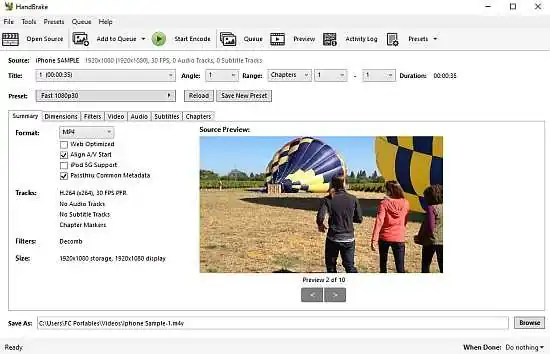
The interface of the application is standard and both beginners and experienced individuals can easily get accustomed to this program.
You can import a DVD folder or video file by using the file browser or the “drag and drop” method. Then, you can select the title and chapters, preset, output format destination, as well as configure settings before initiating the encoding process. I recommend using the included Presets if you lack the needed advanced knowledge.
You can apply many video filters (grayscale, detelecine, decomb, deinterlace, denoise, deblock), as well as set the video codec (H.264, H.265, MPEG-4, MPEG-2, VP8, Theora) framerate and quality, audio codec (AAC, HE-AAC, MP3, AC3, OGG), mixdown, sample frequency rate and bitrate.
Also, you can add, remove or import subtitles (SRT format only) and enable the “Forced Only”, “Burned In” and “Default” options, create chapter markers and import/export a CSV file.
When it comes to advanced options, you can select the encoding method (e.g. reference frames), psychovisual, analysis (e.g. “Adaptive Direct Mode”), partition type, deblocking, and others.
Additionally, you can preview results, create a task list (i.e. batch conversions), import and export presets, configure program settings, and more.
The program uses a moderate amount of system resources, takes a long time to complete a task but manages to keep very good image and sound quality. There’s also an online user guide available.
Built-in Device Presets:
Get started with HandBrake in seconds by choosing a profile optimised for your device, or choose a universal profile for standard or high quality conversions. Simple, easy, fast. For those that want more choice, tweak many basic and advanced options to improve your encodes.
Supported Input Sources:
Handbrake can process most common multimedia files and any DVD or BluRay sources that do not contain any kind of copy protection.
Outputs:
- File Containers: .MP4(.M4V) and .MKV
- Video Encoders: H.265 (x265 and QuickSync), H.264(x264 and QuickSync), H.265 MPEG-4 and MPEG-2, VP8 and Theora
- Audio Encoders: AAC / HE-AAC, MP3, Flac, AC3, or Vorbis
- Audio Pass-thru: AC-3, E-AC3, DTS, DTS-HD, TrueHD, AAC and MP3 tracks
Even more features:
- Title / chapter and range selection
- Batch Scan and Queueing of encodes
- Chapter Markers
- Subtitles (VobSub, Closed Captions CEA-608, SSA, SRT)
- Constant Quality or Average Bitrate Video Encoding
- Support for VFR, CFR and VFR
- Video Filters: Deinterlacing, Decomb, Denoise, Detelecine, Deblock, Grayscale, Cropping and scaling
- Live Video Preview
Release Notes:
All platforms
Video
- Fixed a crash that happened when doing a 2-pass lossless x265 encode
- Fixed a memory leak that happened when doing a 2-pass MPEG-4/MPEG-2/VP9/FFV1 encode
Audio
- Updated the list of supported dithers and encoders combinations
- Fixed the Core Audio AAC encoder 7.1 channel layout
Subtitles
- Fixed the VobSub palette creation in the MP4 container
Build system
- Improved build system compatibility with older build tools
Third-party libraries
- Updated libraries
- FFmpeg 8.0.2 (decoding and filters)
- SVT-AV1 4.1.0 (AV1 video encoding)
Windows
- Improved handling of unsupported presets
- Improved queue low space pause behaviour
- Fixed the automatic audio track name generation
- Fixed the summary description of HDR video