
Portable Glow v26.9 Multilingual
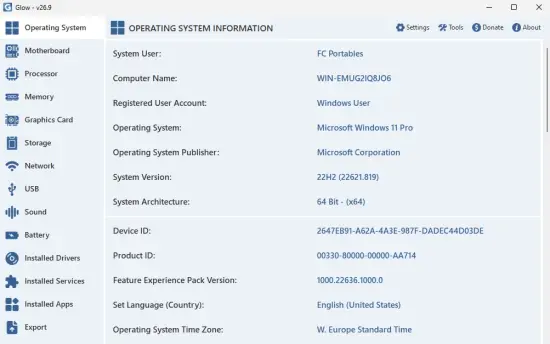
Glow Portable provides detailed information about the operating system, hardware components, and various system settings. The tool can come in handy for anyone looking to learn specific information about their computer’s configuration, whether it’s for upgrading hardware, troubleshooting or simple curiosity.
The app doesn’t require installation, so decompress the archive, launch the executable and you can view various info related to your computer. The interface consists of a single dashboard-window with tabs to the left side where you can easily access the desired category.
As previously mentioned, the idea behind the tool is to provide detailed information about various system components. This includes information about the OS, motherboard, processor, memory, graphic card, storage, network, battery, installed drivers, and services. The information is presented in a well-organized and easy-to-read format, allowing you to quickly find the information you need.
It can generate a complete system report. Glow allows you to export all the gathered information to a plain text file, which can be useful in a number of scenarios. For example, if you need to share system information with others, you can export a report and send it to them. This can be helpful when troubleshooting issues with a technical support team or when collaborating with colleagues on a project that requires specific hardware and software configurations.
Features:
Operating System
Lists advanced and in-depth details such as device ID, product key, installation type, and user information, which are often unavailable in standard system tools.
Motherboard
Analyzes the manufacturer, model, BIOS/UEFI version, serial number, and chipset details to display your motherboard’s hardware infrastructure thoroughly.
Processor
Details technical data including model architecture, physical and logical core counts, real-time frequency (GHz), cache sizes, and instant CPU load. Fully compatible with Intel, AMD, Apple M series, and Snapdragon processors.
Memory
Provides dynamically updated module information such as RAM capacity, frequency, operating voltage, slot layout, manufacturer, and serial numbers. Clearly displays total and available memory amounts.
Graphics Card
Lists the model, manufacturer, VRAM, driver version, and operational status of both active and dedicated graphics cards, alongside technical details of connected monitors. Displays total and available VRAM, and detects NVIDIA G-SYNC and AMD FreeSync compatible monitors.
Storage
Provides comprehensive reports on SSD, NVMe, and HDD drives, including capacity, health status, file system, interface type, and partition details. Also displays used disk space and BitLocker status.
Network
Offers technical profiles of Wi-Fi, Ethernet, Bluetooth, and virtual network adapters, detailing MAC/IP addresses, connection speeds, and real-time network status. Detects IPv4/IPv6 DNS addresses, VPN/tunneling solutions.
USB
Allows real-time monitoring of all connected USB controllers, port statuses, hardware IDs, and operational modes of attached devices.
Sound
Details driver configurations and active operational statuses of sound cards, digital mixers, and connected microphones or speakers.
Battery
Analyzes and reports battery health, design capacity, instant voltage, and wear level specifically for laptops.
Installed Drivers
Lists the operational status, startup types, and compatibility modes of all registered hardware drivers, making troubleshooting easier.
Installed Services
Displays the real-time status and startup types of active and passive background Windows services to assist in system diagnosis.
Installed Applications
Lists all software and update packages on the system in a single screen, including hidden components not visible in Windows Settings or Control Panel.
Export
Speeds up technical support processes by exporting all analyzed system data into TXT, HTML, or Markdown report formats.
Hiding Mode
Censors sensitive data like usernames, serial numbers, and device IDs within the interface and reports, allowing you to share information safely in communities.
Tools
Offers performance utilities like processor benchmarks, dead pixel/monitor tests, and internet speed tests, alongside system cleaning and optimization modules. Includes useful tools such as DISM/SFC repair tool, memory test tool, Wi-Fi password viewer, and Bluetooth information tool.
Data Security
With a privacy-first approach, it never transmits any data—including telemetry—to external servers; all analyses and processes are performed entirely locally on your PC.
Smart Update System
Thanks to its built-in update system, new versions are automatically detected and can be easily updated from within the application. When a new version is released, you receive a notification and can start the update with a single click.
Multi-Theme System
Provides modern Light and Dark theme options based on user preference. It synchronizes seamlessly with the Windows system theme to minimize eye strain.
Multi-Language System
Features an extensive language library designed for a global user base.