Portable Glary Absolute Uninstaller 6.0.1.28 Multilingual
Managing installed applications on a modern operating system is often more complicated than it appears. While most software comes equipped with a native uninstallation script, these built-in routines rarely do a thorough job. They frequently leave behind orphan files, empty installation folders, cached data, and hundreds of redundant registry keys that gradually degrade system performance. Over time, this digital debris accumulates, leading to fragmented storage drives, slower boot times, and unpredictable system conflicts. Glary Absolute Uninstaller Portable serves as a robust, specialized solution designed to replace the standard, often inefficient Windows Add/Remove
Programs applet with a highly optimized, deep-cleaning uninstallation engine.
Engineered to cater to both casual users seeking a cleaner machine and system administrators managing multiple deployments, this utility prioritizes thoroughness and speed. By focusing heavily on the post-uninstallation cleanup phase, it ensures that when an application is removed, every trace of its existence is wiped from the storage architecture and system registry. The portability factor further elevates its utility, transforming it into a versatile tool that can be deployed instantly from a flash drive without requiring its own complex setup routine.
The Growing Challenge of Software Accumulation and Leftover Data
Every time software is introduced to an operating system, it weaves itself deeply into the environment. It modifies critical system configurations, registers dynamic link libraries (DLLs), creates user profile directories within hidden metadata folders, and sets up scheduled tasks or background services. Ideally, removing the application should reverse all of these actions. However, standard uninstallers are notorious for completing only a fraction of this reversal. Developers often focus heavily on the installation and runtime stability of their products, leaving the uninstallation routines as an afterthought.
When these incomplete routines execute, they typically remove the primary executable and core program files but leave behind user preferences, logs, update histories, and sprawling registry hierarchies. This clutter has several negative consequences:
Storage Degradation: Mechanical hard drives become highly fragmented due to thousands of scattered tiny files, while solid-state drives (SSDs) lose valuable blocks of storage to useless cached data.
Registry Bloat: The Windows Registry is a centralized database that the operating system references constantly. When it becomes bloated with thousands of invalid paths and broken references from dead software, the OS takes longer to parse data, resulting in micro-stutters and slower system response times.
System Vulnerabilities and Conflicts: Leftover background drivers or context menu extensions can conflict with newly installed software, leading to system instability, application crashes, or the infamous Blue Screen of Death (BSOD).
Glary Absolute Uninstaller Portable directly addresses these issues by treating the native uninstaller merely as the initial step of a much more comprehensive, multi-layered eradication process.
Core Architecture and Deep Scan Technology Explained
At the heart of Glary Absolute Uninstaller Portable is an advanced post-uninstall scanning engine that operates independently of the application being removed. When a user initiates the removal of a program, the utility first calls upon the software’s native uninstaller to handle the surface-level removal of core files. As soon as that process concludes, the deep-scanning phase begins immediately.
The software scans the entire file system, specifically targeting directories notorious for hiding residual data, including AppData, ProgramData, local documents folders, and temporary system repositories. Concurrently, it performs a high-speed, algorithmic pass through the Windows Registry. It searches for keys associated with the application’s developer name, product GUID (Globally Unique Identifier), context menu integrations, file associations, and startup configurations.
Before any deletion occurs, the software presents a detailed, transparent breakdown of these leftover items, giving the user total oversight. This dual-action approach—combining standard removal with an aggressive forensic scan—guarantees that the underlying system remains as pristine as it was before the target software was ever installed.
Unmatched Efficiency with Batch Uninstallation Modes
One of the most significant bottlenecks when using the native Windows uninstallation interface is its strictly sequential nature. Users must select a program, click uninstall, wait for the wizard to complete, close the wizard, and then repeat the entire sequence for the next application. If you are cleaning up a machine that has accumulated dozens of unwanted programs, toolbars, or trial applications over several years, this manual process can take hours.
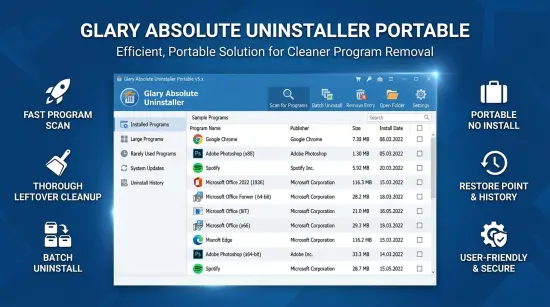
Glary Absolute Uninstaller Portable revolutionizes this workflow through its robust Batch Uninstall functionality. Users can browse their entire software library, check the boxes next to all unwanted applications, and initiate a collective uninstallation sequence with a single click. The utility intelligently manages the queue, executing the uninstallation processes consecutively and automatically sweeping for leftovers after each program is removed. This turns a tedious, repetitive maintenance chore into an automated, set-and-forget operation, drastically reducing the time required for system provisioning and optimization.
Intelligent Organization and Advanced Software Categorization
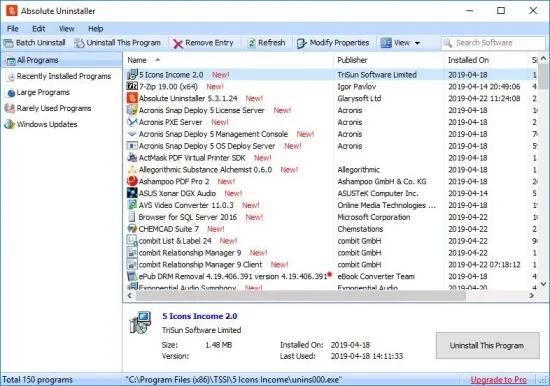
As storage capacities have grown into multiple terabytes, the sheer volume of software installed on an average computer has scaled accordingly. Finding specific programs in a massive, unsorted list of hundreds of entries can be incredibly frustrating. Glary Absolute Uninstaller Portable solves this problem by offering highly sophisticated sorting, filtering, and categorization tools that go far beyond standard alphabetical layouts.
The main interface provides dedicated navigation filters that group applications based on specific operational metrics:
Large Programs: This filter isolates applications consuming massive amounts of storage space, such as modern high-definition video games, media editing suites, and database tools. When trying to quickly reclaim storage space on a nearly full drive, this view instantly highlights the most impactful targets for removal.
Rarely Used Programs: By tracking application access patterns and execution frequencies, this intelligent filter identifies software that has sat dormant for months. This helps users pinpoint forgotten utilities, outdated trials, or redundant software that is doing nothing but wasting space.
Recent Installations: If a computer suddenly begins exhibiting instability, crashing, or displaying unwanted pop-ups immediately after a browsing session, this filter allows users to isolate and remove the most recently added software, quickly neutralizing the source of the issue.
Windows Updates: The software provides an integrated view of installed operating system patches and hotfixes. If a recent Windows update introduces bugs or performance degradation, users can safely locate and roll back the specific package through this consolidated view.
Fixing Broken Entries and Correcting System Invalidities
It is incredibly common to encounter situations where a program was partially deleted manually—such as a user dragging an installation folder directly into the Recycle Bin—without executing an actual uninstaller. When this happens, the application’s entry remains stuck permanently inside the Windows installed programs list, even though the software can no longer run or be uninstalled normally. Clicking the standard “Uninstall” button on these ghost entries usually results in an error message stating that the uninstallation file could not be found.
Glary Absolute Uninstaller Portable includes a specialized “Modify Info” and registry correction sub-system specifically designed to repair these broken links. If an entry is invalid, the utility allows the user to forcefully wipe the broken reference directly out of the system registry with a single command. Conversely, if an application’s installer pathway has changed, advanced users can modify the installation strings, paths, and command lines directly within the interface to restore proper uninstallation functionality, eliminating ghost icons and broken configurations effortlessly.
Safety First: Restore Points and Automated System Backups
Modifying file systems and purging registry structures carries an inherent risk. If a system utility accidentally removes a shared registry key or a critical system dynamic link library (DLL) used by other applications, it can disrupt the entire software environment. Recognizing this risk, the developers of Glary Absolute Uninstaller Portable have built comprehensive safety fail-safes directly into the core execution pipeline.
Before any uninstallation or deep-scan cleanup process begins, the software automatically creates a comprehensive system backup and establishes a fresh Windows Restore Point. If a complex uninstallation causes unexpected behavior or removes critical configuration keys, users can fully reverse all changes instantly. This gives users the confidence to perform aggressive, deep-system cleanups, knowing they can always revert the operating system back to its exact pre-maintenance state if anything goes wrong.
The Power of Total Portability and Desktop Freedom
The true standout aspect of Glary Absolute Uninstaller Portable is its absolute structural independence. Traditional maintenance tools require an installation process of their own, which means they write their own data to the registry, create directories, and add to the very clutter they are designed to fight. This installation requirement also prevents them from being used easily in field environments or emergency recovery scenarios.
This portable iteration completely removes these restrictions. The entire application is self-contained within a single, highly optimized directory structure. It does not modify the host registry during execution, nor does it drop temporary configuration files outside its own folder. Users can place the program onto a USB thumb drive, an external hard drive, or a cloud storage folder and run it directly on any target machine instantly.
For IT professionals, system builders, and technical consultants, this portability is invaluable. You can walk up to an infected, slow, or cluttered client workstation, plug in a flash drive, run the uninstaller directly, execute deep batch cleans, and remove the drive without leaving a single trace of your diagnostic toolkit behind. It maximizes efficiency, respects host system integrity, and provides a level of operational flexibility that traditional installed utilities simply cannot match.
User Interface Design and Seamless Accessibility
A powerful engine is only as good as the interface that controls it. Many advanced system optimization utilities suffer from cluttered layouts, confusing technical jargon, and overly complex menus that intimidate novice users. Glary Absolute Uninstaller Portable balances high-end technical capability with a clean, highly intuitive user interface design.
The software features a structured, modular dashboard dominated by a clean central data grid. Installed applications are listed alongside highly visible contextual icons, clear developer labels, precise file sizes, and accurate installation dates. The search bar responds in real-time, filtering down long lists of software instantly as characters are typed. All primary operations—such as batch selection, deep scanning, information modification, and backup restoration—are accessible via prominent, clearly labeled action buttons located along the primary control ribbon. This flat design language ensures that regardless of your technical background, navigating the application and executing thorough system cleanups remains entirely straightforward.
Optimizing Long-Term System Health and Drive Performance
Incorporating Glary Absolute Uninstaller Portable into a routine system maintenance strategy yields significant long-term performance benefits. By preventing the accumulation of digital debris, the host computer maintains its responsiveness and stability over a much longer lifecycle, delaying or completely eliminating the need for periodic operating system reinstalls.
When storage drives are kept free of empty directories and cached logs, search indexing engines operate faster, anti-virus scans complete in less time, and disk defragmentation or TRIM commands execute with maximum efficiency. Furthermore, by keeping the registry lean, the operating system benefits from faster load phases during boot up and shutdown sequences. In an era where productivity relies heavily on system uptime and snappiness, maintaining a lean, clean machine is essential, and this utility provides the precise toolkit required to achieve that state.
Features at a Glance
- Deep Cleanup Scanning Engine: Goes far beyond the capabilities of standard native uninstallers by performing deep forensic sweeps of both the hard drive and the Windows Registry to completely eradicate leftover files, configuration data, and dead keys.
- Simultaneous Batch Uninstallation: Allows users to select multiple applications via a simple checkbox interface and uninstall them all consecutively in a single automated session, saving substantial time.
- Total Standalone Portability: Requires absolutely no installation. The utility runs directly from any folder, USB flash drive, or external storage device without writing data to the host machine’s registry or leaving a tracking footprint behind.
- Intelligent Software Filtering: Includes automated sorting categories that instantly isolate large applications, rarely used programs, recently installed software, and system updates for highly targeted space management.
- Invalid Entry Repair Tool: Detects and forcefully removes ghost entries and broken software links left behind by improper manual deletions, cleaning up the installed programs list effortlessly.
- Real-Time Instant Search: Features a lightning-fast keyword search utility that filters down extensive software lists dynamically as you type, making it easy to locate specific programs instantly.
- Automated Safety Backups: Automatically generates comprehensive registry backups and system restore points prior to executing any removal actions, providing a total safety net against unexpected system issues.
- Comprehensive Software Insight: Displays highly accurate, transparent data for every installed application, including exact version numbers, publisher names, installation dates, and real storage footprints.
Changelog
The development team continuously maintains the software to adapt to shifting operating system landscapes, new application framework architectures, and user feedback. Below is the latest historical log of updates, performance enhancements, and bug resolutions:
- Optimized the deep residual cleaning algorithm to increase tracking accuracy for software built on modern Electron and Universal Windows Platform (UWP) frameworks.
- Enhanced the Registry scanning speeds by roughly 14%, reducing the total analysis time required after a batch uninstallation concludes.
- Improved the identification accuracy within the ‘Large Programs’ filter, resolving a rare issue where certain distributed game directories reported incorrect file sizes.
- Updated internal localization dictionaries to provide more accurate translations across multiple European and Asian languages.
- Fixed minor interface scaling glitches encountered when running the application on high-DPI 4K desktop displays under specific layout scaling percentages.
- Resolved a minor stability bug that could cause the software application to stop responding if a user aborted a deep scan mid-process while managing a massive queue of programs.