
Portable GImageX v2.3.0
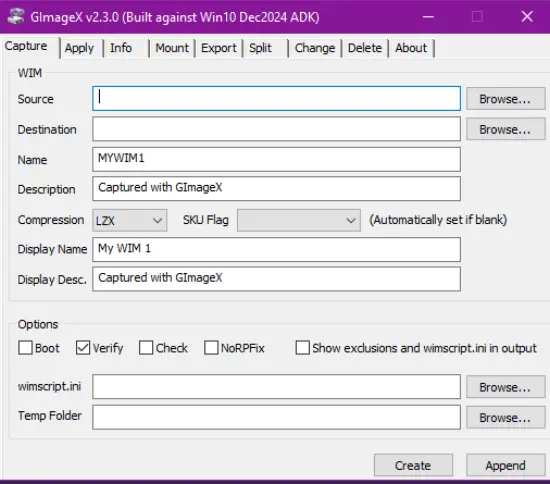
GImageX Portable is a focused Windows utility for working with WIM images in a more approachable way than command-line-only tools. It brings the most common imaging tasks into a graphical interface, which makes it easier to capture, apply, mount, export, split, and delete image files without having to memorize long commands or work through a script every time. For anyone who deals with deployment images, recovery media, or system preparation tasks, it offers a clean and practical environment that turns a technical workflow into something more manageable.
What makes GImageX Portable appealing is its directness. It is not trying to be a broad all-purpose system suite or a heavy imaging platform with dozens of unrelated extras. Instead, it concentrates on the operations that matter most when handling WIM files and presents them in a way that is clear, efficient, and relatively easy to learn. That focus gives it a certain confidence: users know exactly what it is for, and the software does not distract from that purpose. In a field where precision matters, that kind of clarity is useful.
The software is especially valuable for people who want to work with Windows deployment images but prefer not to rely entirely on command-line syntax. WIM files often sit at the center of installation media, recovery workflows, and enterprise deployment setups, so a good GUI can save time and reduce mistakes. GImageX Portable makes those tasks more accessible by organizing them into recognizable actions. Instead of remembering parameters and switches, the user can choose the operation, point the program to the image or source location, and proceed with more confidence.
A major strength of GImageX Portable is the way it supports common imaging operations in one place. Capturing a WIM image is one of the core tasks, and the software makes this process straightforward. Applying a WIM image is just as important when restoring or deploying a system image, and the program treats that step with the same practicality. Mounting an image is another useful function, especially when someone needs to inspect or modify the contents before committing changes. Exporting, splitting, and deleting images round out the tool’s usefulness, making it a compact but capable environment for image management.
The split function deserves special attention because it addresses a very real deployment problem. Large image files can exceed the limits of certain file systems or media formats, which becomes an issue when preparing media that must work in restricted environments. By splitting a WIM into more manageable chunks, GImageX Portable helps users fit image data into situations where size constraints would otherwise create problems. That makes it particularly practical for deployment scenarios where compatibility and portability matter just as much as speed.
Another notable quality is that GImageX Portable is designed to work in environments where resources may be limited. Its usefulness in WinPE is important because many deployment and recovery tasks happen in preinstallation or maintenance contexts rather than in a normal desktop session. Being usable in those situations adds a lot of value, because it means the software can play a role not only in everyday administration but also in rescue, recovery, and imaging workflows. That broadens its usefulness without making it more complicated for the end user.
The software also benefits from its reliance on Microsoft’s supported imaging interface. That connection helps ensure that the operations it performs are aligned with the Windows imaging ecosystem rather than being improvised or disconnected from the platform itself. For users, that often translates into a more dependable experience. They are working with a tool that sits close to the underlying imaging framework while still offering a friendlier front end. The result is a practical middle ground between raw system tools and high-level convenience.
GImageX Portable is also attractive because it is lightweight in spirit. It does not depend on flashy visual effects or a complicated workflow. Instead, it presents a straightforward utility experience that is easy to understand once the user is familiar with WIM concepts. This simplicity is one of its greatest strengths. In technical software, every extra layer of complexity can slow down the process or create opportunities for error. GImageX Portable keeps the focus on the work itself, which is exactly what many administrators and technicians want.
For users who work with deployment images regularly, repeatability is essential. GImageX Portable supports a workflow where the same operations can be carried out consistently across multiple systems or projects. That consistency matters when building standard images, maintaining restore media, or preparing installation resources for different machines. A graphical interface does not eliminate the need for careful work, but it does make recurring tasks faster to perform and easier to verify. Over time, that can reduce friction in day-to-day system maintenance.
The program also has a practical role in environments where documentation and transparency are useful. Because the actions are presented visually, it is easier for users to see what they are doing at each stage of the process. That can be helpful when training new staff, reviewing image workflows, or simply keeping the process understandable. A GUI does not replace technical knowledge, but it can lower the barrier to entry and make the work less error-prone. In many cases, that makes GImageX Portable a good educational bridge as well as a production tool.
One of the reasons this kind of software remains relevant is that Windows imaging has long required a blend of technical precision and procedural discipline. WIM files are powerful, but they are also specialized. A tool like GImageX Portable helps translate that specialization into something more approachable. It does not remove the complexity of deployment imaging, but it helps users manage that complexity more comfortably. That is an important distinction, because the value of a good utility often lies in making difficult tasks feel structured rather than overwhelming.
In practical use, the software supports a wide range of users. A technician preparing a deployment image may use it to capture and export system states. A support engineer may mount an image to inspect or adjust content. A recovery-oriented workflow may rely on it to apply an image during restoration. A systems administrator may use it to split large images for compatibility. In each case, the software serves the same underlying purpose: it helps people work with Windows image files more efficiently and with less friction.
Another appealing aspect of GImageX Portable is that it fits into a broader toolkit without demanding that it dominate the workflow. It can stand on its own for common tasks, but it also complements other deployment practices by handling the imaging layer clearly and directly. That flexibility matters because technical environments rarely rely on just one tool. A utility like this earns its place by being reliable, focused, and easy to return to when the same work needs to be done again. It is the kind of software that becomes more valuable the more often it is used.
The interface itself contributes to that value by reducing the mental load of working with image files. When users can see the available actions and their associated fields or options, they spend less time translating intentions into syntax. That can be especially useful when handling multiple images or switching between tasks. A well-organized interface also helps reduce missteps, which is important when dealing with system images that may be large, sensitive, or time-consuming to recreate. The goal is not only convenience but also confidence.
GImageX Portable also stands out because it addresses a niche that many users still need. Imaging work can be deeply technical, and the people who do it often appreciate tools that are stable and purpose-built. There is something satisfying about a program that does one job well and respects the user’s expertise. Rather than trying to replace deeper knowledge, it supports it. That respect for the user is part of what makes the software feel practical instead of ornamental. It helps professionals move faster without diluting the seriousness of the task.
The software’s continued relevance reflects the fact that image-based deployment and recovery workflows have not disappeared. Even as methods evolve, the need to capture, inspect, modify, and apply Windows images remains present in many environments. GImageX Portable serves those needs in a format that is easier to live with than a pure command-line approach. For users who want efficiency without sacrificing control, that is a strong combination. It keeps the work accessible while preserving the technical depth required for serious image management.
There is also a subtle advantage in the way GImageX Portable encourages orderly work. Because the program is structured around specific operations, it naturally leads users through a more disciplined process. That helps when dealing with large image archives, multiple build variants, or media prepared for different hardware setups. Structured tools often improve outcomes because they make it easier to understand what happened, what was changed, and what needs to be done next. GImageX Portable benefits from that structure, and users benefit from the clarity it creates.
In broader terms, the software represents the kind of utility that earns trust by being dependable. It does not need to impress with novelty. Its purpose is more grounded: handle imaging tasks clearly, reduce unnecessary complexity, and support practical deployment work. That makes it especially suitable for users who value tools that are efficient, focused, and stable. When a utility is built around a real technical need and implemented with care, it tends to remain useful long after more fashionable software has faded.
GImageX Portable is best understood as a practical companion for Windows image work. It brings together the operations that matter most, keeps the interface approachable, and supports workflows that range from routine administration to recovery and deployment. Its strength lies in clarity, not spectacle. It helps users capture and apply images, inspect and mount contents, manage large files, and fit all of that into a more human-friendly interface. For technicians and administrators who work with WIM files, that combination makes it a genuinely useful tool.
Features at a Glance
- Graphical interface for working with Windows WIM images.
- Capture, apply, mount, export, split, and delete image files.
- Useful for deployment, recovery, and imaging workflows.
- Supports use in WinPE environments.
- Built around Microsoft’s supported imaging API.
- Helps manage large WIM files by splitting them into smaller parts.
- Makes common imaging tasks easier to perform without command-line syntax.
- Suitable for technicians, administrators, and system deployment tasks.