Portable EffectCraft 0.11.1 (x64)
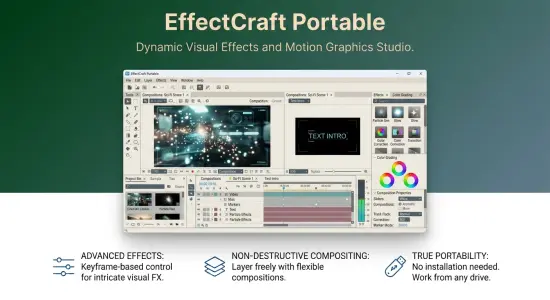
EffectCraft Portable is a motion graphics and compositing application for creating animated titles, visual effects, layered scenes, and rendered video. It brings together compositions, layers, keyframes, effects, expressions, 3D cameras and lights, and a render queue in a single creative workspace. The application is written in Rust and is free and open source, with builds for desktop platforms and a browser-based version.
The program is designed around familiar compositing concepts: create a composition, add layers, animate their properties, apply effects, and render the finished work. That makes EffectCraft Portable relevant to creators making title sequences, animated graphics, explainers, social media visuals, product demonstrations, overlays, and short composited scenes. It is under active development, so its capabilities are expanding, and users should test their specific workflows before depending on it for production deadlines.
What Is EffectCraft Portable?
EffectCraft Portable is a layer-based compositor. Each composition contains visual and audio elements arranged on a timeline. Layers may include text, shapes, solids, footage, nested compositions, nulls, adjustment layers, cameras, or lights. Their properties can be animated over time, and effects can be stacked to transform their appearance.
This structure supports work ranging from a simple animated title to a multi-layer scene with masks, color treatments, 3D elements, and transitions. A creator might begin with a background solid, add text and a shape layer, animate position and opacity, apply a glow, and render the composition as a video. A more involved project could combine footage, nested compositions, expressions, track mattes, and camera movement.
EffectCraft Portable is intended to feel accessible to people familiar with established compositing applications. Its interface includes panels for projects, compositions, timelines, effect controls, properties, previews, audio, and rendering. Familiar panel concepts and keyboard shortcuts can help experienced motion designers begin exploring without learning every idea from scratch. However, a similar interface does not guarantee identical behavior, and the project is still developing.
Compositions, Layers, and Timeline Editing
A composition is the working space where a visual sequence is assembled. It defines a timeline and a view of the scene, while layers provide the individual elements that appear within it. Layers can be reordered, grouped into nested compositions, parented to other layers, or combined with track mattes and blend modes.
The timeline provides a place to manage layer order, timing, and animation. Creators can move layers, adjust their duration, expand properties, and set keyframes at particular moments. A title can fade in, a graphic can travel across the frame, or a footage layer can change scale over the length of a shot. The composition viewer provides a visual reference for assessing the results.
EffectCraft Portable supports a range of layer types, including text, shape, footage, solids, adjustment layers, nulls, cameras, and lights. This flexibility makes the same project structure useful for both simple graphic animations and more intricate compositing work. A null layer, for example, can act as a convenient control point for other elements, while adjustment layers can provide a way to apply an effect across multiple layers beneath them.
Parenting makes it possible to link one layer’s movement to another. This is useful for building coordinated motion, such as keeping a label attached to a moving graphic or making several objects follow a shared controller. Track mattes and blend modes offer further ways to combine visual elements, reveal parts of a layer, and control how overlapping images interact.
Keyframes and Animation Controls
Keyframes define how a layer property changes over time. A creator can set a property at one point, set another value later, and let the animation system interpolate between them. Position, scale, rotation, opacity, and effect parameters are among the kinds of properties that can be animated to give a composition motion and visual rhythm.
EffectCraft Portable supports linear, Bezier, hold, and eased keyframes, as well as roving keys. Linear interpolation produces a steady change between values. Bezier curves provide more control over acceleration and deceleration. Hold keyframes keep a value fixed until the next keyframe, which is useful for stepped changes or deliberately abrupt movement. Easing can make a graphic feel as though it is starting or stopping naturally rather than moving at a constant speed.
The Graph Editor gives users a visual way to inspect and adjust animation curves. Value graphs show how a property’s value changes over time, while speed graphs show how quickly that value changes. Editing curve handles can help refine a movement so it feels deliberate, smooth, and appropriately paced. This is particularly helpful for title animation, interface graphics, logos, and motion that needs to emphasize a specific beat.
Time-related controls include time remapping, time stretching, reverse playback, freeze frames, work areas, and markers. These options let creators control when media appears and how it plays. For example, a footage layer can be slowed, reversed, or held on a single frame while graphics animate around it. Frame-accurate timing is supported across frame rates, including 29.97 drop-frame workflows.
Text and Shape Animation
Text layers are a central part of many motion graphics projects. EffectCraft Portable supports point text and paragraph text, with controls for character and paragraph styling. Text can be animated as a whole layer or through text animators and range selectors, making it possible to reveal letters, words, or sections of a line in sequence.
These tools can be used for opening titles, captions, animated labels, lower thirds, credits, and kinetic typography. A creator might animate a line of text by changing its position and opacity, then use a range selector to bring individual characters into view. Paragraph text is useful when a composition needs longer copy or a block of information arranged within a defined area.
Shape layers provide another way to build graphics directly in the composition. They can contain paths, fills, strokes, gradients, and procedural operations such as trim paths, repeaters, rounded corners, and path distortions. Trim paths, for instance, can animate a line drawing itself across the screen, while repeaters can create repeated elements from one shape. Gradient strokes and path operations help create more elaborate designs without requiring every element to be imported from a separate illustration application.
Masks can be drawn and edited in the viewer. Their modes, feathering, expansion, and vertices provide control over what is revealed or hidden. Masks are useful for creating a focused reveal, isolating part of a layer, or defining a region for a compositing effect.
Effects, Layer Styles, and Visual Treatments
EffectCraft Portable includes a broad library of effects across categories such as blur, sharpening, color correction, distortion, generation, keying, matte work, noise, perspective, simulation, stylization, time, audio, transitions, and utilities. Effects are applied to layers and adjusted through their controls. Stacking several effects can create a more complex treatment, while keyframes can animate effect parameters over time.
Examples include blurring a background, adjusting color, creating a glow, generating fractal noise, applying a key, adding particles, or changing the apparent timing of a clip. The available tools make it possible to perform both practical image adjustments and more stylized visual work. Layer styles add familiar treatments such as drop shadows, glows, bevels, overlays, and strokes.
A useful way to approach effects is to start with the simplest treatment that achieves the desired result. Too many effects can make a composition harder to understand and slower to render. Applying an effect to a test layer, checking its parameters, and previewing the result at full size can help avoid surprises. Creators should also verify how a particular effect behaves in their installed build, especially if the project depends on a detailed, multi-effect stack.
3D Layers, Cameras, and Lights
EffectCraft Portable supports classic-style 3D layers, cameras, and lights. A layer can be placed in three-dimensional space and given orientation and material properties. Cameras provide views of the scene, while lights control how 3D elements are illuminated. The application includes one-node and two-node camera setups, depth of field, and camera navigation tools such as orbit, pan, and dolly.
Lighting options include parallel, spot, point, and ambient lights. Soft ray-traced shadows can give layers a stronger sense of depth and spatial relationship. Different camera views, including front, top, left, and custom views, help creators inspect the scene from different angles.
These controls can be used to build dimensional title cards, layered graphic scenes, animated panels, or simple 3D-style compositions. A creator might arrange several cards in space, place a camera at a custom angle, and use a spot light to create shadow and focus. While this is a useful 3D workspace for motion graphics, creators should evaluate whether it meets the requirements of projects that need a dedicated 3D modeling or animation environment.
Expressions and Procedural Motion
Expressions let users define property behavior through code rather than setting every value by hand. EffectCraft Portable supports JavaScript expressions, including functions and layer references that can link one property to another. Expressions can be edited inline, and a pick-whip interaction helps connect properties without manually typing every reference.
This makes procedural animation possible. A property can respond to another layer, follow a repeating pattern, or vary according to a function. For example, an expression can make a graphic pulse repeatedly, link a label’s position to another object, or add controlled variation to movement. The wiggle and loopOut functions are among the familiar expression tools supported.
Expressions can reduce repetitive work, particularly when several elements need to follow the same rule. They also make projects more flexible: changing one controller can update multiple related properties. However, a complex expression can be harder to troubleshoot than a straightforward set of keyframes. Clear naming, small test cases, and keeping a backup before major expression changes can make procedural projects easier to maintain.
Rendering, Export, and Lottie
The render queue collects compositions for output and provides controls for render settings and output modules. EffectCraft Portable supports video formats including H.264, ProRes, HEVC, AV1, and WebM, as well as image sequences such as PNG, JPEG, TIFF, and 32-bit EXR. Animated GIF, WAV, and AIFF are also listed among the output options.
Render settings include controls for cropping, resizing, regions of interest, field rendering, and other output adjustments. Templates can help standardize common configurations, while render logs make it easier to review output activity. The render queue can also be operated through the command-line tool, which is useful for scripted or headless rendering.
Lottie import and export are built into the application. Lottie is a format used to deliver vector-based animations to websites and apps. EffectCraft can export supported composition elements to Lottie JSON or a .lottie file, and it can import Lottie files as compositions. Since not every effect or feature can necessarily be represented in the format, the export process identifies elements that cannot be expressed. That helps users understand what may need adjustment before using the animation elsewhere.
Project Files and Automation
EffectCraft Portable saves projects as versioned JSON files using the .ecproj extension. A readable project format can make it easier to inspect project structure and compare changes in version control. It may be useful for teams that want to track changes or build repeatable workflows around project files.
The application also provides command-line, JSON control, and MCP interfaces. These allow commands and project operations to be accessed programmatically. The CLI can be used for tasks such as rendering or issuing project commands, while the control channel and MCP server offer ways for external tools and agents to interact with the application.
This automation capability can benefit technical artists, developers, and studios that want to integrate compositing into a broader workflow. A scripted task might render a composition, update a property, or inspect a project without relying entirely on manual panel navigation. As with any automation system, users should validate commands on sample projects before running them against important work.
EffectCraft Portable uses its own media components rather than relying on FFmpeg as an internal dependency. Its codec support includes video and audio encoding and decoding implemented in Rust, with FilmCraft’s codecs also used within the creative-app family. For users, the practical consideration is to test the actual footage, audio, and delivery formats needed for a project, rather than assuming that every variation of a named codec will behave the same way.
Portable Editions and Supported Platforms
EffectCraft is available for macOS, Windows, Linux, and the web. Windows users can choose a conventional installer or a portable ZIP build for supported processor architectures. The portable package can be extracted and run without a standard installation step, which is convenient for testing the software or keeping a separate copy in a chosen folder.
Linux packages include options such as AppImage, Flatpak, Debian packages, RPM packages, and tarballs, with builds for multiple processor architectures. The web build is a WebAssembly version that can be hosted on a static server. macOS packages are available as a universal application for Apple silicon and Intel systems.
A portable application does not necessarily contain every project asset or setting in one folder. Project files may refer to media stored elsewhere, so keep source footage, graphics, fonts, and audio organized. If moving a project between computers, test that its media is available and that paths resolve correctly. Backing up the project and source files together is a reliable habit for any compositing workflow.
Who Should Consider EffectCraft Portable?
EffectCraft Portable may interest motion designers, independent video creators, students, technical artists, and open-source software enthusiasts. It offers a substantial toolkit for animated graphics and compositing, while the familiar timeline and panel layout can make the basic workflow approachable to people with prior experience.
It can be used to explore title animation, shape graphics, layered footage, expressions, 3D scenes, effects, and rendering. Its scripting interfaces also make it relevant to users who want to connect creative work with automation. The software is still in alpha, however, and its development status matters: some behaviors differ from established applications, and the team identifies it as unsuitable as a direct replacement for existing professional workflows on client work at this stage.
EffectCraft Portable cannot open Adobe After Effects project files, and After Effects plug-ins do not run in it. Users should also expect that compatibility and behavior may differ in some areas. macOS is described as the most tested platform, while Windows and Linux users may encounter basic interaction issues. Treat it as an active, evolving project: experiment with sample work, check exports carefully, and maintain backups for important projects.
Getting Started with EffectCraft Portable
A small practice composition is a good starting point. Create a composition with a background, a shape layer, and a text layer. Animate the text’s position and opacity, add a simple effect, and use the Graph Editor to adjust the timing. Then add a second layer, experiment with parenting or a track matte, and render a short test file.
For a more advanced introduction, try a nested composition, a mask, a keyframed effect, and a simple camera move. Save versions as the project develops. Test the output format you intend to use, particularly if you need alpha transparency, a specific codec, a Lottie file, or an image sequence. A render that looks correct inside the composition viewer should still be checked as a finished exported file.
Organizing layers with meaningful names and keeping related elements together makes a project easier to revisit. Use markers to note important moments, and keep expressions understandable if other people may need to edit the project. These simple habits help prevent a promising animation from becoming difficult to maintain.
EffectCraft Portable combines a familiar layer-based compositor with a Rust-built foundation, a large effects collection, keyframe and expression tools, 3D capabilities, multiple export formats, and automation interfaces. It is a compelling option for exploring open-source motion graphics software, especially for users who enjoy trying developing creative tools. Its alpha status and project-format limitations make careful testing essential for work that depends on established production pipelines.
Features at a Glance
- Motion graphics and visual effects compositing
- Compositions with text, shapes, footage, solids, nested compositions, nulls, adjustment layers, cameras, and lights
- Timeline animation with linear, Bezier, hold, eased, and roving keyframes
- Graph Editor with value and speed curves
- Text animators, paragraph text, masks, and shape operations
- More than 300 listed effects and nine layer styles
- Parenting, track mattes, blend modes, and motion blur
- JavaScript expressions and property linking
- 3D layers, cameras, lights, depth of field, and soft shadows
- Render queue with video, audio, image-sequence, and GIF outputs
- Lottie import and export
- Versioned JSON project files using the
.ecprojextension - CLI, JSON control channel, and MCP automation
Release Notes:
Key Improvements & Features
-
Track Mattes on Adjustment Layers: Applying a track matte to an adjustment layer now properly limits where its downstream effects display.
-
3D & Composition Viewer Updates:
-
The Mesh Warp grid can now be directly dragged inside the Composition viewer.
-
Fixed an issue where scaling a layer by its handles follows the pointer properly and resolved 3D compass rendering issues.
-
-
Layer Context Menu: Added Create Shapes/Masks from Text directly in the layer context menu.
-
Media & Footage Handling:
-
Added Copy Source Path in the Media Browser.
-
Improved file listings and sort key caching for faster media browsing.
-
-
Text & Easing Improvements:
-
Quick Apply maintains IME composition while typing pinyin.
-
Shift key constrains Bezier handle drags to a single axis in the Graph Editor.
-
Double-clicking transform rows reveals properties in the inspector panel.
-
Bug Fixes & Rendering Stability
-
GPU & Effect Fixes:
-
Fixed an issue where GPU Echo would drop preceding effects in the pipeline.
-
Fixed CC Particle World / Systems II replacing their entire layer improperly.
-
Time effects now correctly read and recognize earlier applied effects.
-
-
Lottie & Automation:
-
Fixed Lottie exporter serialization for Offset Paths miter limits as animatable values.
-
Prevented duplicate automation edits triggered after lost network replies.
-
-
CLI & Scripting Updates:
-
Preserved CLI template inputs when rendering outputs as hard links.
-
Honored the
--emptyflag when triggering renders from the CLI.
-
-
General UI Fixes:
-
Fixed a bug where a tracker point could not be grabbed while zoomed out.
-
Floating panel dragging no longer causes widget ID clashes near window edges.
-