
Portable Diskpart GUI v4
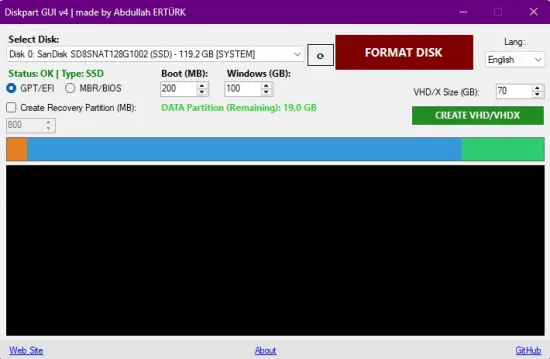
Diskpart GUI v4 is a professional disk partitioning and formatting tool based on .NET Framework 4.8, optimized for both WinPE (Windows Preinstallation Environment) and Live Windows (Live OS) environments.
🚀 Key Features
- Visual Disk Map: Dynamic visualization system showing the partition structure on a colored, proportional graphic.
- S.M.A.R.T. Health Monitoring: Real-time checking of the selected disk’s hardware health status (OK/Warning) via WMI.
- Media Type Identification: Automatic identification of disk device types (SSD, NVMe, or HDD).
- Modern Partitioning Architecture: Professional structure that moves the Recovery partition to the end of the disk.
[ Boot ] ➔ [ Windows ] ➔ [ DATA ] ➔ [ Recovery ] - Enhanced VHD/VHDX Support: Overwrite protection, operation validation logic, and automatic mounting.
- Precise Sizing: Decimal GB display for small disks and smart boundary management (Fixed 0 GB display issue).
- Selection Persistence: The selected disk is now preserved during language changes or list refreshes.
- TopMost Message Boxes: Guaranteed visibility for all warning popups in WinPE/Live OS environments.
- Detailed Confirmation: A professional summary window with multi-line, prominent warnings listing all planned operations.
- Robust Infrastructure: Ability to continue Diskpart operations seamlessly with informative, persistent error messages in restricted environments (some modified WinPE) where WMI services are missing.
- Multi-Language Support: Automatic Turkish or English interface detection.
📚 Usage Scenarios
- Clean Windows Installation (WinPE): After booting from installation media, prepare your disk as GPT and create bootable partitions flawlessly in seconds.
- Virtual Disk Management: Create VHD/VHDX files for testing and attach them instantly, partitioning them as if they were physical hardware.
- Seamless Partitioning: Prepare a new disk by splitting it into DATA and Windows sections with a single click.