
Portable CrystalDiskInfo 9.9.1 Multilingual
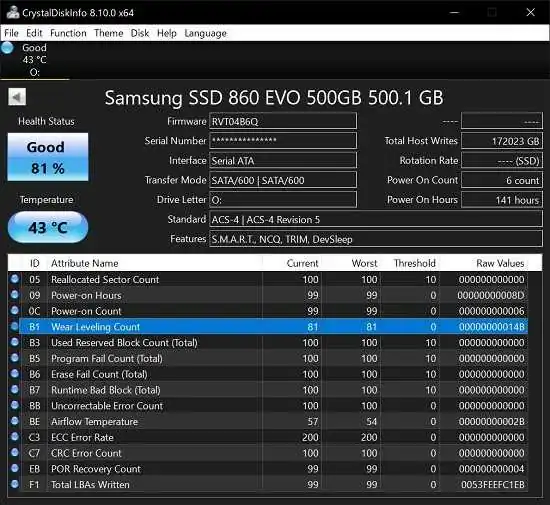
CrystalDiskInfo Portable is a focused Windows utility for monitoring the condition of HDDs, SSDs, and selected external or RAID-connected drives. It is best known for turning low-level storage information into a readable status view that helps users understand whether a drive is healthy, under stress, or beginning to show signs of failure. For anyone who wants a fast, practical way to keep an eye on storage reliability, it has long been one of the most recognizable names in disk health monitoring.
What makes CrystalDiskInfo Portable useful is not only the amount of information it can display, but the way it organizes that information into a clear and approachable interface. Rather than forcing users to interpret raw SMART data on their own, it presents health indicators, temperature readings, device details, and warning states in a format that is easy to review at a glance. That makes it valuable for everyday users, system builders, technicians, and anyone who wants to catch storage problems early.
Core Purpose
The main purpose of CrystalDiskInfo Portable is to monitor disk health through SMART data and related device information. SMART, or Self-Monitoring, Analysis, and Reporting Technology, is a diagnostic system built into many modern storage devices. CrystalDiskInfo Portable reads those values and translates them into practical information about the drive’s condition, which helps users make decisions before a failure becomes serious.
This purpose is important because storage problems often develop quietly. A drive may still appear normal in daily use while internal counters are already showing signs of trouble. CrystalDiskInfo Portable helps reveal that hidden state by surfacing warning signs such as temperature changes, reallocated sector activity, or other indicators that suggest a disk should be watched more closely.
Interface Design
One of the software’s strongest qualities is its interface. It is built to show the most important information immediately, including health status and temperature, while also making deeper SMART details available below. This layout is helpful because users can check the overall condition first and then drill into technical values only if needed.
The interface is also designed to support routine monitoring rather than one-time inspection. Many users keep it open in the background or check it periodically as part of a maintenance habit. The clear visual indicators make it easy to notice if something has changed since the last review, which is exactly the kind of feedback that helps prevent data loss.
SMART Monitoring
CrystalDiskInfo Portable’s most important function is its ability to read SMART attributes from connected drives and present them in a usable format. These attributes can include temperature, usage history, error counters, and other values that reflect the internal state of the device. By monitoring them regularly, users can build a clearer picture of how a disk is aging over time.
SMART monitoring is especially useful because it can reveal gradual decline before a complete failure occurs. That gives users time to back up data, replace a failing drive, or investigate whether the issue is temporary or persistent. Instead of waiting for a crash, the software encourages proactive storage care.
Drive Information
Beyond health status, CrystalDiskInfo Portable also provides detailed identification information about each drive. This can include model name, firmware version, serial number, interface type, transfer mode, capacity, and other descriptive values. These details are useful when managing multiple drives or trying to confirm exactly which device is installed in a system.
For users who build or maintain PCs, this information is especially practical. It makes it easier to compare drives, verify that a replacement was installed correctly, and keep track of hardware across several machines. In environments with more than one storage device, the identification panel becomes just as useful as the health readout itself.
Temperature Tracking
Temperature is one of the most important indicators in storage monitoring, and CrystalDiskInfo Portable gives it prominent attention. Drives that run too hot may age faster or become less reliable over time, so regular temperature checks can help users spot cooling issues early. The software makes this kind of monitoring simple by showing the current temperature clearly in its dashboard.
This feature is valuable because temperature trends often matter more than a single reading. A drive that spikes under load or runs consistently warmer than expected may need better airflow, a different mounting location, or closer observation. CrystalDiskInfo Portable makes it easy to watch those changes without requiring specialized hardware tools.
Alerts and Warnings
The software can be configured to warn users when a drive crosses certain thresholds or shows concerning conditions. Those alerts can be useful for people who do not want to watch the program constantly but still want early notice if something changes. The goal is to turn storage monitoring into a background safety net rather than a manual chore.
Warning systems are most effective when they give users time to act, and that is exactly where CrystalDiskInfo Portable adds value. If a drive begins to show unhealthy behavior, the user can respond by backing up important files, testing the system further, or planning a replacement. That kind of early warning can make the difference between a manageable maintenance task and a sudden data loss event.
Supported Devices
CrystalDiskInfo Portable is primarily associated with HDDs and SSDs, but it also supports parts of USB, RAID, and NVMe environments. That broader compatibility makes it more flexible than a tool limited to a single storage type. In practice, this means users can often use the same utility across desktop drives, laptop storage, and selected external devices.
The level of support can vary by hardware and driver environment, but the software’s broad detection range is one of the reasons it remains popular. It is particularly helpful for people who manage mixed systems with SATA SSDs, NVMe drives, and older mechanical disks in the same workspace. Having a single monitoring application for multiple storage classes simplifies routine maintenance.
Background Operation
CrystalDiskInfo Portable is commonly used as a lightweight monitoring tool that can run without getting in the way of normal work. This matters because users often want storage diagnostics available all the time without sacrificing system responsiveness. The program is designed to stay efficient while still keeping drive status visible and up to date.
This background-friendly design makes it suitable for long-term use. Users do not need to launch it only after a problem appears; instead, they can leave it active or check it periodically as part of a regular maintenance routine. That steady presence is one of the reasons the software remains practical for both personal and professional environments.
Advanced Controls
For users who want more than basic reporting, CrystalDiskInfo Portable includes a range of advanced settings. These can involve power management adjustments, acoustic tuning, and other device-specific options depending on the drive and controller. While not every system will expose the same controls, the software gives experienced users additional flexibility where supported.
These advanced capabilities make it more than just a passive status viewer. In some situations, users may want to adjust how aggressively a drive behaves, how much noise it makes, or how it responds to power-related settings. Having those tools integrated into the monitoring environment creates a more complete storage utility.
Practical Uses
CrystalDiskInfo Portable is useful in many real-world scenarios. A home user may rely on it to watch an aging hard drive. A technician may use it to verify the condition of several systems in a repair bench. A workstation owner may check temperature and health data regularly to reduce the risk of downtime. In each case, the software offers quick insight into whether a disk deserves attention.
It is also useful during hardware upgrades or troubleshooting. When replacing a drive, users can compare the old device with the new one and verify that the system recognizes it properly. When a computer behaves strangely, the tool can help determine whether storage health might be part of the cause. That makes it a valuable first step in many diagnostic workflows.
Strengths of the Program
CrystalDiskInfo Portable stands out because it combines clarity, depth, and speed. It does not overwhelm users with unnecessary complexity, yet it still exposes enough technical detail to satisfy advanced storage monitoring needs. The result is a tool that feels both approachable and serious, which is not always easy to achieve in system utilities.
Another major strength is consistency. Users can open it quickly, check the most important storage data, and get a dependable picture of drive condition. That consistency is especially useful when monitoring multiple systems over time, because a reliable snapshot often matters more than a complicated set of extra features.
Limitations and Scope
CrystalDiskInfo Portable is focused on monitoring rather than repair. It tells users what is happening with a drive, but it does not fix failing hardware or recover lost files. That limitation is actually part of its design philosophy, since the program is built to provide trustworthy insight instead of trying to do everything at once.
This narrow scope helps keep the software efficient and easy to understand. Users know they are getting a diagnostic and reporting tool, not a broad maintenance suite. As a result, it is often used alongside other utilities rather than being asked to replace them.
Why It Matters
Storage failures can happen gradually, and early warning signs are often subtle. CrystalDiskInfo Portable matters because it turns those signs into something visible and actionable. Instead of guessing whether a disk is still reliable, users can check a clear health report and make informed decisions based on real device data.
That practical benefit is what has made the software so widely recognized. It helps users stay ahead of problems rather than reacting after data is already gone. For many people, that alone is enough reason to keep it installed and ready whenever storage reliability needs attention.
Overall Character
CrystalDiskInfo Portable is best described as a focused, dependable, and user-friendly disk health monitor. It gives users direct access to SMART information, temperature data, and device details in a format that is easy to interpret. Its combination of simplicity and technical depth makes it suitable for both casual checking and regular maintenance use.
For anyone who wants a clear view of disk condition without extra clutter, it remains a strong and practical choice. Its value lies in helping users understand their storage before problems become serious, which is exactly what a good monitoring tool should do.
Release Notes:
- Improved: TOSHIBA SATA SSD support
- Updated: Language files (Traditional Chinese, Simplified Chinese, French)