

Portable Crow Antivirus v1.0
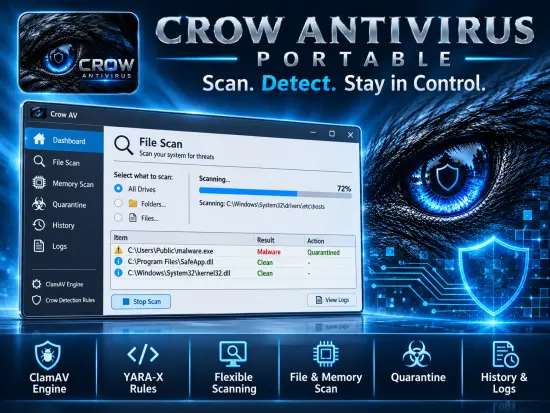
Crow Antivirus Portable is a Windows security application designed to help users identify, analyze, and manage potentially dangerous files through a combination of established antivirus technology and additional detection capabilities. With an emphasis on practical malware scanning, flexible inspection options, and accessible security tools, it provides an environment for examining files, checking system locations, and responding to detected threats.
In an environment where malicious software can arrive through downloaded applications, email attachments, compressed archives, removable storage devices, and unfamiliar files, having an additional security utility available can be extremely useful. Not every suspicious file announces its presence immediately. Some threats attempt to disguise themselves as legitimate programs, hide inside compressed packages, or use misleading filenames to encourage users to execute them. A dedicated scanning application offers another opportunity to inspect potentially dangerous content before it becomes a problem.
Crow Antivirus Portable brings together several security-oriented components in a single application. Its approach combines the ClamAV antivirus engine with YARA-X-based detection rules, providing different methods of identifying suspicious files. This combination makes the software particularly interesting for users who want more than a simple file-checking utility and prefer to have additional tools for examining potentially suspicious content.
The application also focuses on practical operations such as file scanning, memory inspection, quarantine management, and access to scan history and logs. These functions help organize security-related activities and make it easier to understand what has been examined and how detected items have been handled.
With its distinctive Crow Antivirus branding and a straightforward security-focused interface, Crow Antivirus Portable aims to make malware inspection more accessible while providing useful capabilities for users who regularly manage downloaded software, archives, installers, and other files.
Crow Antivirus Portable: A Practical Approach to Windows Security
Modern Windows computers are constantly exposed to files originating from different sources. Software packages, documents, scripts, installers, compressed archives, and downloaded utilities can all represent potential security risks when their origins are uncertain. Even files that appear harmless may contain malicious components or conceal executable content.
Crow Antivirus Portable is designed to assist with this type of situation by providing scanning and detection facilities that help users examine files and identify possible threats. Rather than relying on a single inspection method, its approach incorporates multiple detection technologies, allowing the application to evaluate potentially suspicious content using different security mechanisms.
One of its central components is the ClamAV engine, a widely used antivirus technology recognized for its ability to inspect numerous file formats and identify known malware through signature-based detection. The application also incorporates YARA-X detection rules, adding another approach to recognizing suspicious patterns and characteristics.
This combination is useful because malware detection is not limited to identifying files by their names or extensions. Security engines can examine file contents and compare them against known signatures, while rule-based detection can look for particular patterns associated with malicious behavior or suspicious code structures.
By bringing these technologies together, Crow Antivirus Portable provides a practical environment for carrying out security inspections and organizing the results.
ClamAV Antivirus Engine for Malware Detection
The ClamAV engine is an important part of Crow Antivirus Portable. It provides the underlying antivirus scanning technology responsible for examining files and comparing their contents against available malware definitions.
Signature-based detection remains an important component of computer security. Known malicious programs often contain recognizable patterns that can be identified by antivirus databases. When a file matches a known detection signature, the scanning engine can report the corresponding security finding and allow the user to decide how to handle it.
ClamAV offers broad file inspection capabilities, including support for numerous executable formats, documents, and compressed archives. This makes it useful when examining software packages and files that may contain hidden or embedded content.
For example, downloaded installers can be inspected before execution, while compressed archives can be examined to identify suspicious files contained within them. Documents and other commonly exchanged file types can also be relevant during security investigations.
The effectiveness of signature-based detection depends on the availability and freshness of the malware definitions. New malicious programs appear continuously, and older databases cannot be expected to recognize every recent threat. Keeping the antivirus engine and its associated definitions updated is therefore an important part of maintaining useful detection coverage.
Crow Antivirus Portable makes the ClamAV engine a central component of its security workflow, providing users with a familiar antivirus technology within a dedicated graphical application.
YARA-X Rules for Additional Threat Identification
Another important component of Crow Antivirus Portable is its integration of YARA-X detection rules.
YARA-X is designed to identify patterns within files and other digital content. Instead of relying exclusively on conventional antivirus signatures, rule-based inspection can search for combinations of characteristics that may be associated with particular malware families, suspicious scripts, or potentially dangerous code structures.
YARA-based detection is especially interesting for users who want additional ways to investigate files that may not be immediately recognized by traditional antivirus databases.
A rule can describe specific strings, byte sequences, structural characteristics, and other identifying patterns. When a scanned file matches the conditions defined by a rule, the scanning process can report a corresponding detection.
This approach can complement conventional antivirus technology by providing another perspective on suspicious content. It can be particularly useful when investigating unfamiliar executables, scripts, and downloaded packages.
The combination of ClamAV and YARA-X gives Crow Antivirus Portable a layered detection approach. Each technology has its own strengths, and using multiple inspection methods can provide a more informative assessment than relying on only one detection mechanism.
It is important to understand that no detection engine can identify every possible threat. Detection rules and antivirus databases also require maintenance, and some legitimate files may occasionally trigger suspicious-pattern matches. Security findings should therefore be evaluated carefully rather than automatically treated as proof of malicious activity.
Flexible File Scanning for Everyday Protection
File scanning is one of the most important functions of Crow Antivirus Portable. It allows users to examine individual files and investigate suspicious downloads without necessarily having to inspect an entire computer.
This flexibility is useful in many everyday situations. A newly downloaded installer, an unfamiliar executable, or a compressed package received from another computer can be selected for inspection before being opened.
Users who frequently download software can benefit from this additional verification step. Instead of immediately executing every downloaded program, they can first examine the file with the available detection engines.
Individual file inspection is also useful when troubleshooting suspicious system activity. If a particular executable behaves unexpectedly or appears in an unfamiliar location, scanning it can help determine whether the antivirus engine recognizes a potential threat.
For larger investigations, directory-based scanning provides a way to examine multiple files in a selected location. This can be particularly convenient when checking a Downloads folder, a software archive collection, an external storage device, or a directory containing recently extracted applications.
The ability to choose what should be inspected makes the scanning process more adaptable to different situations.
File and Memory Scanning Capabilities
Crow Antivirus Portable includes file and memory scanning capabilities, extending its usefulness beyond the examination of individual files stored on disk.
File scanning concentrates on content that can be accessed through the filesystem. Memory scanning, on the other hand, addresses a different area of security investigation by examining memory associated with running processes.
This distinction is important because suspicious code does not always remain exclusively within a conventional file on disk. Running processes can load executable components and other content into memory during operation.
Memory inspection can therefore provide an additional avenue for investigating potentially compromised applications and suspicious running processes.
For users troubleshooting unusual system behavior, this type of inspection can be a valuable complement to ordinary file scanning. It adds another dimension to the security examination process and helps users investigate concerns that may not be adequately addressed by checking downloaded files alone.
As with any security inspection, memory scanning should be understood as a detection and investigation facility rather than a guarantee that every running threat will be identified. Its results depend on the capabilities of the underlying engine and the conditions under which the scan is performed.
Nevertheless, including both file and memory inspection in the same application gives Crow Antivirus Portable a broader security-oriented purpose.
Quarantine Management for Detected Threats
Finding a suspicious file is only part of the security process. Users also need a practical way to manage detections and prevent potentially dangerous items from being accessed accidentally.
Crow Antivirus Portable includes a quarantine facility intended to help organize files identified during scanning.
Quarantine is an important concept in antivirus software because it separates suspicious content from ordinary files. Rather than immediately deleting every detected item, quarantine-based workflows provide an opportunity to isolate findings and review them before deciding on an appropriate action.
This is particularly useful when dealing with potential false positives. A legitimate application may occasionally contain characteristics that trigger a detection rule, especially when using broad pattern-based scanning.
By retaining the ability to review detected items, users can make more informed decisions about how to proceed.
Quarantine management also helps maintain a clearer distinction between ordinary files and items requiring further investigation. It can be useful when examining collections of downloaded applications or checking software obtained from unfamiliar sources.
Users should always exercise caution when restoring quarantined files. If an item has been identified as malicious, returning it to its original location can reintroduce the security risk. Any decision to restore a detection should be based on a careful assessment of its origin and legitimacy.
Scan History and Detailed Security Logs
Another useful aspect of Crow Antivirus Portable is its emphasis on scan history and logging.
Security applications can perform many different operations over time. Without a record of previous scans, it can become difficult to remember which directories were inspected, which files generated detections, and what actions were taken.
History and logging facilities help make these activities easier to review.
A scan history provides a convenient way to revisit previous inspection results, while detailed logs can offer additional information about scanning operations and reported findings.
This information is valuable when investigating recurring problems. For example, if the same suspicious file repeatedly appears in a particular directory, previous scan records can help establish whether the item has already been examined.
Logs can also be useful when troubleshooting scanning difficulties or understanding why an inspection did not complete as expected.
For more technically experienced users, access to security-related records is especially important because it provides greater transparency into the operations performed by the application.
Instead of treating antivirus scanning as an entirely invisible process, logging helps make the results easier to examine and understand.
A Clear and Organized Antivirus Interface
Crow Antivirus Portable is presented as a dedicated desktop security application with a recognizable visual identity and a straightforward navigation structure.
An organized interface is important for antivirus software because users need to understand what they are scanning, which tools are available, and where to find the results.
The application organizes its principal functions around security-related activities, including the dashboard, file scanning, memory scanning, quarantine, history, and logs.
This arrangement helps users navigate between the most important areas without having to search through unrelated settings or complicated menus.
The dashboard serves as the natural starting point for accessing the application’s main functions. From there, users can move to the appropriate scanning or management section depending on what they want to accomplish.
The file scanning area provides access to file inspection, while memory scanning addresses the additional process-memory inspection functionality. Quarantine offers a dedicated location for reviewing detected items, and history and logs help maintain an overview of previous security operations.
The presence of clearly separated sections makes the overall workflow easier to understand, particularly for users who are not accustomed to working with command-line antivirus tools.
A dedicated graphical interface can make complex underlying security technologies more approachable by presenting their most relevant operations through recognizable controls and clearly identified sections.
Useful for Downloaded Software and External Files
Users who regularly download software can benefit from having an additional antivirus inspection utility available.
Software archives often contain numerous installers, executable files, libraries, scripts, and supporting components. Although many of these files are completely legitimate, downloading applications from unfamiliar websites or third-party repositories can introduce unnecessary risks.
Crow Antivirus Portable can be used to examine these files before they are executed.
This is especially relevant for people who maintain large software collections, test different applications, or frequently transfer programs between computers.
External storage devices are another situation where additional inspection can be useful. USB drives and other removable devices may contain files originating from different computers, making it sensible to examine unfamiliar content before opening it.
The same principle applies to extracted archives, downloaded documents, and other files received through messaging applications or email.
By providing accessible scanning and quarantine facilities, Crow Antivirus Portable can become a useful part of a more careful file-management routine.
A Complementary Security Tool for Windows
One of the important considerations when using antivirus software is understanding the role it plays within a broader security environment.
Crow Antivirus Portable provides scanning and detection capabilities through ClamAV and YARA-X. These technologies can help identify known malicious files and suspicious patterns, but they should not automatically be considered a replacement for every component of a comprehensive endpoint security solution.
Modern Windows protection involves several different security layers. Antivirus scanning, real-time monitoring, application security, firewall protection, operating system updates, and safe browsing practices all contribute to reducing exposure to threats.
An additional scanning utility can provide another way to inspect files, particularly when users want to examine suspicious downloads or investigate particular directories.
Crow Antivirus Portable is therefore particularly relevant as an additional security and inspection tool for users who appreciate having another detection environment available.
Running multiple security products requires some care, especially when their functions overlap. Users should avoid unnecessary conflicts and should not disable their primary security protection simply because an additional scanning utility is available.
A sensible approach is to use the application as part of a broader security routine, combining file inspection with responsible downloading habits and an appropriately configured Windows security environment.
Why Multiple Detection Technologies Matter
Malware detection is a constantly evolving field. Attackers regularly modify existing malicious programs, introduce new variants, and use techniques intended to make suspicious files more difficult to recognize.
Traditional signature-based detection remains useful because it can identify known threats with recognizable characteristics. However, newly modified files may not always match existing signatures.
Rule-based detection offers another way to identify suspicious characteristics. YARA-X rules can describe patterns that may be associated with particular types of malicious content, providing an additional inspection mechanism.
Using these approaches together can improve the breadth of an investigation.
For example, a file that does not generate a conventional antivirus detection may still deserve further examination if it contains suspicious structures or matches a relevant detection rule.
Likewise, a rule-based detection can provide an indication that a file deserves attention even when its exact identity is unknown.
The two technologies are complementary rather than interchangeable. Their combined use gives users access to different detection perspectives and makes Crow Antivirus Portable an interesting option for security-conscious Windows users.
It is equally important to remember that detection results require interpretation. A clean result does not guarantee that a file is completely safe, while a suspicious result does not necessarily mean that a legitimate application is infected.
Maintaining updated detection resources and evaluating findings carefully remain essential practices.
Portable Convenience and Flexible Usage
The portable-oriented approach of Crow Antivirus Portable makes it particularly attractive to users who prefer maintaining useful utilities in organized software collections.
Portable software is generally associated with convenience and flexibility because it can be accessed without relying on a conventional installation workflow in the same way as traditional desktop applications.
For users who manage multiple computers or maintain a collection of technical utilities, this approach can be valuable.
A portable security application can be particularly convenient when investigating files stored in different locations or when performing occasional inspections as part of a software maintenance routine.
It can also fit naturally into collections of diagnostic and administration tools used by technically experienced users.
However, portable operation should not be confused with automatic independence from all system requirements. Antivirus engines, signature databases, scanning permissions, and other supporting components may have their own operational requirements.
Users should follow the application’s supplied instructions regarding its dependencies, database preparation, and supported Windows environments.
The main advantage of a portable-oriented workflow is the convenience of having a dedicated scanning utility available when required.
Who Can Benefit from Crow Antivirus Portable?
Crow Antivirus Portable can be useful for several categories of Windows users.
Everyday computer users may appreciate having an additional tool for checking unfamiliar downloads, suspicious attachments, and files obtained from external storage devices.
Software enthusiasts who frequently download and test applications can use its scanning facilities as an additional verification step before executing unfamiliar installers and executables.
Technicians and advanced users may find the combination of ClamAV, YARA-X, file scanning, memory inspection, and logging useful when investigating potentially suspicious content.
Portable software collectors can benefit from having an antivirus utility available alongside their other maintenance and diagnostic applications.
Users managing large file collections may appreciate the possibility of examining selected directories and reviewing detections through a dedicated quarantine and history interface.
Although the application offers useful inspection capabilities, it is important to remember that no single antivirus utility can provide absolute security. Users should continue to apply standard cybersecurity practices, keep Windows updated, avoid suspicious downloads, and maintain appropriate primary protection.
Improving Your Everyday Malware Inspection Workflow
An effective security routine does not necessarily require complicated procedures. A few consistent practices can significantly improve the way potentially dangerous files are handled.
When downloading unfamiliar software, users can begin by examining the source and checking whether the application comes from a trustworthy publisher. Files from questionable websites should be treated with additional caution.
After downloading an installer or archive, scanning it before opening it provides another opportunity to identify known threats.
For larger collections, inspecting the relevant directory can help identify suspicious files that might otherwise remain unnoticed.
If a detection occurs, the quarantine facility provides a place to manage the finding while the user investigates its legitimacy. Reviewing the available scan history and logs can also help clarify what happened during the inspection.
It is equally important to maintain current antivirus definitions and detection resources. An outdated security database may lack information about newer threats, reducing the effectiveness of signature-based inspection.
Users should also avoid restoring suspicious files simply because an application they want to use has been flagged. False positives are possible, but they should be investigated rather than dismissed without verification.
These practices help turn Crow Antivirus Portable into a useful component of a more disciplined approach to Windows file security.
Final Thoughts on Crow Antivirus Portable
Crow Antivirus Portable combines several useful security-oriented functions within a dedicated Windows application. Its integration of the ClamAV antivirus engine and YARA-X detection rules provides two complementary approaches to identifying potentially dangerous files.
The availability of file scanning, memory inspection, quarantine management, history, and logs gives the application a practical collection of tools for examining suspicious content and organizing security operations.
Its straightforward navigation structure also helps make the underlying technologies more accessible to users who prefer working through a graphical interface instead of relying exclusively on command-line utilities.
For people who frequently download software, maintain portable application collections, manage external storage devices, or investigate unfamiliar files, having another scanning environment available can be useful.
Crow Antivirus Portable is best approached as an additional malware inspection utility within a broader Windows security strategy. Used responsibly, with updated detection resources and careful evaluation of scan results, it can contribute to a more informed and organized approach to protecting files and investigating potential threats.
By bringing established antivirus scanning together with rule-based detection and practical file-management facilities, Crow Antivirus Portable offers an interesting solution for users looking for accessible malware detection tools and greater control over their security inspections.
Features at a Glance
- ClamAV Antivirus Engine: Uses established antivirus scanning technology to identify known malware.
- YARA-X Detection Rules: Provides additional pattern-based detection capabilities.
- Multiple Detection Technologies: Combines antivirus signatures and rule-based inspection.
- File Scanning: Allows users to examine individual files for potential threats.
- Directory Scanning: Supports inspection of selected folders and their contents.
- Memory Scanning: Provides additional inspection of running process memory.
- Threat Detection: Identifies potentially malicious or suspicious content through its integrated detection technologies.
- Quarantine Management: Offers a dedicated area for managing detected files.
- Scan History: Provides access to previous scanning activities.
- Security Logs: Helps users review scanning operations and reported findings.
- Organized Dashboard: Provides access to the application’s principal security functions.
- Portable-Oriented Workflow: Offers a convenient approach for users who prefer flexible software utilities.
- Windows Security Utility: Designed for malware inspection and file security management on Windows computers.